

Image Source: http://bit.ly/120oAlt
Unbelievable news—Netflix finally works on Linux! I’d whined about this several times, but now, Netflix works on Linux!
This stupendous video walks you through the commands on various 32-bit Linux distros:
[youtube http://www.youtube.com/watch?v=Tfte5su5DIA\]
Here are the commands for those of you using an ubuntu-based Linux distro. I use LubuntuLinux so here’s what the steps look like based on the video and my install on LubuntuLinux:
1. Add repository:
sudo apt-add-repository ppa:ehoover/compholio
2. Update list of apps available:
sudo apt-get update
3. Install Netflix:
sudo apt-get install netflix-desktop
(this step will run for about 3-5 minutes depending on your Internet connection and computer speed)
4. Go to Sound & Video (on LubuntuLinux) and choose Netflix-Desktop. You’ll be prompted to install additional software for WINE—Mono and Gecko—but those are easy:
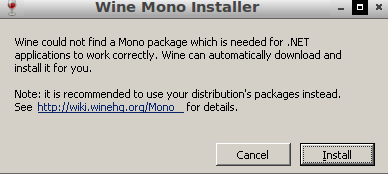

Sure enough, it works great! With Netflix AND Steam on Linux, lots of opportunities for distraction!
Some tips for Steam on Linux (I’m running on LubuntuLinux):
- If you don’t have a beta account, Steam won’t come up for you after login. So, go to command line at type steam steam://store and you’ll be in!
- Find a list of Linux games on Steam online


Sign up for the Texas for Technology Enhanced Education Email List