Problem – I recently had done a lot of work on one of our online courses, an Introduction to Online Learning (IOL). The course had seen some serious revisions, both in links and content, and I found that I didn’t want to go through the rigamarole of backing up the course in Moodle and restoring it. Was there an easier way?
Solution –
The question I asked, “Is there any way to import content from one course into another?” The answer–via Twitter–came quickly.
- etutoria: Try: Administration >> Import, than select what you what to duplicate
- LisaMLane: depends on the resource, but I use the safest way: Backup and Restore, just selecting the one thing & adding it in
- jhando: Use backup feature in Moodle and only select that one activity…. Can copy to any course.
Etutoria’s approach is the one I used. Here’s what it looks like:
Step 1
Step 2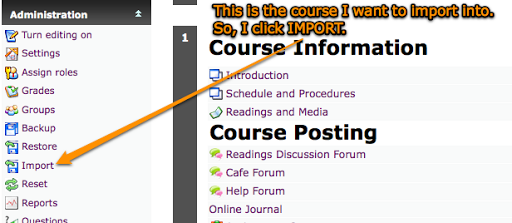
Step 3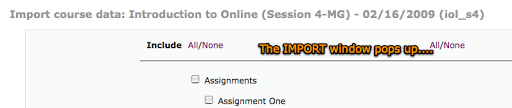

Step 4

Step 5
Finally, check out the Moodle Tip Roundup, Moodle Habitudes, and Moodle Mambo!

 Subscribe to Around the Corner-MGuhlin.org
Be sure to visit the ShareMore! Wiki.
Everything posted on Miguel Guhlin’s blogs/wikis are his personal opinion and do not necessarily represent the views of his employer(s) or its clients. Read Full Disclosure
Discover more from Another Think Coming
Subscribe to get the latest posts sent to your email.
 Another Think Coming
The only thing I don’t like about the Import feature is that (at least on my Moodle) it doesn’t import topic/week summaries (the default labels for each of your weeks). Great step by step!
The only thing I don’t like about the Import feature is that (at least on my Moodle) it doesn’t import topic/week summaries (the default labels for each of your weeks). Great step by step!