Problem – One Moodle discussion forum that is open to the public is going to generate hundreds of emails. How do you keep track of 100s of postings? If they are automatically emailed to you, your inbox will overflow. If you have to visually scan the discussion forum for new posts, that could get time-consuming. There has to be an easier way to handle new postings, to see the new stuff in one place and read them.
Solution – Moodle and RSS Feeds
Every time I go to enable RSS feeds in Moodle, I get thrown off of where to go. I forget, so this is a tip to remind myself of how to get the job done.
Step 1: Go to Site Administration and click on Server, then RSS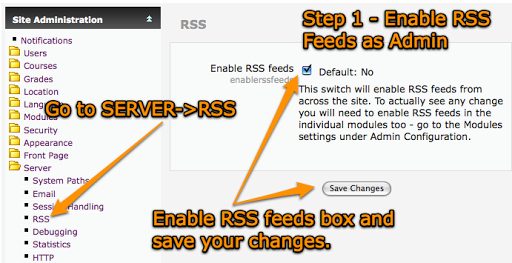
After you’ve done that, you can enable RSS feeds for either discussions or posts. If you want to see every post made–including replies–you’ll need to choose posts. If you want discussion topics, then click on discussions.
To accomplish that, go to the Discussion Forum you want to enable RSS for. Click the UPDATE THIS FORUM button in the top right-hand of the screen…
Your final step is to save your changes and return to the forum. You’ll notice a new RSS button in the top right hand corner of the forum: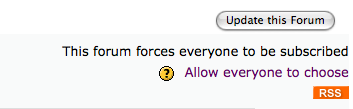
You can click on that button and subscribe using Google Reader or Bloglines or whatever RSS aggregator you use. I usually encourage folks to Watch RSS in Plain English from Lee Lefever’s CommonCraft show.
MISCELLANEOUS RSS TIPS
Now, here are two additional tips:
1) Remote RSS Feeds – You can run content from other places into your Moodle. This is great if you want to pull news about your school district from the local paper and display them in a sidebar, or, if you prefer, some education web site or commentary (e.g. blog).
Here’s how to get that view: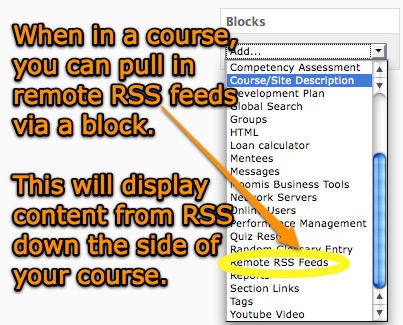
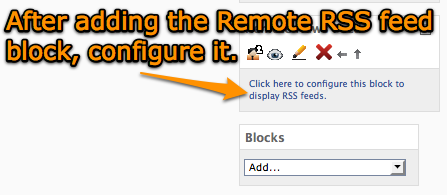
Then you will see….

If you want to add new Remote RSS feeds or delete existing ones, click on MANAGE ALL MY FEEDS.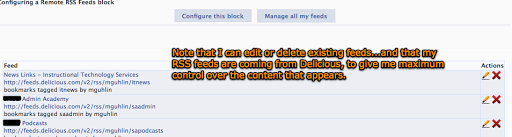
You can also add new RSS feeds: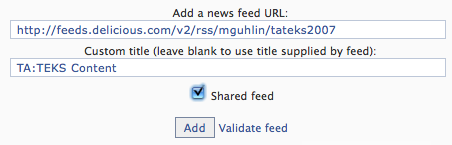
2) Sometimes, Moodle forum RSS feeds can be overwhelming (imagine a course with multiple RSS feeds and having to subscribe to each).
Read this Moodle Tip on RSS Feed Consolidation.
Finally, check out the Moodle Tip Roundup, Moodle Habitudes, and Moodle Mambo!

 Subscribe to Around the Corner-MGuhlin.org
Be sure to visit the ShareMore! Wiki.
Everything posted on Miguel Guhlin’s blogs/wikis are his personal opinion and do not necessarily represent the views of his employer(s) or its clients. Read Full Disclosure
Discover more from Another Think Coming
Subscribe to get the latest posts sent to your email.
 Another Think Coming