Protecting Your Computer from Malware
In this section of Download a la Mode, the following questions are addressed:
- How do I protect myself from malware, including viruses, spyware and/or adware?
———————————————————————————————————————————————————————————————————————————————————————————————————————————————–
“Please help…I have a computer that is infected. The browser (IE 7) keeps going to homepagepark.com as the home page,” wrote one desperate techonology user. “I’m sure there is a free spyware removal tool I can use, but after searching I found that some of the ones that come up are actually rogue spyware programs themselves – like Antispyware 2008.” Fortunately, the tools available for installation on personal netbooks have gotten better.
Here is a list of my favorite tools that I share at least once a month with colleagues wondering, “What is out there for free that I can share with students, parents, and staff to load on their personal computers, including netbooks?”
First, right-click on your “MY COMPUTER” on your desktop (or look under START PROGRAMS).
Navigate to this tab and make the change as shown below:
Second, I would recommend you boot up off a CD-ROM or bootable Flash Drive, and, third, run these programs off your USB Flash Drive (check the section further below for screenshots of what that looks like).
- AntiSpyware Tools:
- Malware Bytes – This program is fantastic anti-spyware tool that finds and eliminates spyware on your computer. Get it online at http://www.malwarebytes.org/mbam.php
- A-Squared HiJaack Free – http://www.emsisoft.com/en/software/free/
- SuperAntiSpyware Free edition – Get the free Home edition online at http://www.superantispyware.com/superantispyware.html
- AntiVirus Tools:While there are many antivirus tools, there is only one that is worth installing on thousands of computers.
- AVG AntiVirus Free – This free version is for personal home use, but you can also install the free version for a 30-day trial. Get it online at http://free.avg.com/
- Avast AntiVirus – avast! antivirus Home Edition is available free of charge for non-commercial home use ONLY. Get it online at http://www.avast.com/eng/download-avast-home.html
The damage caused left by viruses and spyware to your Windows Registry can be catastrophic. To fix those problems, you need to take advantage of two tools that will help you 1) Uninstall undesirable programs completely and 2) Clean up your Windows registry.
- Revo Uninstaller – Some times, you need a program that will completely uninstall a program, including cleaning up your Windows registry. This program accomplishes that and ensures complete removal of a program. Get the portable version online at http://www.revouninstaller.com/
- CCleaner – This invaluable tool actually cleans up your computer’s registry, and run periodically, keeps your computer running in tip-top shape. Get the portable version online at http://www.ccleaner.com/download/builds
- PowerTools Lite – Another tool to help clean up your computer’s registry. You can this in addition to CCLeaner. Get it online at http://www.macecraft.com/ptlite/
And, since in the worst case scenario, it’s not a bad idea to make regular backups of your work. Before restoring your work to your freshly cleaned computer, make sure to clean it!
As a final preventative step, install these programs to prevent a “re-infestation:”
- SpywareBlaster – This program innoculates your computer against spyware. Get it online at http://www.javacoolsoftware.com/spywareblaster.html
- SpywareGuard – From the web site: SpywareGuard provides a real-time protection solution against spyware that is a great addition to //SpywareBlaster//‘s protection method. Get it online at http://www.javacoolsoftware.com/spywareguard.html
and, if you’re really worried about reinfestation, install this last one:
- Hitman Pro – This tool combines Ad-Aware SE, SpyBot Search & Destroy, Spy Sweeper, Spyware Doctor, CWShredder, Spyware Blaster, NOD32, Sysclean package to get the job done. Most of the included programs are freeware. Get it online at http://tinyurl.com/3bk4lv
ANTI-MALWARE USB FLASH DRIVE
I recently booted up off my UbuntuLinux USB Flash drive, installed Windows antivirus and anti-malware tools on it. UbuntuLinux, like other distributions of GNU/Linux, can run some Windows applications using a program called WINE. The old laptop I was booting up off of was infested with viruses and spyware…and it gave me the opportunity to capture these screenshots:
Here is what an installation of Avast! AntiVirus Home Edition looks like scanning a Windows mounted hard drive on an UbuntuLinux Flash boot: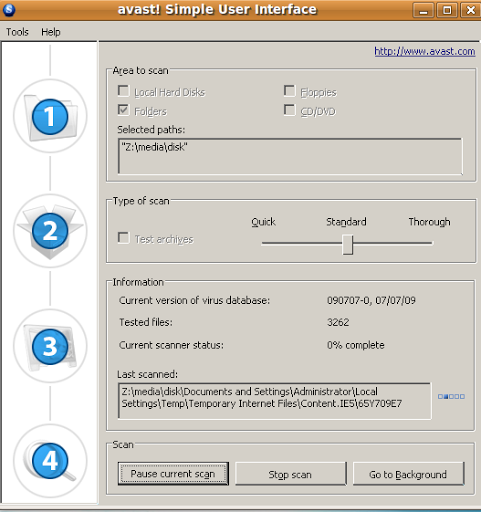
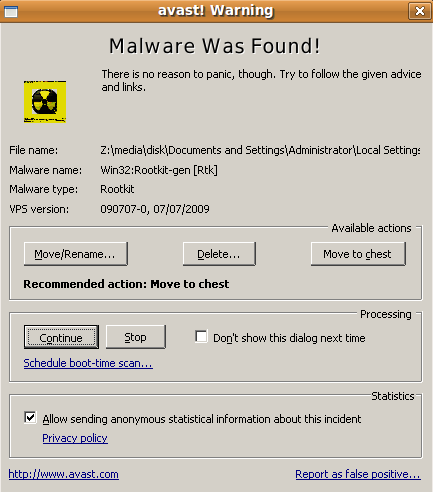
The results…
Here is another antivirus program, A-Squared Free edition. This program actually didn’t work as well as Avast!, crashing about 2% into the scan.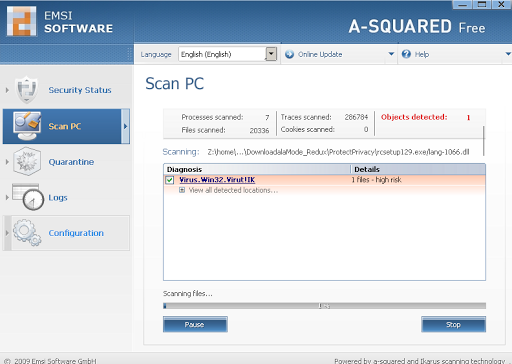
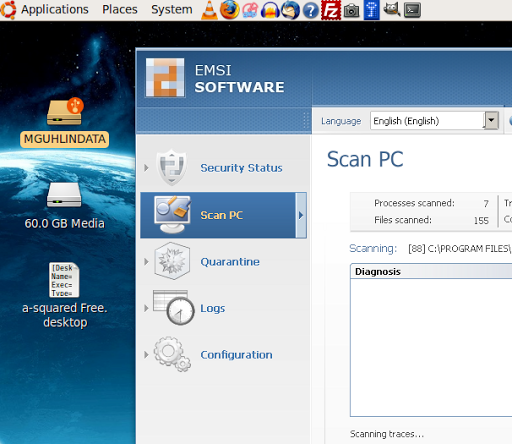
Another screenshot, showing the desktop of my Ubuntulinux flash drive. The 60GB media volume is the Windows drive.
That’s it! Good luck!
———————————————————————————————————————————————————————————————————————————————————————————————————————————————–
Copyright Notice: Content appearing on this page was originally published by TCEA TechEdge magazine by Miguel Guhlin sharing his work under Creative Commons Copyright (ShareAlike-Attribution-NonCommercial).
 Subscribe to Around the Corner-MGuhlin.org
Everything posted on Miguel Guhlin’s blogs/wikis are his personal opinion and do not necessarily represent the views of his employer(s) or its clients. Read Full Disclosure
Discover more from Another Think Coming
Subscribe to get the latest posts sent to your email.
 Another Think Coming