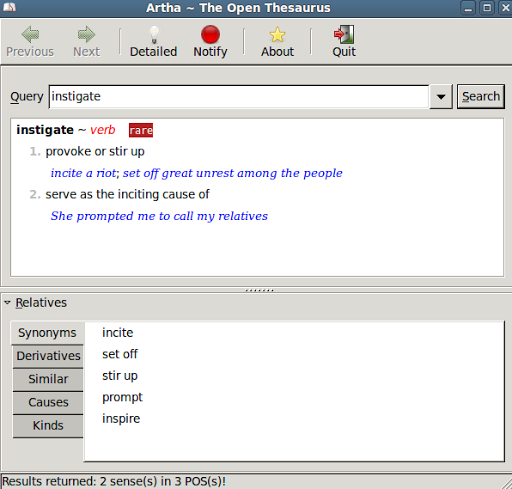
Source: Artha Thesaurus on my computer
Earlier today, I received the following:
I’ve been having great fun writing a new book on my Netbook, running Ubuntu. Working with a fun OS is not like working.
However, I have one pretty glaring gap to fill — and you can probably help. Do you know of a good thesaurus application for Ubuntu. The one that is built in to OpenOffice is simply not sufficient, and going to http://thesaurus.reference.com every time I need a better word —
well there’s got to be a more interesting way.Can you help with a suggestion?
Here’s my response…what would your’s have been?
two possible solutions for you! Artha and KThesaurus. Option 1: Artha is a prettier, nicer option than Option 2: KThesaurus.
OPTION 1: ARTHA
Source: http://ubuntuforums.org/showthread.php?t=1065384
Step 1: Download the DEB file of Artha
Download for i386 – artha_0.9.1-1_i386.deb
Step 2: Install the Deb File at the Command Line
Make sure you are in the same directory you downloaded the DEB file to for this command to work.
sudo gdebi artha_0.9.1-1_amd64.deb
Step 3: Run Artha
Go to Applications->Accessories to run Artha.
OPTION 2: KThesaurus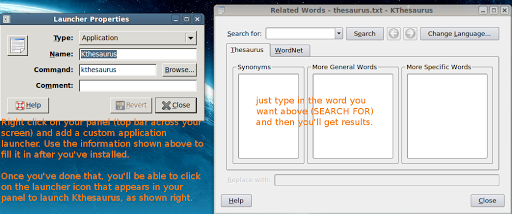
Step 1 – Installing KThesaurus
You have to install Koffice first to get the necessary “dependencies” for KThesaurus.I installed “Kthesaurus” with these commands at the comand line and in this order:
sudo apt-get install koffice
sudo apt-get install kthesaurus
Step 2: Creating a Custom Application Launcher for your Panel
Your panel is the bar across the top of your screen in Ubuntu. KThesaurus may not appear in the Applications menu, so you will need to create a “custom application launcher” by right clicking on the panel itself and choosing “Add to Panel.” Then use the attached image to guide you on what to put into the appropriate boxes (it’s just the word “kthesaurus” without quotes).
Step 3: Running the Program
Although you can always drop to Terminal/command line to run the program with the command “kthesaurus” you can also just click on the application launcher now in your panel. This will bring up the program and you are set to go!
Adding Dictionaries:
You can also improve your built in dictionary – sudo apt-get install dictd dict-gcide dict-wn
Check under Applications->Office->
 Subscribe to Around the Corner-MGuhlin.org
Everything posted on Miguel Guhlin’s blogs/wikis are his personal opinion and do not necessarily represent the views of his employer(s) or its clients. Read Full Disclosure
Discover more from Another Think Coming
Subscribe to get the latest posts sent to your email.
 Another Think Coming