Last Updated: 07/2015
A short time ago, I updated my must-have Macintosh Apps but failed to do the same for my Windows software. The need to do the same for Windows was driven home when a colleague asked me to re-setup her computer after a spyware infestation. Although I tried to bring it back, after an hour and a half of work, the spyware hung tough. At which point, I reformatted.
Although I keep a copy of all this great software on a USB flash drive, I am also finding it extremely convenient to house it in Dropbox.com and then access it via the Web interface when needed. Works like a charm! Definitely an option to keep in mind.
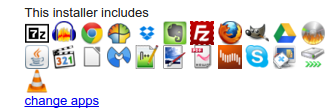
Hey, check this out! Use Ninite for creating a quick, easy to download and install set of programs you can use. Here is a screenshot of my favorite apps available through Ninite. This is free for home use, but if you’re a business/school, you’ll want to spend some money.
Below is my must-have software list, as well as a few educational software titles that folks thought worthwhile, divided up into two categories:
- Great to Have on Any Windows Computer – These are those programs you shouldn’t have a Windows installation miss. Starred items are intended for home, personal use and aren’t appropriate for K-16 settings.
- Educational Settings like a Computer Lab – These are additional programs that would make great additions to a Windows computer lab machine.
#1 – Great To Have on Any Windows computer
- Put This On All Your Computers
- 7Zip – Simple, powerful compression/decompression program. Need a GUI? Use PeaZip
- Chrome browser apps:
- GoogleCast + Videostream for Google Chromecast
- Screencastify screencasting tool
- Tweetdeck for Twitter in the cloud
- AnyVideoConverter Free*– Some folks love this program…it works.
- Audacity audio editor/player
- DVD Flick – Burn DVDs from videos on your computer.
- FileZilla – FTP Client, a necessity if you work with a server.
- Firefox Internet Browser
- GreenShot – A simple, easy to use screen capture tool. Free, open source, too.
- Handbrake – Rip DVDs to movie format.
- LibreOffice – my favorite alternative to MS Office…in fact, with LibreOffice (replaces OpenOffice), you don’t need MS Office!
- NotePad++ – need a simple text editor? this is it.
- Paint.net – Up to date Paint application
- PDF Creator – allows you to print to PDF from any application for free.
- PDFSAM – Merge PDFs with this cross-platform java-based tool.
- Scribus – Desktop publishing software. I’ve used this to create picture calendars…great!
- TeraCopy – Copy/move files quickly. Much faster than relying on built-in Windows explorer to make the copies, especially to external USB drives.
- THE GIMP – image editing tool
- Universal USB Installer – from PenLinux, allows you to burn ISO images of GNU/Linux to USB. Works great, even better than Unetbootin.
- Virtual Dub – Video/audio capture software…let’s you record what you’re watching/playing on your computer.
- VLC Media Player – plays just about everything video and/or audio
- WinFF – video and audio conversion tool
- *Software That’s Nice to Have But is For PERSONAL, HOME USE ONLY as determined by License or Appropriateness
- License Restriction
- Malware Bytes* – Great to use when you think your computer has been infected with malware/spyware and you need your computer “cleaned out.”
- Spyware Blaster*– An easy to use “innoculation” program against spyware/malware.
- Spybot Search and Destroy* – Best part of Spybot is the TeaTimer which protects your computer’s registry against contamination and immunizes your browsers (IE,Firefox) against malware.
- Not Appropriate for Computer Lab or School Use
- AVG AntiVirus* – A nice antivirus program.
- BleachBit – Keep your machine clean of junk and free space wiped for security purposes. Also handles a lot more to keep your machine safe.
- CCleaner – Use CCleaner to securely erase your temporary Internet files, clean up your registry.
- Skype – great app to connect with other folks
- Virtual CloneDrive – a must-have for netbook users…it allows you to mount ISO (CD images) without a CD drive. This enables you to download ISOs of CD images–or make your own on another computer that has a CD drive–then mount it on your computer as a virtual drive.
- Virtual Box – lets you add other operating systems and run them without interfering with your Windows installation.
- uTorrent – Lots of information is shared via Torrent file. It’s nice to have one handy that works well.
- Xvid video codecs
- XP Codec Pack
- My Favorite Security Software
- Secure Space Encryptor (SSE) – Encrypt files and folders with AES-256 encryption. Works great and is available for Mac, Windows, Linux, and Android.
- Paranoia Text Encryptor (PTE) – Encrypt text messages, email, and other text documents. Available for Mac, iOS, Windows, Linux, and Android.
- Keepass Password Manager – Keep track of your passwords, as well as generate high-quality ones. Works on Mac, Windows, Linux, Android, and iOS.
- File Shredder – Securely shred individual files or folders. You can skip this app if you install AVG AntiVirus, which comes with a shred utility.
- Veracrypt Drive Encryption – Create an encrypted “hard drive” container.
#2 – Educational Settings (e.g. Computer Lab)
- Productivity
- GoogleApps for Education
- LibreOffice
- Cmap Tools – Graphic organizer software.
- Google Earth –
- Google Sketchup – “easy to learn 3D modeling” program.
- Programming
- Miscellaneous Titles
- SchoolForge collection of educational software
- Stellarium – free planetarium
- Celestia – free space simulation
- Graph – make graphs of different mathematical functions in a coordinate system.
- TuxMath – save the world by solving math problems
- Tux Typing – easy typing program for kids…perhaps, too much fun?
 Subscribe to Around the Corner-MGuhlin.org
Everything posted on Miguel Guhlin’s blogs/wikis are his personal opinion and do not necessarily represent the views of his employer(s) or its clients. Read Full Disclosure
Discover more from Another Think Coming
Subscribe to get the latest posts sent to your email.
 Another Think Coming
Great list. Thanks for this share.
For writing blogs Windows Live Writer is a must have for Windows systems. Its the first app I install on a new system. It's free.
Giant Dittos on VLC & OpenOfficeOther must-haves on my Windows 7 netbook:Microsoft Security Essentials (reportedly legal for school enterprises, unlike some free AV clients)Google Chrome – fast Internet browserGoogle Apps Desktop installation with Offline (Gears) enabledSynkron – synchronize, move or backup large folders or network shares (I used to use SyncToy)Windows Media Encoder – capture, convert or stream WMV format for Media Player – I use it to stream live events such as football gamesUltra-VNC – remote desktop or server host and viewer – for connections to non-Pro systems where RDP not an optionAdobe Digital Editions – eBook reader for thousands of free and public domain books also has DRM support
HI,This is really one of the best and very interesting post here yopu have submitted and i think it will become a great place to know about the new topics.Thanks!
Hey I wanted to thank you for this post. My mom's friend has somehow destroyed another win7 installation and ninite was invaluable part of the putting it back together process. As well as finding comondo anti virus and firewall.I will definitely have to add your blog to my rss!
@Bigleon, great, glad to hear it was useful. I always forget Ninite.com until I need to setup a new machine…very nice to have an automated process.Miguel
Great list. Thanks for this share.
For writing blogs Windows Live Writer is a must have for Windows systems. Its the first app I install on a new system. It's free.
Giant Dittos on VLC & OpenOfficeOther must-haves on my Windows 7 netbook:Microsoft Security Essentials (reportedly legal for school enterprises, unlike some free AV clients)Google Chrome – fast Internet browserGoogle Apps Desktop installation with Offline (Gears) enabledSynkron – synchronize, move or backup large folders or network shares (I used to use SyncToy)Windows Media Encoder – capture, convert or stream WMV format for Media Player – I use it to stream live events such as football gamesUltra-VNC – remote desktop or server host and viewer – for connections to non-Pro systems where RDP not an optionAdobe Digital Editions – eBook reader for thousands of free and public domain books also has DRM support
HI,This is really one of the best and very interesting post here yopu have submitted and i think it will become a great place to know about the new topics.Thanks!
Hey I wanted to thank you for this post. My mom's friend has somehow destroyed another win7 installation and ninite was invaluable part of the putting it back together process. As well as finding comondo anti virus and firewall.I will definitely have to add your blog to my rss!
@Bigleon, great, glad to hear it was useful. I always forget Ninite.com until I need to setup a new machine…very nice to have an automated process.Miguel