How do you measure disk space on your computer? Running UbuntuLinux (latest version), it should have been easy but I couldn’t find the Disk Usage Analyzer that typically is installed at Applications->Accessories.
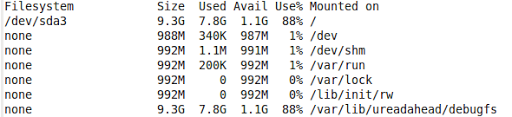
Fortunately, a short tutorial allowed me to type “df -h” (without quotes) at the command line that yielded these results:
For fun, I installed another program and it gave me slightly different results (probably because I installed a program, Discus):
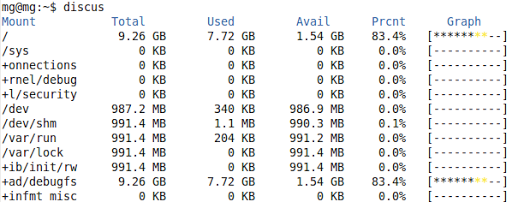
I’m sure there are fancier programs to accomplish this, but often, I like the text only approach that tells me how much space is left. In this case, I uninstalled Discus in favor of df -h which is already installed and provides the info needed.
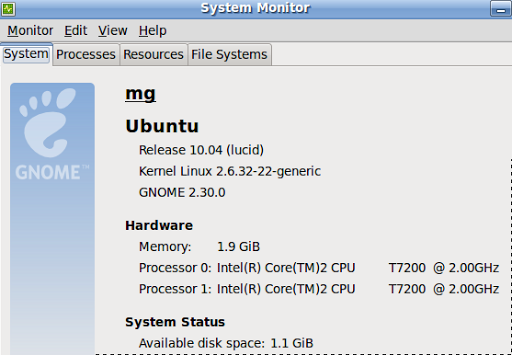
Of course, another way to check wouldn’t have involved the command line at all. I simply had to go to the System Monitor (System->Administration->System Monitor) and then click on the appropriate tab (System) to see:
Lots of other nifty information there, too. Under the File Systems tab…one can see this:
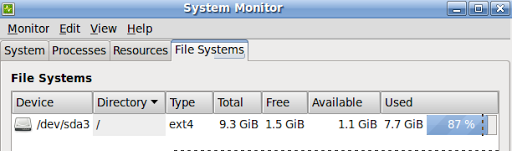
So…command line is optional at this point.
 Subscribe to Around the Corner-MGuhlin.org
Everything posted on Miguel Guhlin’s blogs/wikis are his personal opinion and do not necessarily represent the views of his employer(s) or its clients. Read Full Disclosure
Discover more from Another Think Coming
Subscribe to get the latest posts sent to your email.
 Another Think Coming