
Do you know where you can find free ePub publications for your eReader, especially the Nook?
Earlier this year, I shared eReader Indecision. After hemming and hawing about the monumental decision to abandon print, switch to eBooks, and selecting an eBook reader I could afford, I finally made a decision and ordered the Barnes and Noble Nook Wi-Fi. (Here’s one of the reasons why I didn’t get a Kindle…lack of format support, such as for ePub…no iPad because I just don’t see folks spending that much money for etextbooks). I’m hoping I didn’t totally make a mistake but only hands-on experience and time will tell. Also, I’m hoping that the Nook Wi-Fi will be something that will work well in a school environment where 3G access isn’t necessarily encouraged (potential CIPA violations).
Veteran “nooker” Bud Hunt shared a few Twitter direct messages with me about the Nook and its benefits. One of the ones he mentioned was support for a variety of ebook formats, some of which are included in the list below.
Here’s the list that I know of so far that works with the Nook, as well as links to book providers of that format. There are others but I’ve excluded the ones that “charge” for books (or tried to).
- Adobe ePublication – These are the “digital rights management” (DRM) titles that are available.
- ePub – Per The Web Books web site, “Google has more than 500,000 public domain titles in the EPUB format and Project Gutenberghas over 20,000 titles.” Other Sources of free ebooks include:
- 4ebooks.org
- Baen Free Library of Science Fiction (I love this site)
- Book Glutton
- eBooks.com – This site supports lots of formats, not just ePub. . .and tons of titles!
- Free ePub Books – They provide a nice list of eReaders supported, including the Nook. Tons of books here that I’m dying to explore.
- Feedbooks
- Free eBooks
- FreeBookSpot.com
- Globeusz.com
- ManyBooks
- Waterstones
- Instapaper.com – A tool to save web pages for reading later. Check out this blog entry on Instapaper on Nook.
- MobiBooks – You may have to convert these to ePub format using Calibre (free, cross platform tool).
- Overdrive – about ePubs from Libraries listed by OverDrive. Since I live in San Antonio, Texas I found this information helpful.
Another possibility is creating your own ePub publications…have to give more thought to that, but what a fascinating concept. And, if you format your creations in ePub, there’s bound to be an audience (if not a market) for your work.
You can also convert content for use on your Nook using a free, open source tool known as Calibre.
Calibre is a free and open source e-book library management application developed by users of e-books for users of e-books. It has a cornucopia of features.
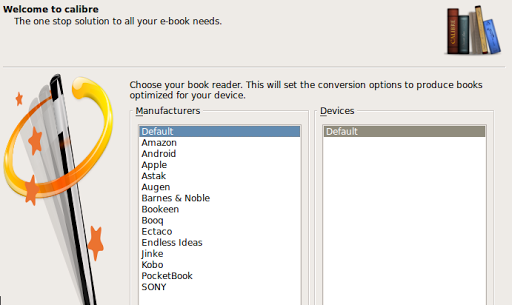
Again, I’m amazed at the power of Calibre, a free open source ebook converter and manager, that converts to a variety of formats, including support for a variety of eReaders:
No matter what eReader you get, Calibre is a MUST HAVE software program.
It’s pretty amazing in that you get a preview of the cover of the book…watch a demo of how Calibre works online (Requires YouTube access). You can also see screenshots online…here’s what one screen looks like:

Sending data to your eReader is a cinch…

Note that you can right click on and convert books to a variety of formats…ePub works great on Nook and iPad:

So, the Nook makes a great inexpensive eReader solution that is MORE open than Kindle. Add Calibre to the mix, though, and you can pick your eReader of choice since you can convert to anything you want!
Update 09/06/2010: Thanks to Wes Fryer for compiling a list of ePub creation tools:
- Calibre (free, Mac / Windows / Linux)
- ePub2Go (free, web-based converter)
- Zamzar (free, web-based converter)
- ePubBud (free, web-based converter)
- Stanza (free, Mac and Windows)
- Pages (commercial, Mac only)
 Subscribe to Around the Corner-MGuhlin.org
Everything posted on Miguel Guhlin’s blogs/wikis are his personal opinion and do not necessarily represent the views of his employer(s) or its clients. Read Full Disclosure
Discover more from Another Think Coming
Subscribe to get the latest posts sent to your email.
 Another Think Coming
Very cool. Thanks for sharing. I haven't purchased an e-reader yet. However, I use Mobipocket Reader to read books on my computer and my smartphone. I like the reader on my computer because I can change the font color and size, the background color, and because I can bookmark and make notes that are saved with the book. Also, it imports and converts PDF, HTML, Text, CHM, and EPUB documents. I am thinking that I'll get a tablet and use it as a reader in addition to it's other functions. Thanks for the great resources for books. I'll have a great time browsing them. Cheers,Jeff
Very cool. Thanks for sharing. I haven't purchased an e-reader yet. However, I use Mobipocket Reader to read books on my computer and my smartphone. I like the reader on my computer because I can change the font color and size, the background color, and because I can bookmark and make notes that are saved with the book. Also, it imports and converts PDF, HTML, Text, CHM, and EPUB documents. I am thinking that I'll get a tablet and use it as a reader in addition to it's other functions. Thanks for the great resources for books. I'll have a great time browsing them. Cheers,Jeff