Although no service is great, you have to appreciate Google’s efforts to make rescue of your precious bookmarks–and the tags that define them! After all, although you could just install Scuttle (as I did here, creating my own domain name-MGLinks.org), it’s great to know that one’s Delicious bookmarks are available and protected by “Do No Evil” Google.
The process is pretty straightforward, as shown in the screen shots below:
1) Go to the Delicious Bookmarks Import page on Google Bookmarks
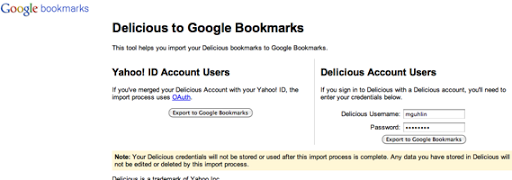
2) After entering your username and password for Delicious (of course, you have to be logged into Google gmail or something first), click the EXPORT TO GOOGLE BOOKMARKS button.
3) And, finally, click the import button one more time….
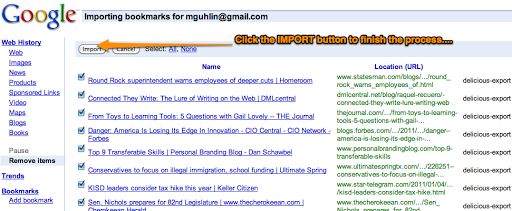
4) When you’re done with this very quick process–much faster than other sites–you’ll see your bookmarks appear in GoogleBookmarks.
Now, is this a perfect solution? Yes. Thank you, Google.
In the meantime, how do I reconcile MGlinks.org with GoogleBookmarks? Hmm…
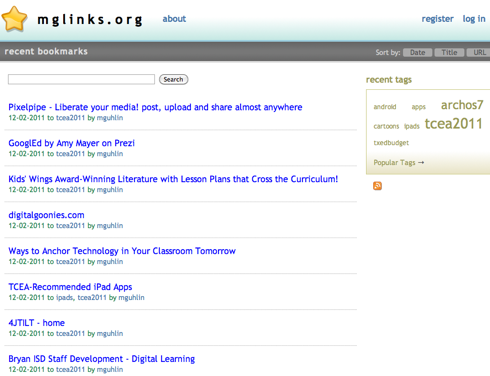
Ah well….

Get Blog Updates via Email!
Enter your email address:
Delivered by FeedBurner

 pingthis();

Everything posted on Miguel Guhlin’s blogs/wikis are his personal opinion and do not necessarily represent the views of his employer(s) or its clients. Read Full Disclosure
Discover more from Another Think Coming
Subscribe to get the latest posts sent to your email.
 Another Think Coming