This is by NO means, in ANY way shape or form an official or supported way of running the Netflix: Watch Instantly feature natively in GNU/Linux.
So the only way I have found to watch Netflix in Linux is by running a virtual machine. If you don’t like it, complain to Netflix, not us. Their phone number is 1-866-716-0414 or you could sign the petition to add Linux support to Netflix. Petition to add Netflix “Watch Now” feature for Linux. Calling Netflix and signing the petition both is the best plan as the numerous times I’ve called has resulted in the call center person telling me that “…the more people who call and request linux as an option is noted by Netflix”.
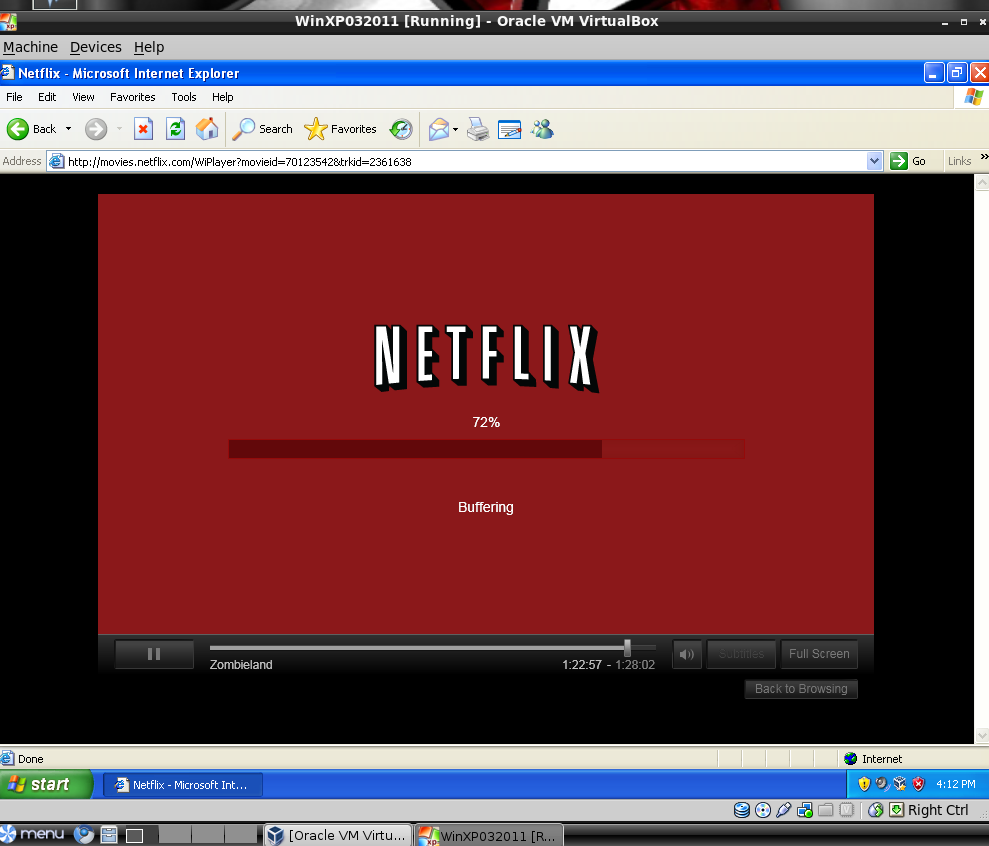 |
| Watching Netflix on Peppermint ICE via VirtualBox Install of WinXP |
I had a hankering to watch Netflix on the Lenovo m90z ThinkCenter running Peppermint ICE…but I didn’t want to reboot and switch to Windows 7 to do it. Why not watch Netflix while playing around on Peppermint ICE?

I did encounter one obstacle…I had this strange error (even after reboot). Fortunately, it told me what do to fix it…type the command sudo /etc/init.d/vboxdrv setup in LXTerminal. I did, and this is what it did:
 |
| You will probably have to repeat this step each time you run VirtualBox to start up Windows. I’m not sure why exactly, but, it’s not that big a deal. |
Once that was working, I installed Windows, let Windows updates run, installed Internet Explorer, then installed Microsoft Silverlight and accessed Netflix.


Enter your email address:
Delivered by FeedBurner

 pingthis();

Discover more from Another Think Coming
Subscribe to get the latest posts sent to your email.
 Another Think Coming