 |
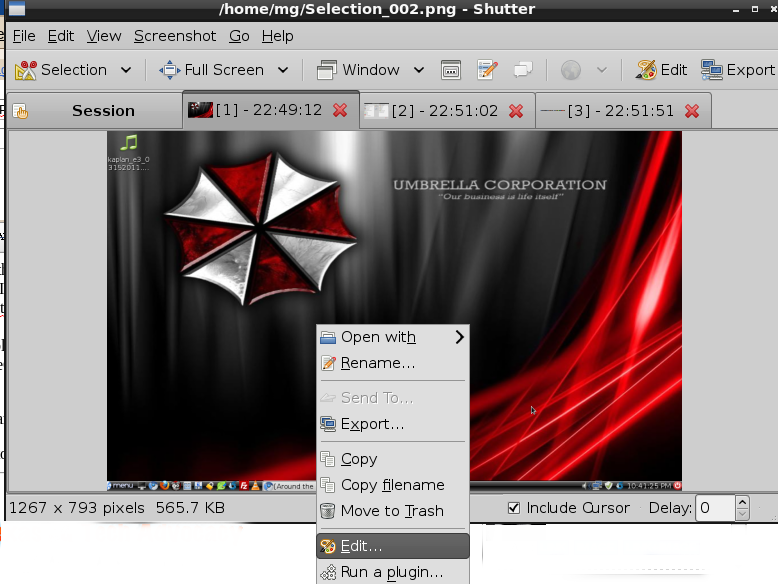
| Right-click to EDIT in SHUTTER screencapture tool |
Having just setup a Dell e6410 with Peppermint ICE (and realized incredible hard drive savings compared to Ubuntu 10.10 which I had on previously), I wanted to take a few screenshots. My favorite screenshot tool on GNU/Linux distros is Shutter.
 |
| Editing/annotating a captured image |
One of Shutter’s neat features enables you to right-click on your captured image and EDIT that image. On Peppermint ICE install on the e6410, this didn’t work. I had to take an additional step of installing more:
sudo apt-get install libgoo-canvas-perl
For some reason, this enabled me to right-click on images in Shutter and edit. Go figure.

 pingthis();
 |
| Source: http://www.letslearnlinux.com/suseblog/wallpaper/thumb/ linux-wallpaper–1600×1200–tux-we-suck-more.jpg |

Get Blog Updates via Email!
Enter your email address:
Delivered by FeedBurner
pingthis(); 

Everything posted on Miguel Guhlin’s blogs/wikis are his personal opinion and do not necessarily represent the views of his employer(s) or its clients. Read Full Disclosure
Discover more from Another Think Coming
Subscribe to get the latest posts sent to your email.
 Another Think Coming