You’re a busy professional, right? And all day you have to work with multiple applications at once. A Web browser for doing research, an email client for keeping in constant contact with colleagues, an office suite, a graphics program, and the list goes on. All of these applications take up valuable desktop space. Since you are now familiar with managing desktop application windows, things couldn’t get any easier right? Wrong! The Linux desktop offers an added feature called virtual desktops to ease your multitasking woes. Let’s take a closer look.
Virtual desktops are multiple desktop areas. This is much like having multiple computers. Applications can be sorted by running them on separate desktop areas. For example, you can set up a virtual desktop for each group. You can set up a separate virtual desktop for Office applications, email, graphics, etc. Then, to move between applications, simply switch desktops without the need to minimize, maximize, or shade the application windows. (Read more)
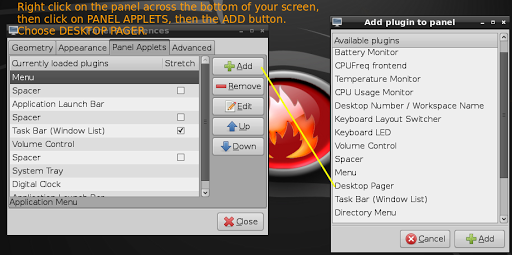
A colleague recently asked, “How can I switch between virtual desktops, like you did earlier?” The process is one I usually stumble upon when working, not being a big user of virtual desktops myself…so, accidental use is what she saw.


Enter your email address:
Delivered by FeedBurner

 pingthis();

Discover more from Another Think Coming
Subscribe to get the latest posts sent to your email.
 Another Think Coming