 |
| Image Source: http://moreenergy.org/wp-content/uploads/2010/11/Register-Now-352×250.jpg |
Someone asked the following question today:
My district is planning a Tech Day. I would like for everyone to sign up online. Not sure where to start–what program to use, etc. There will be limited seats in all sessions and it will be a first come first serve basis….hopefully free and easy to use. Any guidance will be appreciated and thanks in advance.
Several possible approaches were shared by folks responding and I just had to note them here. One approach involves Moodle’s Choice Activity, while the other uses GoogleDocs Forms. I have also included other responses from Google-Certified Teachers (GCT) list.
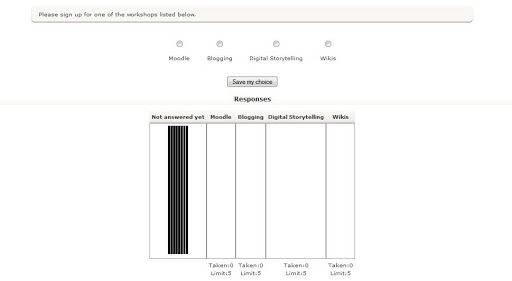
Another approach using suggested by Ken Task goes as follows:
There is a Face-2-Face module/add-on for Moodle (<=1.9.x) that can do.http://moodle.org/mod/data/view.php?d=13&rid=995
We used this for our voluntary after-school Professional Development Registration. Worked great we had 180 separate registrations.
We set email address as the only required question. Set up each workshop as a separate question. Gave a brief description and had the participants type their name (lastname, fristname) in the text box for the sessions they wanted to attend (there were over 20 to choose from).
It put all the info into a spreadsheet that was shared with all those involved in planning the PD. Again, worked great and we followed up with a confirmation email.
I’ve used Google Spreadsheets for this. I put each session in a column and numbered how many seats were in it. The teachers got into the Doc and added their names. if they wanted to be on a waiting list for a session, they added at the bottom of the list. Since it does revision history, nobody deleted anyone else to get their own name on it.
EVENTBRITE
Ian Addison suggested the following: “For teachmeet at bett in January of used eventbrite, that’s free. Also let’s attendees print tickets.” You can find it online at http://www.eventbrite.com/
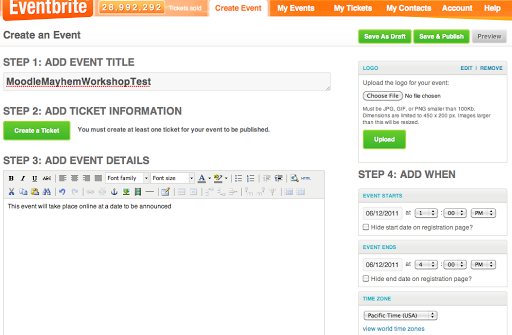
You can even customize the URL (web address):


WUFOO
Vinnie Vrotney suggested WUFOO.com. He points out, “Are you registering a large amount of people? http://wufoo.com/ might be an alternative — has email verification and other helpful features:http://wufoo.com/features/. We use it for the NICE mini-conference.”
How would you have solved the problem, whether using Moodle or Google or something else?

Enter your email address:
Delivered by FeedBurner

 pingthis();

Discover more from Another Think Coming
Subscribe to get the latest posts sent to your email.
 Another Think Coming

Hi Miguel,I just used Doodle to register my entire high school to schedule them for laptop training. Worked like a champ.
Hi Miguel,I just used Doodle to register my entire high school to schedule them for laptop training. Worked like a champ.
Event Brite is what we've used for years for District-wide conference as well as small events. Works great. You can even have participants print tickets to be scanned/presented at the door. Includes a convenient link to email all participants. iPad App is a convenient way to monitor registrations. For small events, I like that I can choose get an email when someone registers. You can limit participants.
Event Brite is what we've used for years for District-wide conference as well as small events. Works great. You can even have participants print tickets to be scanned/presented at the door. Includes a convenient link to email all participants. iPad App is a convenient way to monitor registrations. For small events, I like that I can choose get an email when someone registers. You can limit participants.