 Image Source: View Source |
Note: Although at the time I wrote this Google+ Invitations were closed, I did successfully go through the process of importing friends into Google+ Circles.

Moving from Facebook to Google+ includes the following challenges:
 |
| Some folks are using this for their new Fbook profile picture…. |
- Dealing with the LARGE network of people you have to replicate. While I don’t expect everyone from Facebook will switch to Google+ when they have the opportunity, I am hopeful that the majority will…allowing me to drop Facebook, as I have done in the past.
- Moving Your Images/photos OUT of Facebook, and perhaps, into PicasaWeb (which is way better than Facebook’s Photo Manager).
- No Pages or Group web pages on Google+ similar to Facebook, although those features are coming in the future.
- Posting to Facebook from Google+ – Want to leave Facebook but still keep folks updated there with content you post on G+?
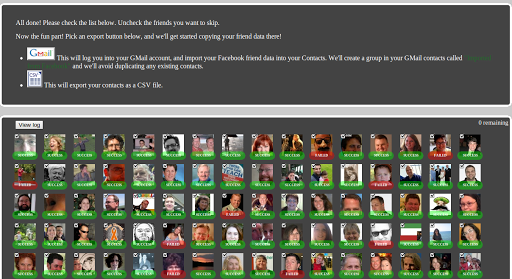
Gmail Group that is then accessible in Google+
Update: 06/06/2011 – This news that Facebook is blocking this feature should come as no surprise. I’m glad I took advantage of it, though.
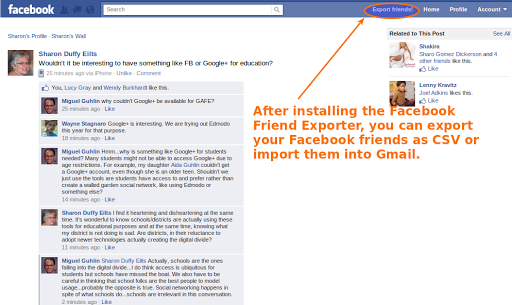
After the import, you can check your Gmail and see a new group in your contacts entitled “Imported from Facebook;” here’s what it looks like based on a small screenshot that doesn’t give away all my Gmail groups:

TOPIC #2 – MOVING YOUR PHOTOS OUT OF FACEBOOK
Looking to move your photos out of Facebook? There’s a new tool that can help you get it done– –that allows you to download all your photos/images as a zip file. The tool is called Pick-n-Zip.
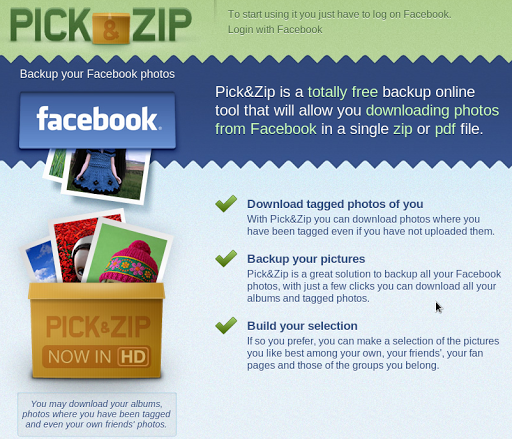 |
| http://www.picknzip.com/ |
On the page above, you can click a button and add it to your Facebook pages, as explained below:
Adding Pick&Zip – Photo downloader will let it pull your page’s profile information, photos, friends’ info, and other content that it requires to work. It will also add a box to your page and can publish Feed stories about your page.
Once you add it to your page, it will pop up as shown below:

As far as I can tell, you can’t just download photos affiliated with your Facebook account…only photos associated with a Facebook Page. For that, you could have tried something like the Facebook Photo Album Downloader but unfortunately, that’s just a sad story worth reading. The situation makes one appreciation Google+ all the more.
Here are some workable solutions in order of my preference and ease of use (IMHO):
- Social Photo Download (web based) – This one works pretty well, although you have to login to Facebook, then they email you the link for your download.
- PhotoGrabber (added 06/09/2011) – a Mac/Windows friendly photo grabber for pulling pictures out of Facebook
- Move2Picasa – This allows you to move your pictures to Google’s Picasa Photo service (which will be renamed soon to “Google Photos” or something similar).
- Facebook Tools app – a nice web-based GUI for downloading photos
- fbDownloader – Windows program you have to install
- FotoBounce – Windows program you have to install
TOPIC #3 – PAGES/GROUPS ON GOOGLE+
Not yet available, unless you are Ford Motor Company:
 |
| https://plus.google.com/114277687548103339609/posts |
The Ford Google+ site had 1,222 followers on Saturday morning and featured posts such as a photo caption contest, a question about what people would like to see out of Ford on Google+, and promotion of a live chat with Ford’s director of marketing communications–with a Google+ video-chat hangout afterward.
Read more: http://news.cnet.com/8301-30685_3-20077242-264/ford-wins-a-rare-corporate-foothold-on-google/#ixzz1Rd8mQzsN
Will schools defer to a Google+ Page in favor of managing their own content management systems (e.g. Joomla, WordPress)?
TOPIC #4 – POSTING TO FACEBOOK FROM GOOGLE+ (Updated 6/10/2011)
Although it’s still a “home-grown” solution, Emlyn O’Regan has created a solution called SYYNCC that allows you to post to Facebook and Buzz from Google+. You can see it in action here:
http://my.syyn.cc
 |
| http://my.syyn.cc/ |
As always with any individual’s solution, you may have privacy concerns. Fortunately, SYYNCC uses OAuth, which is a way of authorizing Google+, Buzz without having to type in your password if you are already logged in to Google+. For Facebook, you have to allow access as an app. You retain control over what you allow to access and, no private info is shared.
I’ve asked Emlyn if he will be sharing this solution for hosting on one’s own server, but this certainly sounds like a solution to try if you are desperate to switch to G+ now before Google or others have developed their API. Kudos to Emlyn for his hard work!
MISCELLANEOUS GOOGLE+ STUFF
And, completely unrelated, some tips on getting around Google+
- Chrome Extension – Surplus – View notifications from your browser even when not on Google+
- Chrome Extension – Google+Facebook – Shows your Facebook stream in Google+
- Chrome Extension – Send Stuff from Google+ out to Twitter/Fbook (Extended Share for Google+)
- Google+ Tips and Shortcuts
- Google+ Cheat Sheet (shown below)
 |
| via this link |
 |
| via this link |

Enter your email address:
Delivered by FeedBurner

 pingthis();

Discover more from Another Think Coming
Subscribe to get the latest posts sent to your email.
 Another Think Coming
