Earlier today, a colleague at a university sent me an email asking for help (actually, the second one in two day from different folks!). The problem was that the edit button on the summary section in the topic list of a Moodle course was not editable.
Even though many are worrying about 2.0 install issues, I took your advice and just did an upgrade to the latest 1.9. I have a problem that may be an issue for other moodle administrator’s as well. In Moodle 1.9, I had a teacher open the top box, the header, and do a manual cut-and-paste into that section, without uploading a graphic file. What it did was “freeze” that area, so I cannot get into that section and delete the graphic. How can I get to that section to make edits?
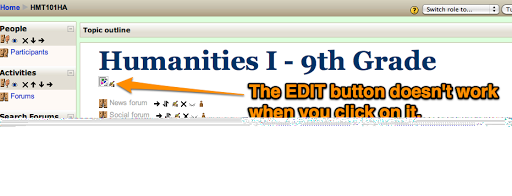
Fortunately for this Moodle course, the problem has been encountered before (although this was a first for me!), as I found out after an extensive google search (2 minutes):
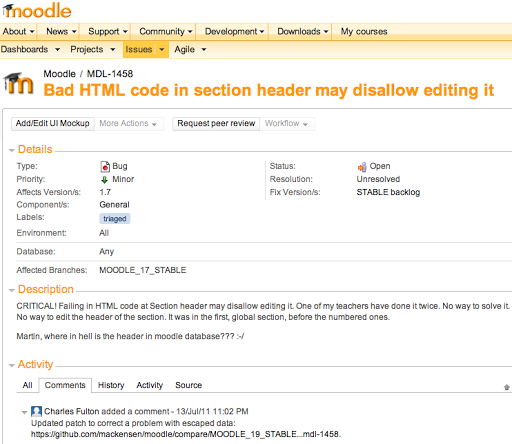 |
| http://tracker.moodle.org/browse/MDL-1458?actionOrder=desc |
So, I did. Here is what it looks like:
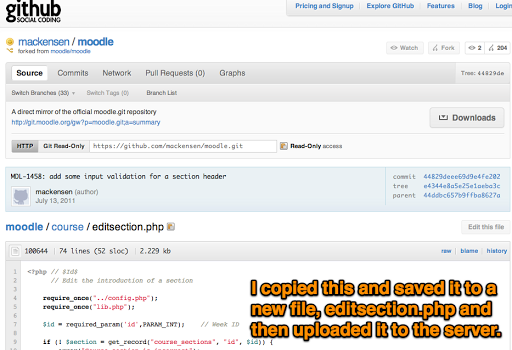
Unfortunately, this issue is still unresolved but there is a low-tech way to fix it without editing MySQL.
Realizing that each edit button in a course has an ID, I copied and pasted the edit code:

So, after doing that, I made an educated guess at the ID number for the edit button (shown above). The window popped right up with the edit:
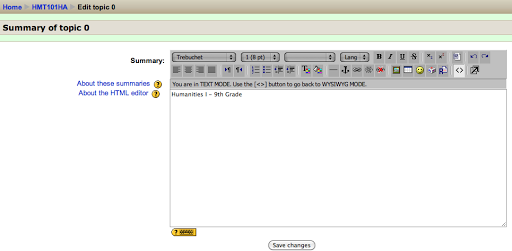

Note that “Edit Summary” now appears as a possibility, when before, you couldn’t do anything. I verified this approach by backing up a course with the same issue, then restoring it and trying it again. Worked twice!
Was there a better way to solve this problem?

Enter your email address:
Delivered by FeedBurner

 pingthis();

Discover more from Another Think Coming
Subscribe to get the latest posts sent to your email.
 Another Think Coming