 |
| Source: http://www.aiim.org/sites/default/files/u77/lincdocipad.png |
Updated 1/12/2012
In response to my rough draft webinar preso–iPad Tips for Administrators—Doug “Blue Skunk” Johnson asked the following in a comment:
My admins are looking for a way to do teacher evals using self-created forms that have drop down boxes, not just text. Any suggestions from you or your participants tonight? I had Bento suggested but haven’t tried it yet.
Thanks for any help you can give.
Although I didn’t include it in my original list–which was focused on free, no-cost iPad apps–I did run across some possible solutions to the question Doug shared:
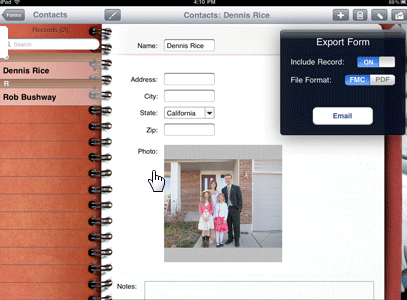 |
| As you can see in the picture above, there’s a drop-down for the State field. |
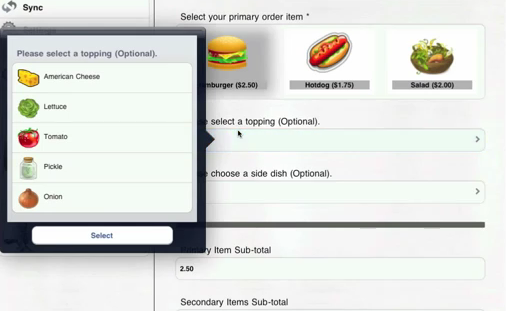
Check out the video at 42 seconds in…you can put images within the form….
3) Wufoo for Education Form – Wufoo is an Internet application that helps anybody build amazing online forms. When you design a form with Wufoo, it automatically builds the database, backend and scripts needed to make collecting and understanding your data easy, fast and fun. Because we host everything, all you need is a browser, an Internet connection and a few minutes to build a form and start using it right away. Of course, you can access these forms online via your iPad. Thanks to John Blake for the suggestions via G+ conversation.
I’m not sure if Wufoo does drop-downs, so that’s to be discovered.
4) For the rest of us, GoogleDocs Forms will have to do!
and, bonus tip,
5) Consider using Evernote for Checklists. This is good only for one person filling out a form. There is no aggregation of data, so each individual form has it’s own information…think of it as a digital paper checklist without the benefits of the other options mentioned here.
Enter your email address:
Delivered by FeedBurner


Discover more from Another Think Coming
Subscribe to get the latest posts sent to your email.
 Another Think Coming
Thanks, Miguel. I'll check these and Bento out and let you know what happens.Doug
@Doug, there's an update thanks to a suggestion by John Blake
I just discovered & am looking at Teacher's Assistant (iPad app) for this purpose. While developed for teachers, I believe it can be modified for use by administrators and it does use drop downs. There is a lite version (free) that can be tried out before deciding if it does what is wanted and the price (normally $10, currently on sale for $7) is worth it. iTunes link
Thanks, Miguel. I'll check these and Bento out and let you know what happens.Doug
@Doug, there's an update thanks to a suggestion by John Blake
I just discovered & am looking at Teacher's Assistant (iPad app) for this purpose. While developed for teachers, I believe it can be modified for use by administrators and it does use drop downs. There is a lite version (free) that can be tried out before deciding if it does what is wanted and the price (normally $10, currently on sale for $7) is worth it. iTunes link