 |
| Source: http://www.eanes.wikispaces.net/iPad+PIlot |
If you had to deploy iPads starting soon, what would you do different from the way you did it in the past?
Mobile Device Management (MDM) tools display console views of enterprise mobile devices, their users, and user profiles, and usually work with Active Directory or other third-party authentication and authorization platforms to assign privileges and policies. Major names in the MDM space include Good Technology, Boxtone, Sybase, Zenprise, and MobileIron. Cloud-based MDMs include AirWatch, Fiberlink, andTangoe.MDMs can enforce password policies and remotely wipe or disable lost devices. They can also install necessary applications and anti-virus clients, load patches, and ensure that any data copied to the device is properly encrypted.The problem with MDM-enforced encryption is that it’s typically an all-or-nothing function. While an iPad supports encryption of data in transmission, stored on the device, and loaded on PCs through iTunes, it’s a device-wide affair. “You cannot go in and say, ‘This application is not allowed to read this data,’” says Chenxi Wang, vice president and principal analyst at Forrester Research Inc. (Source: Email from Steve Young, 1/2012)
“What’s wrong with that approach?” I countered, although I could guess.
 |
| Source: http://www.enterpriseios.com/wiki/Comparison_MDM_Providers |
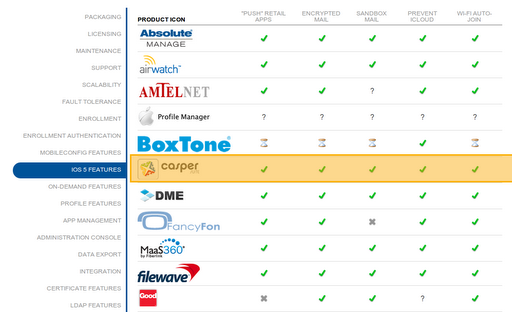
- Choose a mobile device management system, and you recommend Casper right now based on what it can do and the efficiencies it enables for iOS 5 devices and Macs.
- Make sure all devices are running iOS 5.
 |
| Source: http://goo.gl/AzIc5 |
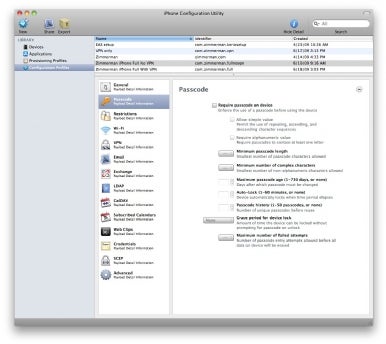
iPhone Configuration Utility lets you easily create, maintain, encrypt, and install configuration profiles, track and install provisioning profiles and authorized applications, and capture device information including console logs.
Configuration profiles are XML files that contain device security policies, VPN configuration information, Wi-Fi settings, APN settings, Exchange account settings, mail settings, and certificates that permit iPhone and iPod touch to work with your enterprise systems.
iPhone Configuration Utility 3.4 for Windows can be downloaded here: iPhone Configuration Utility for Windows.
For information on how to integrate iOS devices with your enterprise systems, visit http://www.apple.com/support/iphone/enterprise/.
“Yes, we try to organize apps according to the 4Cs and grade level.” He paused for a moment, then continued: “Anyone who is trying to do this really needs to chat with Carl Hooker (Eanes ISD) and Carmen Garza (McAllen ISD, who deployed 5000 iOS devices recently).”
- Choose a mobile device management system, and you recommend Casper right now based on what it can do and the efficiencies it enables for iOS 5 devices and Macs.
- Enroll in the Apple Volume Purchase Program
- Make sure all devices are running iOS 5.
- Learn to use the iPhone Configuration Utility
- Connect with others who have deployed iOS devices and get their advice.
In addition to many other things, it gives you the ability to create virtual wireless networks (multiple SSIDs) and configure virtual LANs (VLANs). These features let you offer public or separated access, and are usually found only in more expensive enterprise-level gear. You get them and much more at the cost of just a cheap home router.
In this tutorial, we’ll create a second SSID, segregate it from the main SSID, make two of the LAN ports on the back of the router connect to just the new SSID, and leave the other two LAN ports connected to the main SSID.
You might want to, for example, use this second SSID to offer your visitors wireless Internet access, or encrypt it for use by another department in your organization. Plus, you can also plug computers into the individual networks and/or expand each with more access points. We’ll make it so users won’t be able to snoop or communicate with users from the other SSID or LAN ports, to protect your shared folders and resources.
- JAMF Software’s CASPER
- iPhone Configuration Utility
- Interactive Comparison of Mobile Device Management Providers
- News Story of McAllen ISD
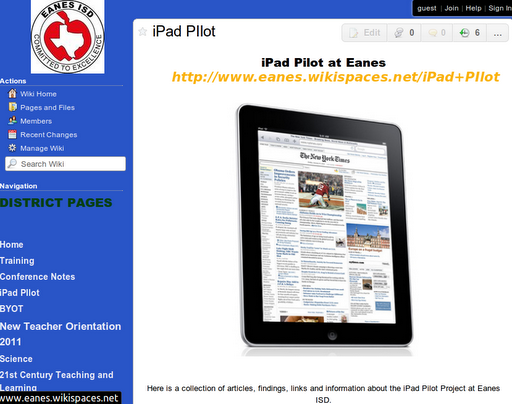
- Eanes ISD iPad Pilot wiki
- 10 Tips for Deploying New Wireless Access Points
- Video Tutorial on Registering Your MAC Address for Network Security
- Read EdTechSandyK’s TCEA Workshop Notes with Carl Hooker, Eanes ISD
iPhone Configuration Utility lets you easily create, maintain, encrypt, and install configuration profiles, track and install provisioning profiles and authorized applications, and capture device information including console logs.
The iPhone configuration utility doesn’t have anything to do with itunes purchased apps.
“In my district, we create generic accounts for every iPad issued using GoogleApps for Education (GAFE). Each iPad has a generic account connected to an email through Google. We organize them into sub-domains for management, assigning Program facilitators to campuses.”
A set of ipads are tied to one downloader account. It all depends on the grade level, classroom or department but not one for every ipad.
Here’s how another colleague in Texas schools manages iPads:
If you are in iOS5+ you might think about something like this:
Reset one of the iPads and then sync it with the iTunes library and all the content, apps you want on it. Then set all of the configuration and security settings locally on the iPad through the restrictions settings. Make sure you set the iPadto sync wirelessly (and give the iPad a name) and turn on automatic downloads in the store section. At that point create a backup of the iPad through iTunes (or iCloud). When you create the backup, make sure you know the time and date of the backup, because you aren’t able to name the backup. You have to chose it from a list of dates/times. From there you can take the remaining iPads and restore them from that backup through iTunes (or if you have the bandwidth you could reset them, sign into iCloud and pull the settings down from the backup you sent to iCloud). You may still have to connect each iPad to iTunes to enable the wireless sync option (I can’t remember if this comes across from the backup). As each iPad connects to iTunes (either through the cable or wirelessly) give them a name. Oh and if you use a wireless config that requires a certificate (like WPA2 or something) then you will have to reset the network connection (the certificate doesn’t get pulled through in the backup process).
At this point you probably are wondering why you wasted your time reading all that, because you are still doing a lot of work. 🙂 But here’s what you now have:
Same1)You have the same security settings you had before
2)You still have to do some manual interaction with each iPad to sync new apps (only if you have disabled the App Store as part of your restrictions).
New1)You can now sync content (iTunesU/videos/etc) on the fly wirelessly without any manual changes to individual iPads
2)iPads are set to sync (and automatically download – so you don’t have to sync) apps wirelessly (but the app won’t show up on the iPad until you re-enable the App Store restrictions)
3)They are named so that if they don’t all connect wirelessly you can quickly identify which one(s) has issues.
4)You have an iCloud backup that can be used to restore any iPad on the fly without iTunes if needed
5)And if you set turn on the find my iPad option in iCloud on each device you have a possible way to track down theiPad if it gets lost/stolen
Read more about iPad stuff in schools….
Enter your email address:
Delivered by FeedBurner


Discover more from Another Think Coming
Subscribe to get the latest posts sent to your email.
 Another Think Coming
Miguel,I agree that centralized management via Casper has saved us quite a bit of time and headache. It's handy for deploying apps and tracking down iPads. Using the iPhone config utility is also extremely helpful when getting the iPads deployed and managed via a cart. However, one of the biggest benefits of the iPad is the freedom with which end-users can explore and customize their learning. That is taken away the second you start managing their account centrally and selecting what they have on their device. We felt, that while it's true there would be some loss with the apps when the person leaves, it's much like a consumable workbook that we used to buy. For example, we spent over $120,000 in "materials" for ELA curriculum a couple of years ago. If we spend $50 per device (haven't hit that number yet) on all 2300 devices we have, we'd be close, but not quite at that number. Also, when we purchase, we include a $50 app fee so that VPP cards are both with the purchase of the device. Couple that with supplemental IMA dollars and we've more than covered our expenses this far, and have enough to maintain indefinitely. (or as long as the IMA exists)So you see, he's right on track with the IT side of management, where we differ is in the educational approach. For some districts that will be a cost-benefit decision they will have to make at some point. For us, we're going forward with the use of their own accounts. After all, I'd hate for a student to go to college using some educational apps he got from us 🙂
Miguel,I agree that centralized management via Casper has saved us quite a bit of time and headache. It's handy for deploying apps and tracking down iPads. Using the iPhone config utility is also extremely helpful when getting the iPads deployed and managed via a cart. However, one of the biggest benefits of the iPad is the freedom with which end-users can explore and customize their learning. That is taken away the second you start managing their account centrally and selecting what they have on their device. We felt, that while it's true there would be some loss with the apps when the person leaves, it's much like a consumable workbook that we used to buy. For example, we spent over $120,000 in “materials” for ELA curriculum a couple of years ago. If we spend $50 per device (haven't hit that number yet) on all 2300 devices we have, we'd be close, but not quite at that number. Also, when we purchase, we include a $50 app fee so that VPP cards are both with the purchase of the device. Couple that with supplemental IMA dollars and we've more than covered our expenses this far, and have enough to maintain indefinitely. (or as long as the IMA exists)So you see, he's right on track with the IT side of management, where we differ is in the educational approach. For some districts that will be a cost-benefit decision they will have to make at some point. For us, we're going forward with the use of their own accounts. After all, I'd hate for a student to go to college using some educational apps he got from us 🙂
Miguel – Thanks for taking the time to post this well-written article. The more we share our frustrations and successes with mobile learning environments, the easier it will become for all!- Tammy Worcester
Miguel – Thanks for taking the time to post this well-written article. The more we share our frustrations and successes with mobile learning environments, the easier it will become for all!- Tammy Worcester
Interesting article but nothing is one size fits all. Decide on how you want to use the devices first, establish a solid governance framework that includes configuration management based on the use cases then pick the MDM (and there are several products out there) that allows you to optimize your use case, fits into your mobile architecture (you ought to have one before you buy your first iPad but we recognize it rarely happens that way) and is consistent with your security and policy goals. We help organizations deploy these consumer devices across the enterprise (mostly local governments, healthcare organizations and schools) and the approaches need to be as unique as the organizations and missions — there is not a silver bullet or one size fits all approach. Good luck all!
Interesting article but nothing is one size fits all. Decide on how you want to use the devices first, establish a solid governance framework that includes configuration management based on the use cases then pick the MDM (and there are several products out there) that allows you to optimize your use case, fits into your mobile architecture (you ought to have one before you buy your first iPad but we recognize it rarely happens that way) and is consistent with your security and policy goals. We help organizations deploy these consumer devices across the enterprise (mostly local governments, healthcare organizations and schools) and the approaches need to be as unique as the organizations and missions — there is not a silver bullet or one size fits all approach. Good luck all!