 |
| Image Source: http://goo.gl/6UAWN |
Contemplating an iPad Deployment? Join me in my journey to explore some of the questions I’ve seen others asking, and asked myself.
“What kind of cart,” someone asked me recently, “should I get to house all the iPads for our high school deployment?”“And,” asked another, “what kind of cases for the individual iPads should we buy?”
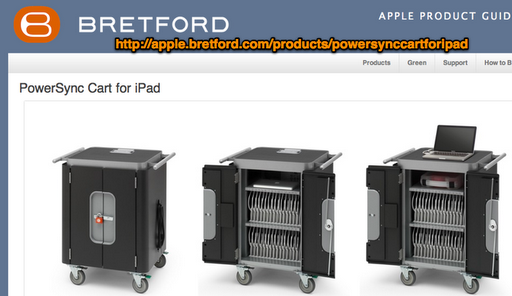
It also can accommodate Otterbox Defender case protected ipads! Per their web site: iPad slots: 0.81 x 9.5 x 12 in (2 x 24 x 30 cm) (W x H x D). Note: Each slot can accomodate an iPad 2 with an Otterbox® Defender Series case (OtterBox part APL2-IPAD2), without its clip-on touch screen cover.
One of the neat aspects of this cart is that it can serially “image” your iPads:
For example, if we hooked all 30 up in the Bretford cart and tried to update to the latest iOS, it would start one, and the rest would just wait until that one finished. Then the next one in line would start. This can take quite some time if you have a large deployment.
#2 – ParaSync solution – Another “cart for the iPad is the ParaSync, pictured below:
 |
| ParaSync 10-unit Charge and Sync (there is a 20-unit ParaSync, too) |
The new PARASYNC for iPad stores, charges, and syncs content to 20 iPad devices from one iTunes library.
With no manual cable connections, simply insert the iPad with the included case into a slot to charge and sync. Each PARASYNC for iPadincludes 10 specially designed cases to protect both the iPad and the docking system!
Convenient charge status LED’s show whether the iPad devices are charging, fully charged or syncing. PARASYNC for iPad looks great and its compact footprint (19″ x 11″) fits nearly anywhere.
#3 – ErgoTron Carts – Thanks to Don Hindsley (Whiteface ISD) for pointing this one out.! He writes:
Ergotron also makes a good one that we are in the process of buying. Depending on how many inserts you put in the cart, it will support charging/synching 16/32/48 iPads.http://www.ergotron.com/ComputerCarts/tabid/158/language/en-US/Default.aspxscroll down to the АЬTablet Management Ca т Э. We bought them for less through CDW-G.

“This open-architecture desktop module provides a system for fleet management of tablets by storing, syncing and charging up to 16 devices.
The universal design accommodates the iPad, iPod Touch, Barnes & Noble Nook and Amazon Kindle.” Source
Features:
|
|
|
|
|
|
|
|
#5 – QwikLink – http://www.intellerum.com/qwiklink/

From their web site:
QwikLink is the newest addition to Intellerum’s extensive computer security line.If you are looking for syncing and charging capability for your iPad or USB charging tablet, then we have the solution for you. QwikLink boasts the best capacity options on the market with the ability to store, secure, sync and charge 16 or 32 iPads or tablets. This cart will allow the iPads and tablets to be updated in the cart they charge in. No need to remove the iPads or tablets and take them to another area to sync them. QwikLink will save you time, money and hassle.
#6 – Spectrum inTouch 40-iPad Cart
 |
| Spectrum inTouch 40-iPad Cart |
Here are the specifications on this cart. A brief description from their web site:
The IT40 is the first cross-platform solution to charging and storing up to 40 iPads®, e-readers, or a variety of tablets in one cart. Designed for easy cord management in a multiple iPad® sync, the IT40 helps keeps tablets organized by safely nesting tablets along two rows of padded shelves with unobstructed access for easy plugging and unplugging of cords.
More info about it online.
Cases for iPad

- iPad 2 Leather Case with Stand ($5-$10 via Amazon) – A well-reviewed item, probably what I would buy my children if an iPad came home in their backpack one day. It’s inexpensive and has great reviews.
Other cases worth checking out:
 |
| Big Grips |
- Apple iPad Smart Cover ($39-$69) – A colleague was using this and the main benefit is the lack of bulk, which would have been a winner for me if I hadn’t seen the Zagg keyboard/case combo.
- Logitech Zagg keyboard/case combo ($100) – I love the one I have and if that isn’t enough praise for you, c’est la vie.
- Kensington’s Blackbelt Protection Bands ($29.99) – These fit around the corners of an iPad to protect it.
- BigGrips iPad ($50) – A comment from a colleague, “We have been buying BigGrips iPad covers for our preK-early elementary campuses along with screen protectors. We have a few in our special education Functional Living Units as well. The kids and teachers like these.”

- Apple VGA Adapter – Lets you hook your iPad up to any digital projector that support VGA input.
- Apple TV ($99) with AirPlay – Stream content from your iPad over WiFi. For those using the Apple TV in a school setting, a tip: Turn off the NAT control for wireless and/or use it on a small network with its own wireless access point.
- You will want to read these blog entries on the subject as well:
- Apple’s Component AV Kit ($29.99) – Makes it possible for you to plug into your television.
- Apple Digital AV Adapter ($39) – Allows you to hook up your iPad to an HDTV
- iD9 Speaker Stand – This features a “universal dock to charge and play iPad, iPhone or iPod while docked”
So is the iPad a fundamentally different device that will change education in a way that a $300 laptop cannot?
item rough cost base model iPad $500 third-party insurance $79-99 case $6-$100 keyboard $40-70 After $626+ per student (not including tax) the iPad can function as a traditional laptop at around or above the same price per unit. Some schools are going further and supplying stylus, earphones, microphones, SD cart adapters and other peripherals. Note that, as with any new technology purchase, this price is just for the actual hardware. There are still costs involved with software, set-up, support and training – costs that can easily rival the initial purchase order. The iPad isn’t necessarily a bad investment, but it is a significant one, especially considering that computing devices are subject to planned obsolescence.
As you can see from the management issues and cost of extras, is the cost really worth it? Only if the organization itself has the wherewithal to implement a complex, costly initiative like this. If you want to find out if your organization can implement iPads–it’s an acid test, isn’t it?–then ask yourself if you’ve been able to implement anything else successfully. If the answer is YES, then you’re set. If NO, do everything you can to stop the expense.
“The first rule of any technology used in a business is that automation applied to an efficient operation will magnify the efficiency. The second is that automation applied to an inefficient operation will magnify the inefficiency.“
Source: Bill Gates
Read more about iPad stuff in schools….
Enter your email address:
Delivered by FeedBurner


Discover more from Another Think Coming
Subscribe to get the latest posts sent to your email.
 Another Think Coming
I like these posts, they really get me thinking about our own iOS roll out. :-)Power carts? They are all way too expensive. We've been daisy chaining some 7 port USB hubs, and can sync/charge 20-30 machines at a time for <$100. Our latest charging stations consists of 4 port USB chargers plugged into a power strip. It doesn't look pretty, but it works.For cases we just buy the cheapest we can find. :-)As for a keyboard, if you're buying a keyboard for an iOS device you're already missing the point of a handheld or tablet computer and would be better off buying laptops. These are to be used standing, sitting, walking, outside, inside, at recess, in the office, etc. Adding a keyboard forces you to be sitting, preferably at a table or desk.
I like these posts, they really get me thinking about our own iOS roll out. :-)Power carts? They are all way too expensive. We've been daisy chaining some 7 port USB hubs, and can sync/charge 20-30 machines at a time for <$100. Our latest charging stations consists of 4 port USB chargers plugged into a power strip. It doesn't look pretty, but it works.For cases we just buy the cheapest we can find. :-)As for a keyboard, if you're buying a keyboard for an iOS device you're already missing the point of a handheld or tablet computer and would be better off buying laptops. These are to be used standing, sitting, walking, outside, inside, at recess, in the office, etc. Adding a keyboard forces you to be sitting, preferably at a table or desk.