 |
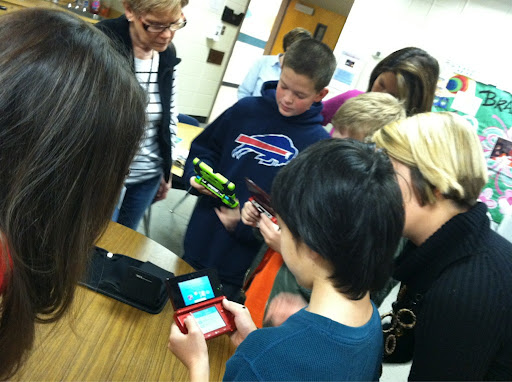
| Source: Image as shared by @BYOTNetwork |
“We’ve found Twitter to be a really effective mode for two-way communication–where it’s not just [the Department of Education] putting out a press release or statement, but … something that’s soliciting feedback from everyone–teachers, students, [and] parents,” says Daren Briscoe, deputy press secretary for the Department of Education. (Read Source)
Thinking social media may be more trouble than it’s worth? Every educational idea probably faced some opposition!
 |
| Read more about Venn Banning |
Consider this:
As a parent of two school-age children, what I desire the most is to know my children are safe, actively participating in engaged learning opportunities, as well as making progress on skills and strategies that will fundamentally change their lives for the better. The 5 tips in this article will help you, as a school leader, reassure parents in your community that these 3 goals are being met. How can you get it done? Strategic blending of social media with face to face meetings you have every day.
Tip #1 – Build a safe online learning space for your school.
Social media tools abound for building an easy-to-update virtual space that can transform how parents view your school. You want parents to see beyond the brick-n-mortar of the school to the spirit captured in images, multimedia, and children’s voices. Think of it as allowing your school spirit to shine through in ways you hadn’t imagined before.
You can accomplish this by building an online space using a variety of tools such as Moodle, a Wikispaces.com wiki, or a web log (a.k.a. blog). These sites are easy to create an allow us to blend images, video, and sound easily in one place. To protect student names and images, always make sure to have a posted checklist in each classroom of who can be photographed or audio/video-recorded. Setting up a virtual space can be done in a variety of ways, but you can start at web addresses like the following:
- Wikispaces.com for K-12 Education – This quick and easy to edit web page–a wiki–enables you and your teachers to build a virtual space all of you can monitor and contribute to. These sites are no-cost for educators and advertisement free. You can be up and going in less than a day.
- Blogger.com – You can take advantage of various blogging providers
Tip #2 – Set up Your School Twitter Account
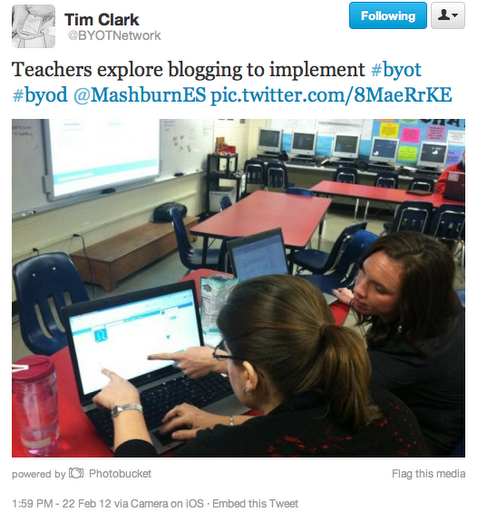
Many of us have heard of Twitter as a way to build professional learning networks that gives us access to online professional development 24/7. What many school leaders don’t realize is that each Twitter update that is sent comes with what is known as an RSS feed. This feed can be blended into existing web sites, such as the wiki you created in Tip #1.
Imagine an easy to organize virtual notebook where you could store images, pictures, and text about the people you see as you walk through your school’s hallways and classrooms. Not only that, but you are able to automatically share those annotated observations online in an instant to your safe online space (e.g. wiki mentioned in Tip #1).
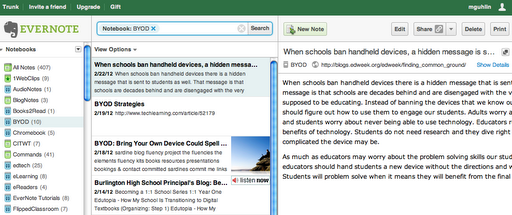 |
| This is a snapshot of my Evernote Notebooks, all of which are shared. Imagine your classroom teachers’ names or room numbers running down the left-hand side, content you’ve shared–pictures, text, audio–in the middle column, and the details on the far right column. |
Tip #4 – Hashtag Your School’s Tweets
If every one in your school knew the secret keyword to search for on the Internet, wouldn’t this make it a lot easier to find information about your school? Currently, educators have conversations about various professional learning resources, such as #edchat and #cpchat and many others. These not so secret keywords are called hashtags and enable you and school community to share information specifically via Twitter. If you search on a Twitter hashtag for your campus, any 140 character tweet that includes the hashtag will be discoverable.
Tip #5 – Encourage Sharing Online
It’s tempting to want to control all the tweets and online sharing that can go on by parents. Focus on creating a culture of empowered learners–adults or students–sharing what they are learning as they are learning it. With shared hashtags, you can easily pull in content and share excerpts from that in your virtual space.
Note: This is the long-winded version of a lighter, better written 200 word version submitted for publication (rejected…sigh).
Enter your email address:
Delivered by FeedBurner


Discover more from Another Think Coming
Subscribe to get the latest posts sent to your email.
 Another Think Coming