Note: You may want to scroll down and pause the auto-start video somewhere down in this post…or go crazy.
Some time in the last week, I shared the following with colleagues on the Google-Certified Teachers (GCT) list:
A colleague recently posted this question, and to be honest, we’ve had the same question in my current district. Any suggestions/ideas?
Students from one of our classes have entered a contest in our Electric Coop. They have uploaded a video to Youtube and it will be seen and judged on content. When I go to see it (and hopefully put it on our website) I see content that shouldn’t be viewed by children next to it. How can I avoid this? We tagged the youtube video with the words: teen, Silverton, electricity, co-op, energy.
You’ve probably already heard of ViewPure.com–I’d heard of it, but forgotten to bookmark it, and so…it was lost to me until Robert Madden (@mrmadden77) on the GCT list mentioned it again.
Viewpure is a web service that removes all the clutter from YouTube video and runs it in a neat interface. You can also create a custom environment for video viewing, example you can generate personalized URL (ViewPure.com/[URL]) and also password protect your video.
Read more: http://www.callingallgeeks.org/3412/watch-youtube-videos-in-clutter-free-interface-using-viewpure/#ixzz1qwJg3Ea9 Under Creative Commons License: Attribution No Derivatives
ViewPure.com solves the problem of inappropriate content popping up…not that I could find any for this blog entry:
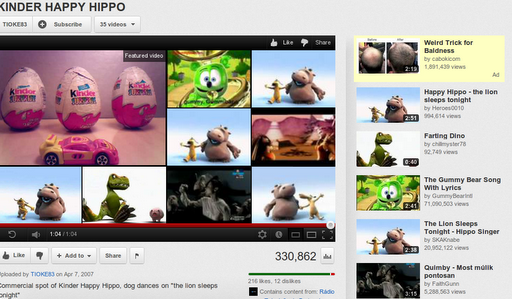
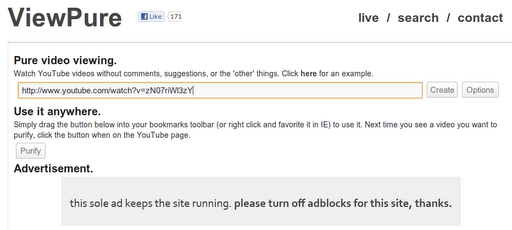


And, if you’re feeling really adventurous and edgy (not really), you can also customize the page that appears on the ViewPure site, cutting out extraneous stuff…but that’s a bit more risky and in danger of violating copyright that ViewPure has established. I’ve emailed ViewPure.com to see what might be possible…is this something that could be self-hosted by schools?
Some other write-ups on ViewPure:
http://www.educatorstechnology.com/2011/03/viewpure-how-to-make-educative-videos.html
http://www.detools.ca/?p=6973
Enter your email address:
Delivered by FeedBurner



Discover more from Another Think Coming
Subscribe to get the latest posts sent to your email.
 Another Think Coming
These are great tips! I need to experiment with ViewPure.Another option is to embed the video in your own website. When you generate the embed code on YouTube, you can select to NOT show related videos at the end. I almost always use that option when embedding from YouTube since I have no idea what related videos YouTube is going to display.
These are great tips! I need to experiment with ViewPure.Another option is to embed the video in your own website. When you generate the embed code on YouTube, you can select to NOT show related videos at the end. I almost always use that option when embedding from YouTube since I have no idea what related videos YouTube is going to display.