
You’ll never be bored for reading material if you can get ePub-formatted books onto your iPad. For example, some great places to find content include the following:
There are a million ways to load ebooks onto your iPad. A few that come to mind:

- Copy the ePub ebook into Dropbox or Box.net cloud storage, then open it on your iPad with Stanza.
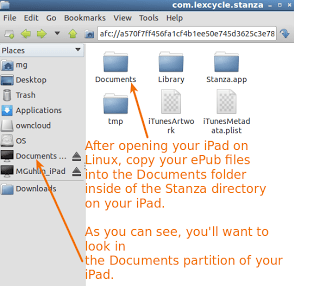
- Connect your iPad to a Linux machine and then copy the ePub files into the Documents drive of the iPad. You’ll need to put the ePubs into the Stanza documents directory.
- Email the ePub to yourself, then open the ePub file with Stanza.
- Load the ePub using iTunes via iBooks.
- And, if you’ve been following the WebDav conversation, setup your own OwnCloud on your home/work computer, then access books from there (simply setup the OwnCloud URL to files (http://ipaddress/owncloud/files/index.php), login, and then you have access to all your books you’ve put in the OwnCloud. With this, you can select books individually then save them to your Stanza library!)
Another approach–which is the one I’ve used–if using iTunes involves the one illustrated below:
 |
| Source: https://getsatisfaction.com/stanza/topics/how_to_get_books_into_stanza |
My preference? Hook your iPad up to a Linux machine and drag-n-drop straight onto the device. It looks like this:

Works great, no need to mess with iTunes, cloud storage, etc. Of course, most folks don’t have that handy.
Get Blog Updates via Email!
Enter your email address:
Delivered by FeedBurner


Everything posted on Miguel Guhlin’s blogs/wikis are his personal opinion and do not necessarily represent the views of his employer(s) or its clients. Read Full Disclosure
Discover more from Another Think Coming
Subscribe to get the latest posts sent to your email.
 Another Think Coming