 |
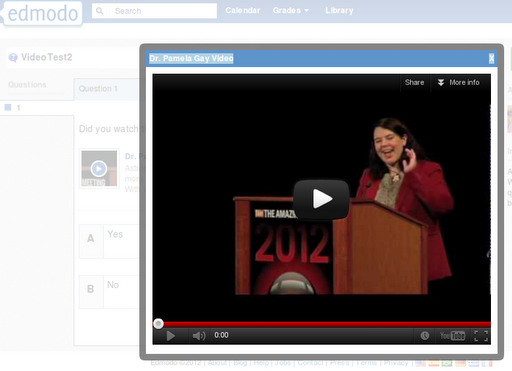
| Video embedded in an Edmodo Quiz – Dr. Pamela Gay (YouTube) |
Earlier today, a colleague asked me, “How could I track who has watched a video?” The question would have been easy to answer if I wanted to use Moodle. Simply, drop the videos into a lesson and that would track a student’s performance in the Moodle gradebook. But, then, I asked, what if Moodle wasn’t an option? What if I decided to try and ONLY use Edmodo, like many educators are doing?
I would like to know how you have your students “turn in” their homework assignment after watching a video. Since my students use interactive notebooks in science, I want them to record their summary and question for the video they watch at home in their notebooks. My question is: What do they need to type on Edmodo to indicate they have completed their assignment or should they type the summary and question on the computer? How are you doing this in your class?
Source: Mrs. Fisher to
Flipping Your Classroom(Edmodo Group)
Is there a way to “assign” the video with a YES/NO question as to whether they watched it or not?
Ms. Oglivie – Create a Google Doc with questions from the video and attach to the assignment. Or simply create a quiz through Edmodo, (it will be auto corrected), and add it to the assignment. Either way you review the wrong answers, and the stray post video questions students may have. Too many wrong answers, concepts need to be readdressed or clarified. I am new at this as well, so I will keep up with this post for replies. Have a great year!
Kirsten Braun – I am having my students write a question they have about the math lesson on Edmodo. This way I know what to anticipate when I get to school. I can also see who has completed it and who still needs to watch it.
Mrs. Hardy – When you post an assignment you can post your questions there or attach a document, there is a space for the students to respond or they can reattach the completed saved document, and a “turn in” button. Those you have to grade individually. 🙂
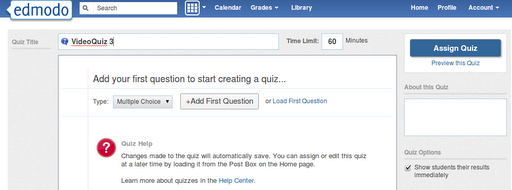
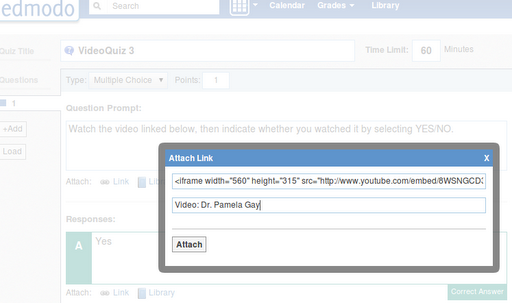
4) When your “students” take the quiz, they will have a link to watch the video, which will pop-up for you.
And, that’s that. Of course, thanks to embed code available on many multimedia tools, you can embed just about anything.
The answer to my question is a resounding YES…I’m sure this is obvious to folks using Edmodo for a long time, but…it’s nice to know definitively from my perspective.
Update: Here’s a nice video on the subject of embedding Brainshark presentation into Edmodo:
Enter your email address:
Delivered by FeedBurner



Discover more from Another Think Coming
Subscribe to get the latest posts sent to your email.
 Another Think Coming
I really appreciate your thorough response! Since this is my first year flipping, recording videos, and using Edmodo I wanted to stick with just one thing. I am trying to take it slow but it is so exciting to see the students excited about learning!
I really appreciate your thorough response! Since this is my first year flipping, recording videos, and using Edmodo I wanted to stick with just one thing. I am trying to take it slow but it is so exciting to see the students excited about learning!