A colleague recently wrote me, asking the following:
I never setup Active Directory for my students in Moodle, and now I need to get student accounts setup. What should I do?
If you can’t get Active Directory setup–and that’s well worth doing if you have your students in it–then an alternative I recommend involves using an external database for student account authentication.
This method uses an external database table to check whether a given username and password is valid. If the account is a new one, then information from other fields may also be copied across into Moodle. (Source: Moodle Manage Authentication Screen)
EXTERNAL DATABASE for STUDENT ACCOUNT AUTHENTICATION
Using an external database for authentication enables one to setup a MySQL database with all the student info–including the fake disabled email accounts–and students would just login with their student ID# and stock password (birth month/day, perhaps), which they would change after login.
The student relevant information pulled from the external database includes the following:
- First Name
- Last Name (Surname)
- Email address
- City/Town
- Country
- Language
- Description
- Web page
- ID #
- Institution
- Department
- Phone #1
- Phone #2
- Address
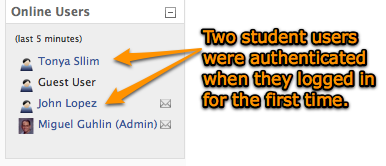
This can be a low-cost option for districts who haven’t setup student users on LDAP/Active Directory. I highly recommend it over uploading users directly into Moodle.
Check out Miguel’s Workshop Materials online at http://mglearns.wikispaces.com

var _gaq = _gaq || []; _gaq.push([‘_setAccount’, ‘UA-3445626-5’]); _gaq.push([‘_setDomainName’, ‘mguhlin.org’]); _gaq.push([‘_trackPageview’]); (function() { var ga = document.createElement(‘script’); ga.type = ‘text/javascript’; ga.async = true; ga.src = (‘https:’ == document.location.protocol ? ‘https://ssl’ : ‘http://www’) + ‘.google-analytics.com/ga.js’; var s = document.getElementsByTagName(‘script’)[0]; s.parentNode.insertBefore(ga, s); })();
Discover more from Another Think Coming
Subscribe to get the latest posts sent to your email.
 Another Think Coming