I was totally unprepared for today’s bombshell revelations describing the NSA’s efforts to defeat encryption. Not only does the worst possible hypothetical I discussed appear to be true, but it’s true on a scale I couldn’t even imagine. I’m no longer the crank. I wasn’t even close to cranky enough. Source: On the NSA
For all my fellow cranks out there, a concise list of my free open source software (FOSS) favorites. All these solutions take advantage of AES-256 encryption.
- Computer:
- Operating System(s):
- Encrypted Files/Folders…
- on a hard drive (external/internal): Veracrypt
- individual files/folders: Secure Space Encryptor
- Encrypted End to End Messaging via Your Computer: Signal
- Encrypted Email: ProtonMail.ch via web or Thunderbird
- Virtual Private Network: Private Internet Access
- Browser: Tor Browser
- Password Management: Keepass2
- Chromebook:
- Encrypted Email: ProtonMail.ch via web
- Virtual Private Network: Private Internet Access
- Mobile Phone
- Encrypted End to End Messaging: Signal
- Encrypted Files: Secure Space Encryptor app
- Encrypted Email: ProtonMail.ch
- Virtual Private Network: Private Internet Access
- Search Engine/Secure browser: Duck Duck Go
- Block RoboCallers/Spammers: Hiya
- Password Management: KeepassDroid
- Check vulnerabilities on your phone: NYC Secure
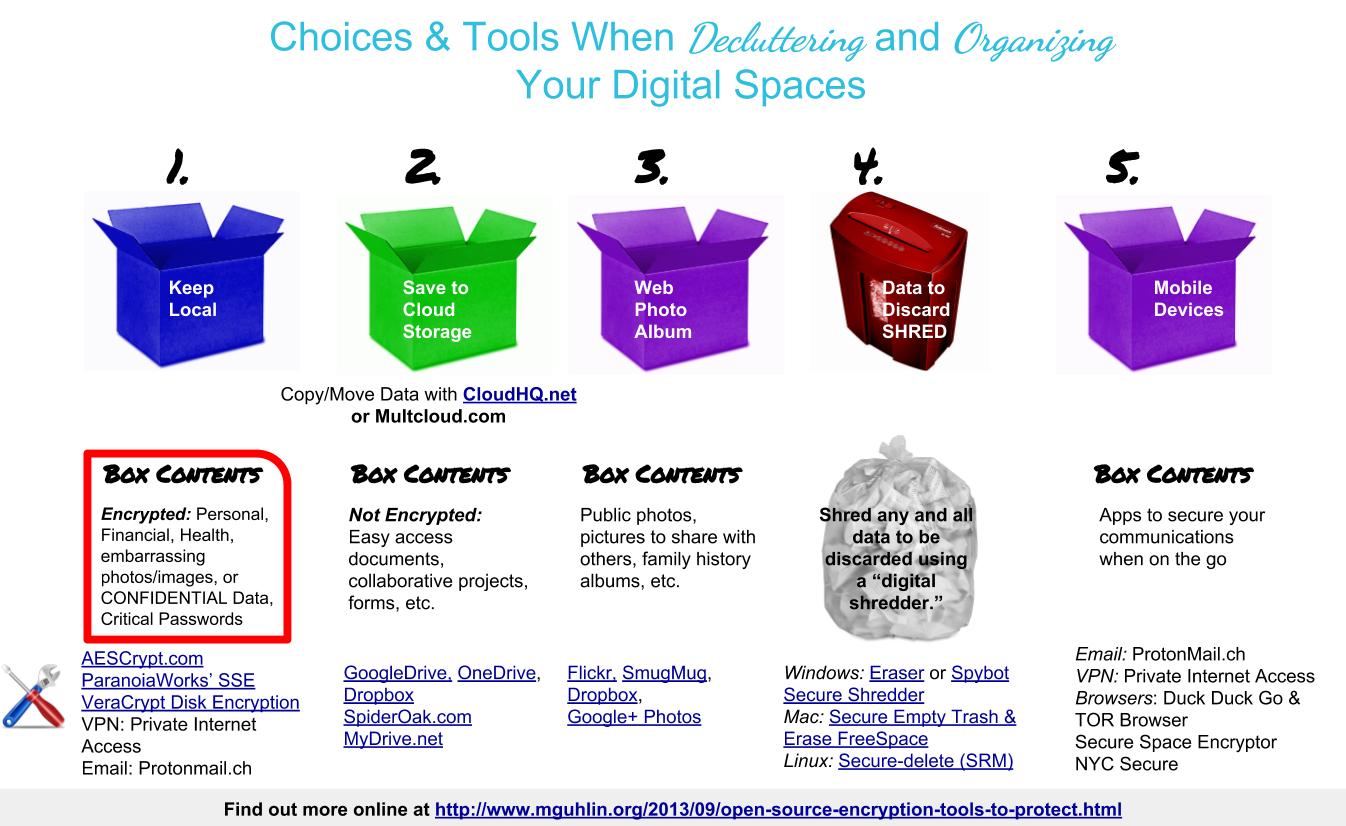
At the end of each section, I share my recommendation.
1. Encrypted Email & Encryption Tools
- Non-US-based Encrypted email service providers:
- Neomailbox
- CounterMail
- ProtonMail (Swiss-based, end to end encrypted email)
- Tutanota (German-based, end to end encrypted email). FREE for 1gig of space.
- Email client with PGP/GPG Support:
- Use Thunderbird with Enigmail
- For encrypting email messages:
- Fourmilab’s web page (save it on your computer locally) on your own computer to encrypt text messages. Use secure passwords.
- On Linux, use KGPG; on Mac, GPGTools; on Windows, GPG4Win
- SecureMail for Gmail (Chrome browser add-on)
- Mailvelope for your Browser (add-on)
Recommendation: For end to end encrypted email, I use ProtonMail and have for awhile. I also use ParanoiaWorks’ Text Encryptor for extra stuff, even though ProtonMail now offers PGP encryption in addition to its built-in encryption.
2. Encrypt Your Files/Folders
- Use TAILS Disk Utilities to create encrypted USB External Drives; read this tutorial
- Secure Space Encryptor (SSE) tool (lets you encrypt folders of files into one). Runs on Win/Mac/Linux. Watch this video. Also available for iOS devices: ParanoiaWorks’ Text Encryption on iOS
- AESCrypt.com (encrypts file by file, available for Win/Mac/Linux) – This also enjoys solutions for Android and iOS devices ($1.99 per app).
- VeraCrypt (creates an encrypted container file) – This replaces TrueCrypt and enjoys higher security.
- For passwords security:
- KeepassX (or Keepass2). If on a Chromebook, use BrowsePass to access your Keepass2 file (*.kdbx).
- For encrypted chat/messaging sessions (good luck with this…encrypt your text on top of this):
- CryptoCat – Private Encrypted chats
- OTR – Off The Record instant messaging (encrypted)
- Share top secret files (encrypt them) via the Web using…
- OnionShare. Here is some more info about it: OnionShare lets you securely and anonymously share a file of any size with someone.
- BitTorrent Sync.
3. Security & Encryption in Your Internet Browser
- TAILS – This is the way to go and works great. Read the Linux Journal for getting started guide, although TAILS Documentation is easy to follow. This is a very nice package for encrypting everything and also supports encrypted USB external drives.
- Use Tor Browser Project (the 2.4 version, not 2.3) to protect your location; it comes with HTTPS Everywhere
- Browser add-ons:
- AdBlock for Firefox/Chrome – Blocks banners, pop-ups and video ads – even on Facebook and YouTube and Protects your online privacy
- Facebook Privacy List for Adblock Plus – Enhances AdBlock Plus.
- Facebook Disconnect for Chrome and Firefox – Facebook is notified whenever you visit one of the more than one million sites on the web that use Facebook Connect and has a history of leaking personally-identifiable information to third parties. This turns off data flow.
- Priv3 for Firefox – The Priv3 Firefox extension lets you remain logged in to the social networking sites you use and still browse the web, knowing that those third-party sites only learn where you go on the web when you want them to.
- Ghostery – Ghostery looks for third-party page elements (or “trackers”) on the web pages you visit and notifies you that these things are present, and which companies operate them. If you wish, choose to block the trackers they operate.
- Do Not Track Plus, and for fun,
- HTTPS Everywhere
4. Mobile Phone Apps
- Signal – Works on iOS and Android to send end-to-end encrypted SMS. Offers phone calls, text, image and voice messages that are encrypted if you use their encrypted chat option.
- Duck Duck Go app –
- Private Internet Access Virtual Private Network (VPN)
- Hiya – Hiya partners with carriers and smartphone makers to offer caller profile solutions and spam protection for their customers
- Secure Space Encryptor App
- NYC Secure –
- Finally, if you really want to attempt security from the operating system up, give Replicant OS for Android phones a try.
Recommendation: Of these messaging apps, I’m using the free open source and no-cost Telegram. Works great! As to Replicant OS, I’m not so sure and given my current phone so I can’t switch to that.
Check out Miguel’s Workshop Materials online at http://mglearns.wikispaces.com

var _gaq = _gaq || []; _gaq.push([‘_setAccount’, ‘UA-3445626-5’]); _gaq.push([‘_setDomainName’, ‘mguhlin.org’]); _gaq.push([‘_trackPageview’]); (function() { var ga = document.createElement(‘script’); ga.type = ‘text/javascript’; ga.async = true; ga.src = (‘https:’ == document.location.protocol ? ‘https://ssl’ : ‘http://www’) + ‘.google-analytics.com/ga.js’; var s = document.getElementsByTagName(‘script’)[0]; s.parentNode.insertBefore(ga, s); })();
bullrun encryption free software freedom liberty mac mguhlin national security agency nsa obama open source prism privacy protection security windows
Discover more from Another Think Coming
Subscribe to get the latest posts sent to your email.
 Another Think Coming