One of the oft-asked questions this morning during the Build Your Virtual Classroom and the Create Online PD that Works was, How can I implement flipped classroom?
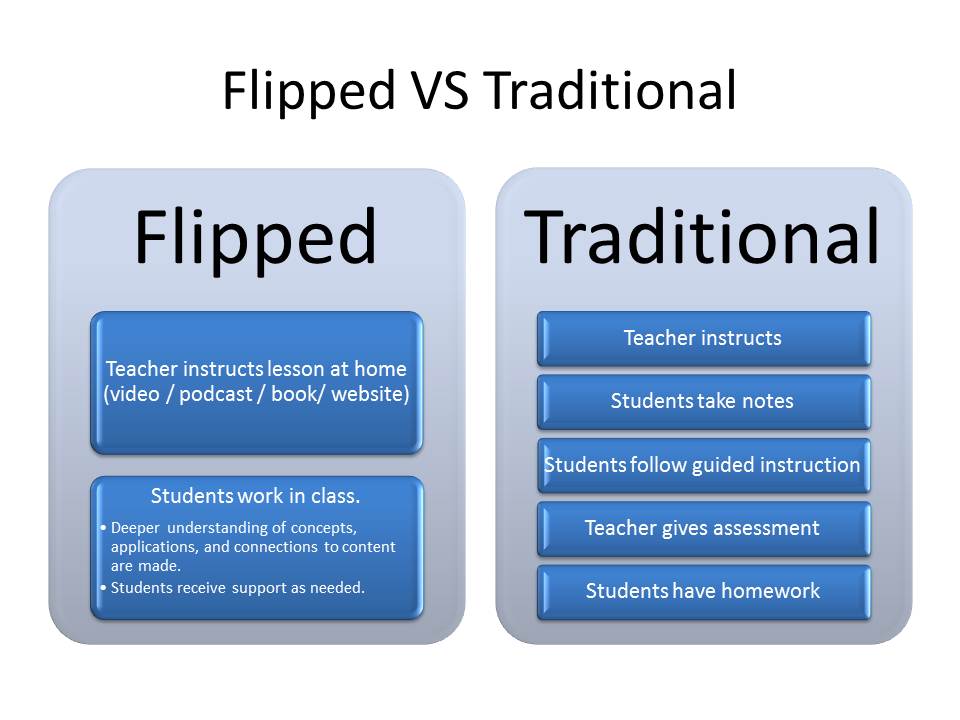 |
| Source: http://instructionalservices.blog.gustavus.edu/files/2013/03/Flipped-Classroom-Comparison.jpg |
In fact, Rhia Parramore (Winters ISD) asked me to share my insights and resources into flipped classroom, especially what software/apps are available. I’ve included my list below. Arden, who you can listen to in the podcast recorded above, shares that she uses ShowMe app on the iPad, as well as TechSmith’s Camtasia software.
- Screencast Creation Tools –
- Computer and Web:
- Use either Vocaroo.com (web) or Audacity (computer) to record audio narrations. Both are free, works on all computer types.
- Screencast-o-Matic is a web-based screen-recording tool that allows you to record your computer’s screen.
- TechSmith’s SnagIt – This is the premiere $20 program to record screencasts on your computer.
- iPad:
- Touchcast (Free) – This is a tool to flip communications,create videos while reading a script right on the screen. Read this blog post to see examples.
- Explain Everything ($2.99) – This is the must-have, go-to tool for creating screencasts on iPad and Android tablets. Let’s you create and share content via GoogleDrive, Dropbox, etc. Watch this video highlighting its features.
- Knowmia (free) – It’s a versatile tool like Explain Everything, although it does not allow you save your content as a video file, only host it on theknowmia.com web site. This is used by Domingo Martinez at ECHS!
- EduCreations (free) – Try EduCreations. Works great, is free, and easy to share online through their web site. Drawbacks: Can’t export video and their web site is slow to load.
I would also encourage Rhea to check this web site out
What else would you share with Rhea? Please share in the comments!
Make Donations via PayPal below:

var _gaq = _gaq || []; _gaq.push([‘_setAccount’, ‘UA-3445626-5’]); _gaq.push([‘_setDomainName’, ‘mguhlin.org’]); _gaq.push([‘_trackPageview’]); (function() { var ga = document.createElement(‘script’); ga.type = ‘text/javascript’; ga.async = true; ga.src = (‘https:’ == document.location.protocol ? ‘https://ssl’ : ‘http://www’) + ‘.google-analytics.com/ga.js’; var s = document.getElementsByTagName(‘script’)[0]; s.parentNode.insertBefore(ga, s); })();
Discover more from Another Think Coming
Subscribe to get the latest posts sent to your email.
 Another Think Coming