“Storytelling is one of humans’ most basic and effective forms of communication. Researchers at the Yale Child Study center are even finding that storytelling–especially between children and caregivers–is a key component of our neurological development,” says Pam Allyn.
Presentations make it easy to make thinking visible, and tell stories. How you decide to craft your presentation can have a profound impact on audience receptivity.
Let’s explore a few ideas that can help you craft incredible presentations with Microsoft Powerpoint.
Idea #1: Lend Me Your Ears.

“It is more difficult to process information if it is coming at us both verbally and in written form at the same time,” says Garr Reynolds, author of the Presentation Zenbook and blog. A stirring story well-illustrated can make it easier for your audience to process information. Avoid bulleted lists, lots of text, fancy and transitions and animations. These just get in the way of the story you are telling. Charts are fine to include when they align to the story you are trying to show and tell.
Idea #2: Worth a thousand words.
“Pictures should contain the story within a frame,” suggests Tatjana Soli in The Lotus Eaters. This isn’t a bad approach when selecting pictures that capture the flow of your narrative. Once you have crafted an enthralling story, you need pictures that illustrate each well-defined idea or concept. The simpler the image, the more impact it can have on the viewer.
You can upload (put) your own picture; grab a snapshot if on a device equipped with a camera; paste in the URL (web address) to a picture you have found online, in your albums; or take advantage of Bing’s Image Search.
You can also rely on free image repositories, such as those shown below, to find relevant, breathtaking images that adhere to a particular theme for your overall presentation. Here are my top eight image search sites:
- Compfight
- Creative Commons Search
- Free Images
- Free Images Collection
- Pexels
- Pixabay
- UnSplash
- Wikimedia Commons
You can also reshape images in Powerpoint by double-clicking the image. Simply select the desired shape from the menu available.
Idea #3: Sound and Fury.

- American Memory Collection
- Internet Archive
- NASA Videos
- OpenFlix
- OpenVideo
- Vimeo Creative Commons Videos
- YouTube USA Gov (find out more about Creative Commons)
Idea #4: Be BOLD or italic. Never regular.
“If you need to put eight-point or ten-point fonts up there, it’s because you do not know your material,” says Garr Reynolds. Instead, take advantage of large font size and easy-to-read fonts. In Windows 10, you can add fonts, as detailed in a previous blog entry. Be brief and use large font sizes with only a few words on the screen. Vary colors of your font text to match the theme of your slide show.

- 1001 Fonts’ Classroom Fonts – A great variety for education such as the Kindergarten Primary font.
- Design Writing Research Free Fonts – A small collection of fonts.
- FontSpace – Find access to educational fonts, such as Pencilled, which displays as pencils laid end to end. Or the LA El2 font which will be instantly recognizable to classroom teachers.
- FontSquirrel
- Search Free Fonts – Provides access to a large selection of fonts.
Step 1 – Save the font from the website. If it is in zip format, you will need to extract it (right-click on it and choose Extract All Files).
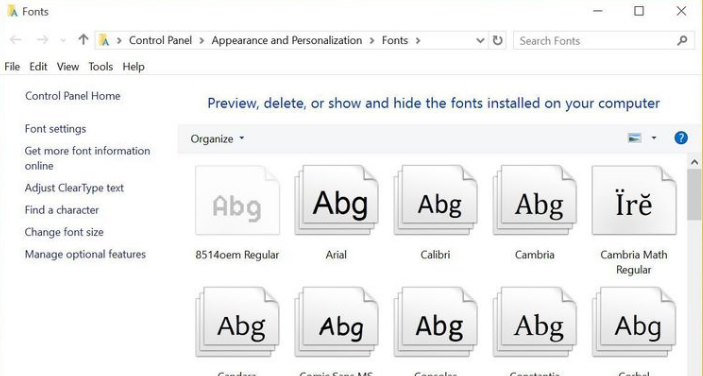
Step 2 – Open the Windows 10 → Windows → Fonts folder. Then drag the TTF font into the folder. You can easily find the folder by clicking in the search box (Cortana box), typing “fonts,” and then opening Fonts in the Control panel.
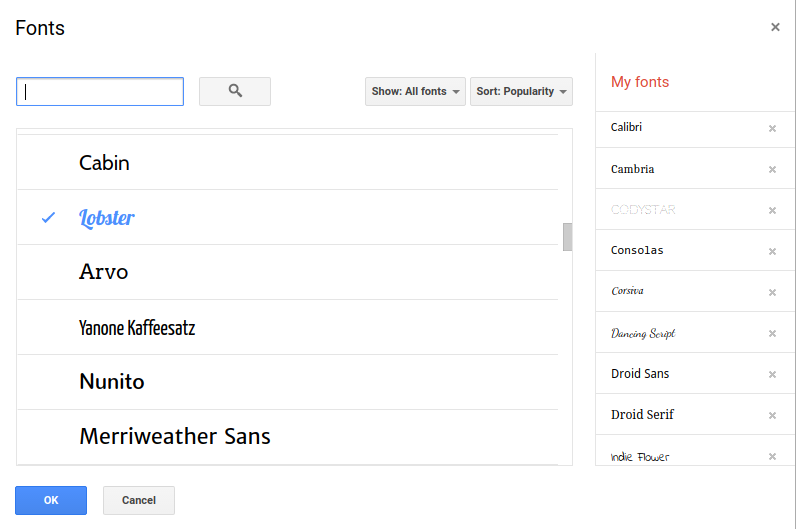
You can easily take advantage of these fonts to enrich your documents and printouts.
Idea #5: Lorem Ipsum.
Are you stuck for a creative look to your slide theme? Then check out this blog for some amazing templates that can serve as your starting point or an inspiration for what you want to create yourself.

Everything posted on Miguel Guhlin’s blogs/wikis are his personal opinion and do not necessarily represent the views of his employer(s) or its clients. Read Full Disclosure
Discover more from Another Think Coming
Subscribe to get the latest posts sent to your email.
 Another Think Coming