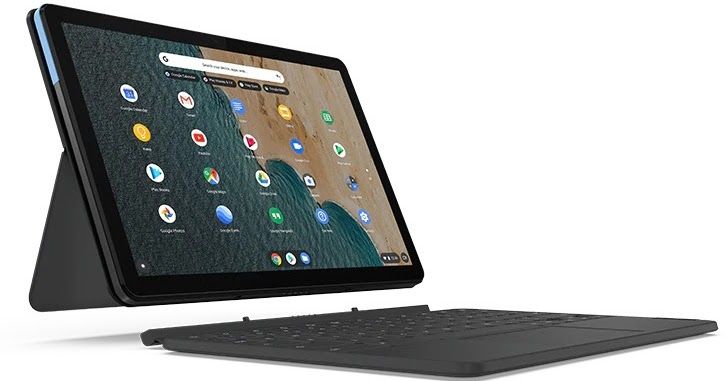
When my Acer C740 passed on earlier this week, I decided that I needed a replacement device. The Acer C740 had endured for five years, and had reached end of life some time ago. After reading a few reviews, I decided to invest in a Lenovo Chromebook Duet.
Why Not a High-End Chromebook?
Well, first of all, who has that kind of cash laying around? Not me. That pretty much ended my deliberations, but I have to admit that a high-end Chromebook might have been nice. But not nice enough to spend $800-$1000. Now, if Chromebook would let me run the Hemingway Editor app, use OBS, Shotcut (or actually had a decent web-based video editor), then maybe. But probably not.
Chromebook Duet?
Instead, the Lenovo Chromebook Duet made the affordability cut. As nice as a full-blown laptop may be, it’s nice to have something light to carry around. The Duet, a Chromebook tablet, appeared to fit the bill. After putting it through its paces for a few hours, it will do just fine. What I like most about it? It works like a Chromebook, can run Android apps that work just as well as on a dedicated Android tablet (like Samsung).
The tablet has a 10.1-inch display that can be used with the accompanying full-sized QWERTY keyboard to transform it into a fully functioning laptop that’s ready to provide enhanced productivity.The unit is powered by a MediaTek Helio P60T octa-core processor that’s supported by 4GB of RAM, while also featuring 121GB of internal storage.
(Source: Adapted from GrendZ’s description to match mine)
What’s more, it didn’t take too long to get all my favorite content loaded up on it. With ample storage (120+ gigs), 4 gigs of RAM, it’s snappy enough and able to handle a load of video/audio files. As expected the keyboard is small but not too difficult to get around. I was typing full speed in no time, and getting at the special keys was easy with practice. In a conference setting, where you might be typing on your lap, I can see a clipboard or large children’s hardback book may come in handy. Or, you could set it on top of your laptop bag to make an impromptu lap desk.
I was blown away by the video quality. I started up a Zoom and loved the level of detail. I’m still running the ZoomPWA…background replaced except for a circle where my face appears. I wish Zoom had a blur background or something available, but not quite.
My real concern is, how will it work via HDMI? I hooked it up to an old monitor I had (like 20 years old), and it worked just fine. I’m hoping the quality of the image will improve when hooked up to a modern projector. I’ll have to test that later.
Some of my Must-Have Apps
Android
- ALZip: I needed an easy to use 7zip (handles other compression formats, too), and this was the best one I found. If you know of a better one, let me know! What’s nice about this one is how you can open encrypted 7z archives, which I have a few. This makes it easy when interacting with USB storage devices with confidential data I have stored on them.
- Audible: Must have audiobook app. Of course, Kindle app is also included just in case.
- GitLab’s Audio Recorder: Great for recording meetings, presentations, or audionotes.
- Bitwarden: All around password keeper. What’s neat is that the Android app works to safeguard all my passwords on the Android side. For the Chrome browser, I use the Bitwarden Chrome extension.
- Cx File Explorer: I needed a file manager that was a bit more robust than “Files,” which is what comes standard on any Chromebook. Cx File Explorer does quite a bit without ads.
- DuckDuckGo: A secure browser, which is ironic on a Chromebook. I also keep Brave browser Android app installed since it provides easy access to all my bookmarks.
- Fast Scanner Pro: With a built-in outward facing camera, scanning has never been so easy. FastScanner saves scans in image or PDF format to your cloud provider of choice (e.g. Drive/Dropbox).
- Private Internet Access: Who doesn’t need a Virtual Private Network (VPN) when on the go? This will do the job.
- Readdle Spark: A fantastic email program, it makes it a cinch to move emails from one account to another (something Gmail app can’t quite do).
- SSE – Secure Space Encryptor: A file/folder encryption tool. This app makes it so easy to encrypt content, and since it works on Window, Mac, and GNU/Linux, you can send the encrypted file/folder (*.enc) to any of them. I use it as an even more (prob unnecessary) alternative to 7zip encrypted archives.
- Xodo PDF Viewer/Editor: The multi-purpose tool. It works like an Android app, but you can also access it on the web, so truly powerful. One of my favorite PDF tools and I encourage you to try it out.
And those are the Android apps I use on a regular basis. There are a few others but not worth mentioning since they are “use ’em every once in a blue moon.” Those include media apps, such Netflix type apps.
Wait, Do You Use Windows or Mac?
While I no longer have access to a Mac these days, I do rely on Windows. The more varied the platforms I have access to, the more I learn about working on each. I’m not sure platform is as important as it once was, though.
Everything posted on Miguel Guhlin’s blogs/wikis are his personal opinion and do not necessarily represent the views of his employer(s) or its clients. Read Full Disclosure
Discover more from Another Think Coming
Subscribe to get the latest posts sent to your email.
 Another Think Coming