Earlier today, I had a chance to chat with Zach from BoodleBox AI. Wow, what an incredible conversation about an amazing tool. If you want to try Boodle Box AI out, I’ve included a referral link.
Note: I’ve updated this blog entry to reflect new questions and links to a follow-up blog entry.
Quick Take
My quick take on boodle box? It’s awesome! It has some features I really like, but I do have a few follow-up questions and suggestions for improvement. There are some definite applications for organizations, businesses, and individuals. I have also added a checklist of desired features. It appears as a separate blog entry, but I’ve also included it in this one.
Defining Terms
Trying to make sense of boodle box’s content, I decided to Let’s define terms first:
| Boodle Bot Term | Description | ChatGPT Equivalent | Claude Equivalent | Perplexity |
| Chat | Standard LLM chat but with lots of different models available via APIs | This is a chat that offers access to various ChatGPT models | Offers access to Claude models | Offers Perplexity’s select models and whatever they make available via API |
| Chat with Knowledge Bank | Add files and anything the chatbot can read and interpret. You can have collaborators in boodle box in the SAME chat. | ChatGPT Projects. Collaboration not available to the best of my knowledge at this time. | Claude Projects. Collaboration not available to the best of my knowledge at this time. | Perplexity Spaces. Collaboration not available to the best of my knowledge at this time. |
| Bot (includes knowledge bank and custom instructions) | Create a tool that you can share a link to and others can access easily and use. Use free model for free users to access with limited chats. | ChatGPT Custom GPT. Users can access full version with free account for limited chats. | Claude Projects. Free, limited access like the others. | Perplexity Spaces. Free users can access with limited chats. |
Before I get into my reflections, here’s a quadrant outline of my notes:
Quadrant Outline: BoodleBox AI
Quadrant Outline for Boodle Box
| Main Ideas (What is the Topic?) | Key Details (Supporting Concepts and Strategies) |
|---|---|
| Boodle Box: A collaborative AI tool that integrates multiple AI models for education and business use. | – Uses AI models like DeepSeek and ChatGPT 3.5. – Provides collaborative AI and co-intelligence bot features. – Supports business-focused AI and machine learning pipelines. – Integrates with Learning Management Systems (LMS). – Offers multi-modal collaboration (chat, knowledge banks). – Limits access to Large Language Models (LLMs) for compliance. |
| Examples (Techniques and Applications) | Takeaways (Why It Matters and How to Apply It) |
|---|---|
| – Allows users to switch between AI models and bots. – Offers vocabulary-building features. – Businesses can train and sell custom bots. – Schools and higher education have limited applications due to compliance and privacy concerns. – Pricing: $20 per person, site licenses available, free 3-month trial with referrals. – Set up bots using a variety of LLMs (e.g. DeepSeek, Claude, ChatGPT, Perplexity, etc.) and each can have its own Knowledge Bank. – Create chats that anyone can access with a free Boodle Box account. | – Helps users access different AI models for various needs. – Provides a structured way to interact with AI in collaborative settings. – Offers monetization options for businesses. – Challenges in education due to privacy, compliance, and limited adaptability. – Encourages AI literacy and knowledge-sharing in professional settings. |
Boodle Box Chat Example – AI Strategist
As you may know, I have an AI Strategist MGpt (a ChatGPT Custom GPT) that I set up to help me think through AI use in different environments. I add to it periodically when I find content that might help me, so it’s always evolving. I’ve started keeping track of all the info I’m putting into GPTs because I know that I will always be migrating between AI tools (since they are too expensive to run local on my desktop computer).
Here’s what the creation of AI Strategist looks like:
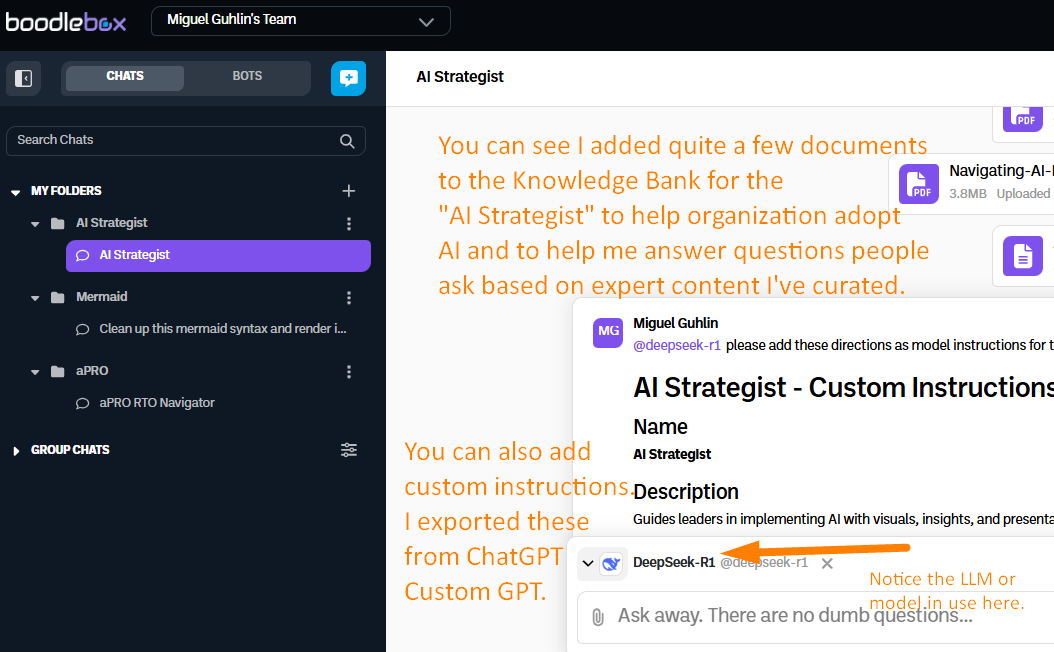
Some things to note about this is that I can:
- Use a wide variety of chatbots, such as DeepSeek-R1
- Add all sorts of files (but not Markdown unless they have the TXT filename extension…please change that! Also allow adding webp images)
- Create both chats based on boodlebox AI paid models (e.g. DeepSeek, ChatGPT, Claude, etc.) as well as free versions (e.g. ChatGPT 4o-mini, Claude 3.5 Haiku, Gemini 1.0 Pro)
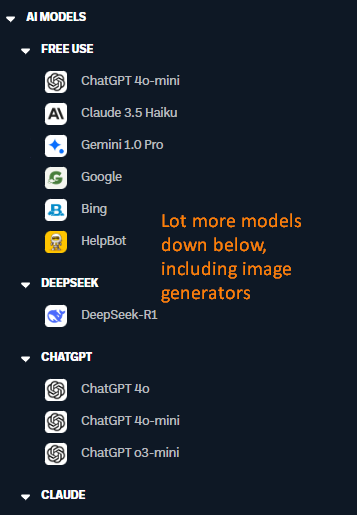
In the screenshot above of the AI Strategist, I’m using a whole bunch of PDF, text, and image files. However, a chat with a Knowledge Bank is NOT a Custom GPT…it’s more of like a ChatGPT Project, Claude Project, or Perplexity Space.
Let’s explore Boodle Box Bot creation, which is more akin to Custom GPTs.
Boodle Box Bot Creation
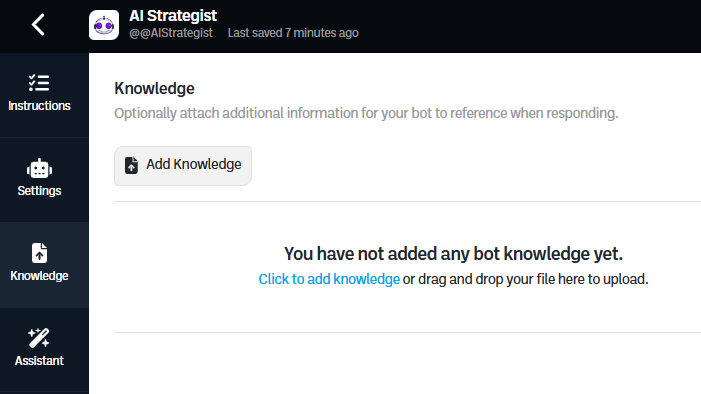
In the screenshot below, you can see what Bot creation looks like. On the left side of the screen, you see several menu items (Instructions, Settings, Knowledge, Assistant), the screen showing an easy to edit custom instructions window, and a place to test the bot.
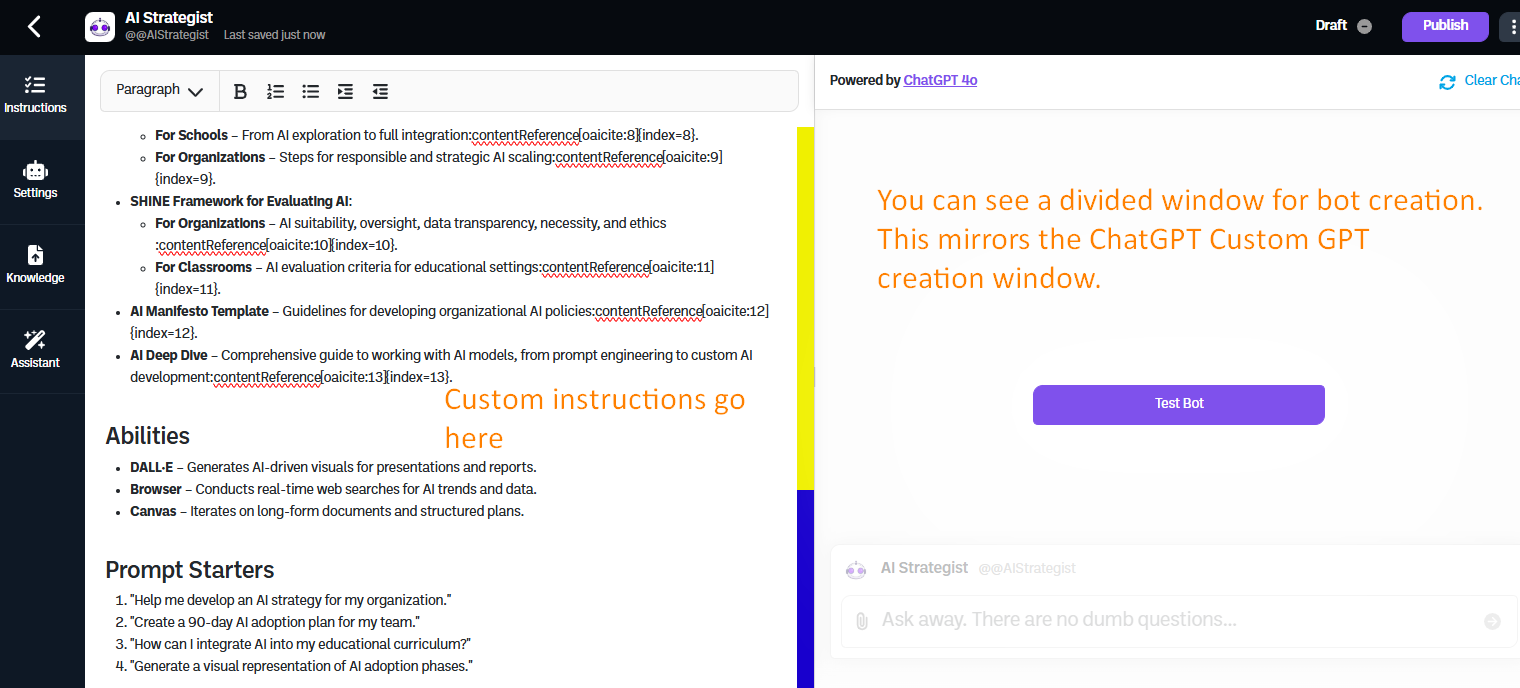
Here are what the other screens look like:
Settings
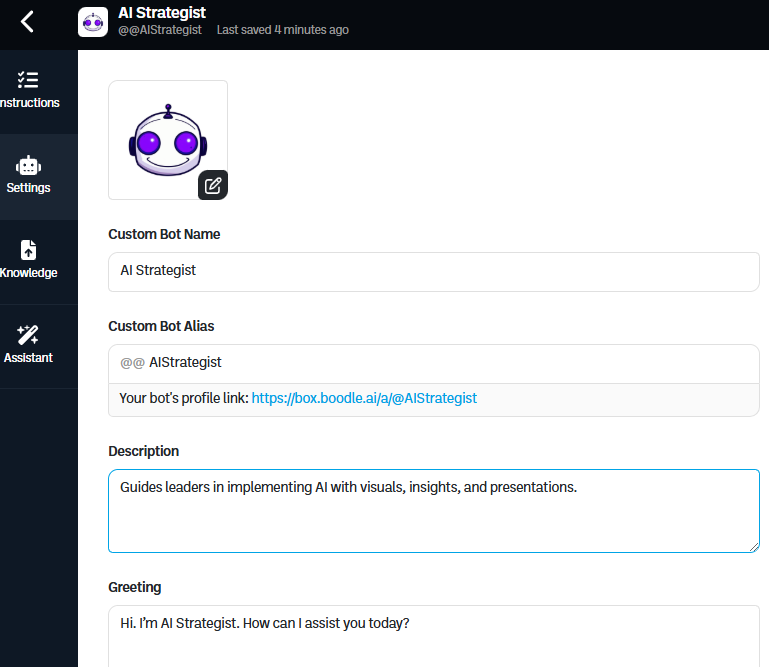
Knowledge
Assistant
Clicking on this opens a new window:
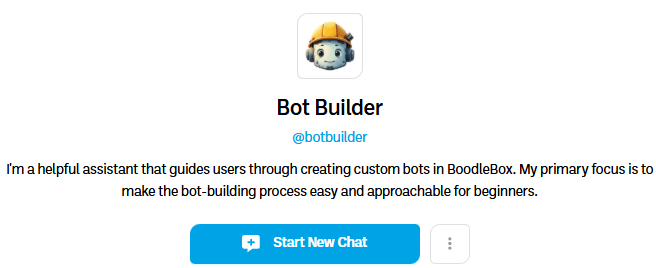
When I asked it questions, it did a great job generating content. More play is required and naptime beckons.
Play with the AI Strategist Bot.
I will probably be creating more bots in the future, and this one is just thrown together from some files I had on a drive. It may stop working in the future, but be sure to check my list of GPTs here.
Questions
I’ll be adding more in the future. I ran out of gas on this blog entry. 😉
- Creating a Bot
- When creating a chat inside an existing folder (e.g. AI Strategist), I’m stuck with a limited list of models to use. But Bots have full access to a wide variety of models. What’s up with that?
- When adding content to the Knowledge Bank in a chat, why can’t I added MarkDown (MD) files?
- How easy is it to take my data and run? Export knowledge banks to a zip file with custom instructions?
- Is there an iOS and Android app in the works? I hope so!
- Are Knowledge Banks specific to a chat or bot, or are they accessed by all bots and chats?
- Is there a way to create Bots that use different AI image models (e.g. Flux)? What really makes the difference for BB is the availability of the various AI models.
- Allow anyone, whether they have an account or not, use the free-based AI models in a bot
- Can you add a “ON/OFF switch” for what models to use for free AND premium? Make it easy to create ONE Bot that can do either free or Premium models, including images and video, and adjusts based on what the end-user does
- Can you allow Knowledge Banks that can be accessed by any Bot, in free or premium model use? Read the accompany blog entry.
- K-12 Education
- Most K-12 educators are looking for free tools that do something…prompting or designing bots is beyond them at this time. Most K-12 teachers don’t have the time, inclination or technical skill to design their own.
- Why can’t Boodle Box organize K-12 educator Bots a la TeacherServer or MagicSchool?
- What are some administrator/leader oriented tools you could design or make available.
- Miscellaneous
- In the screenshot below, there is an option to “Favorite this bot.” But I’m in a chat. It’s a little confusing…why not say, “Favorite this chat?”
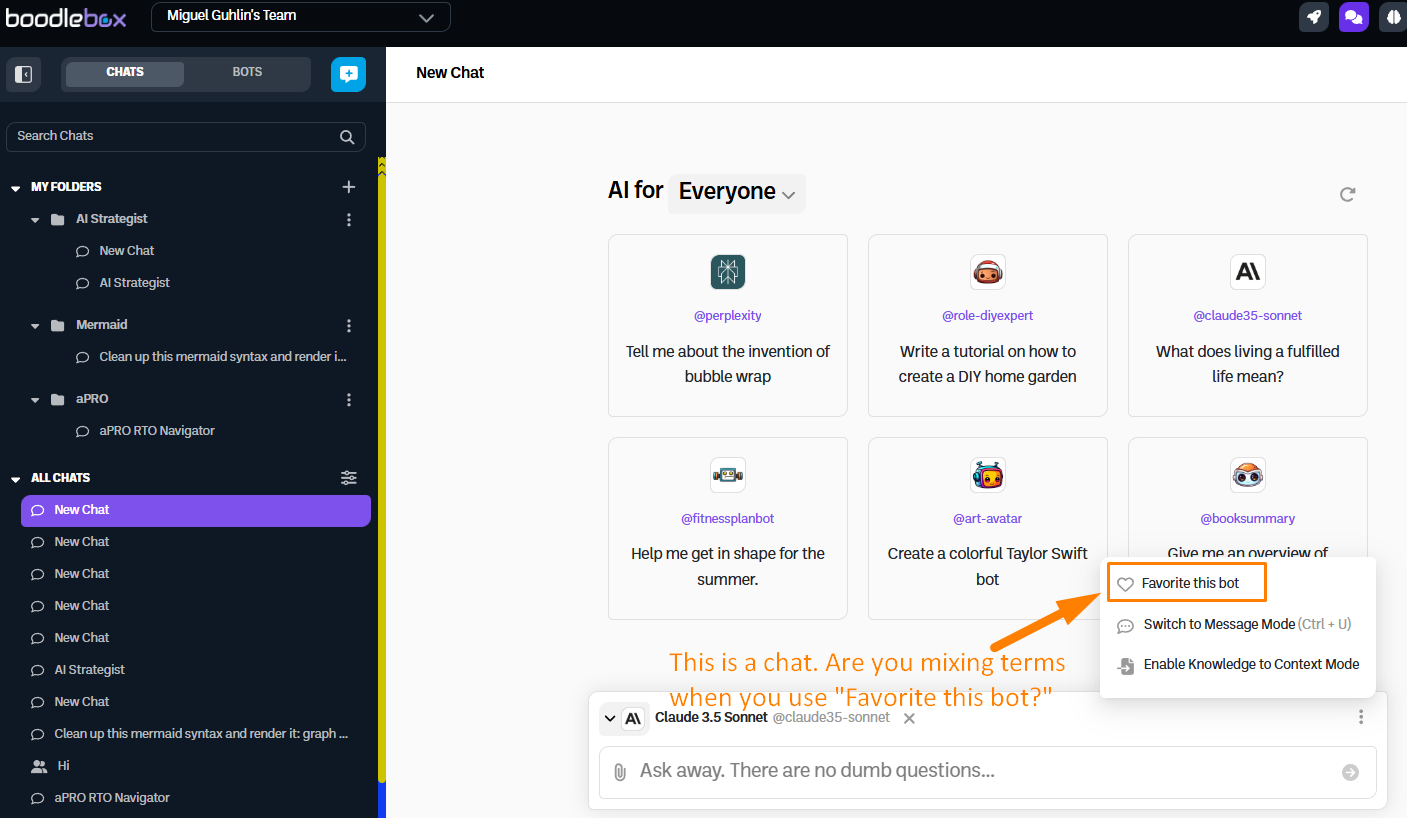
This is kinda confusing, too:
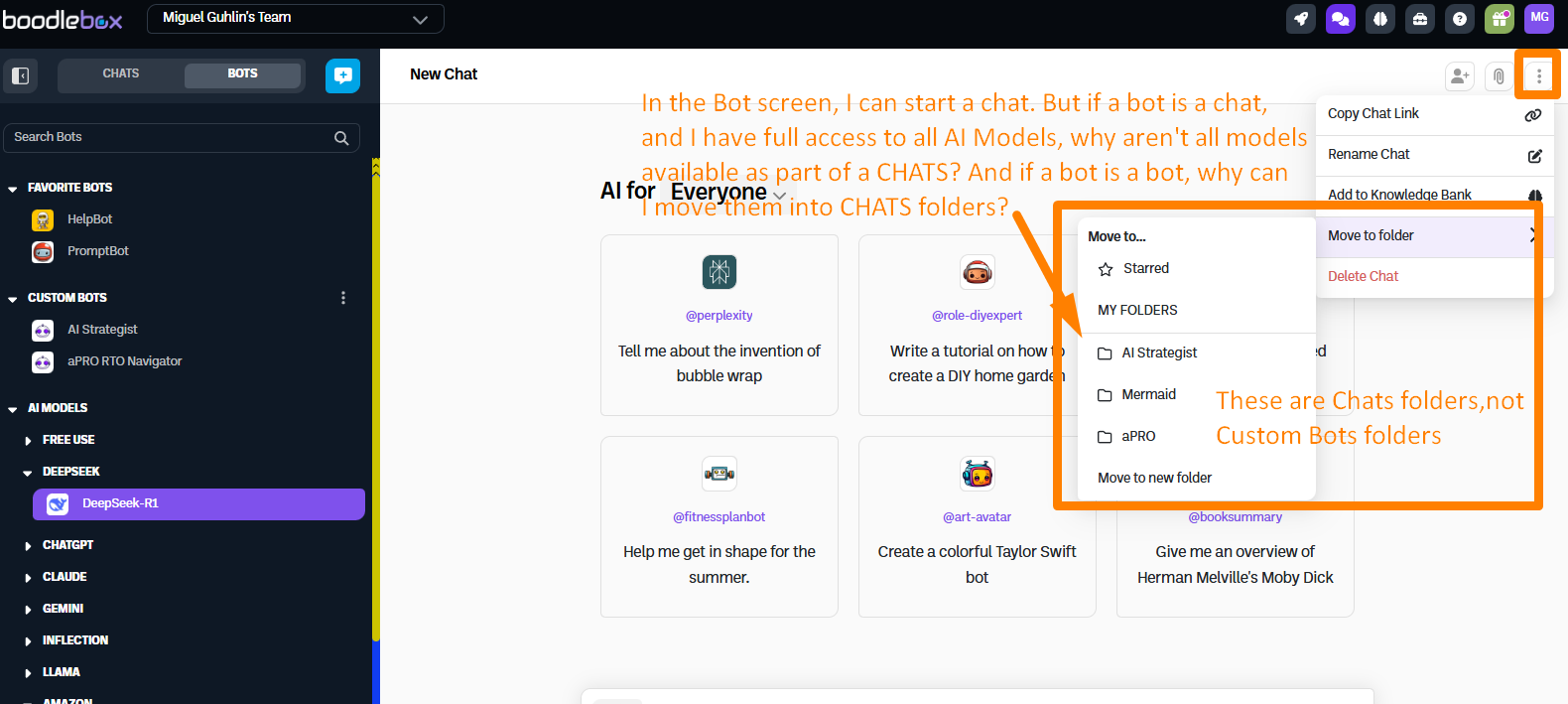
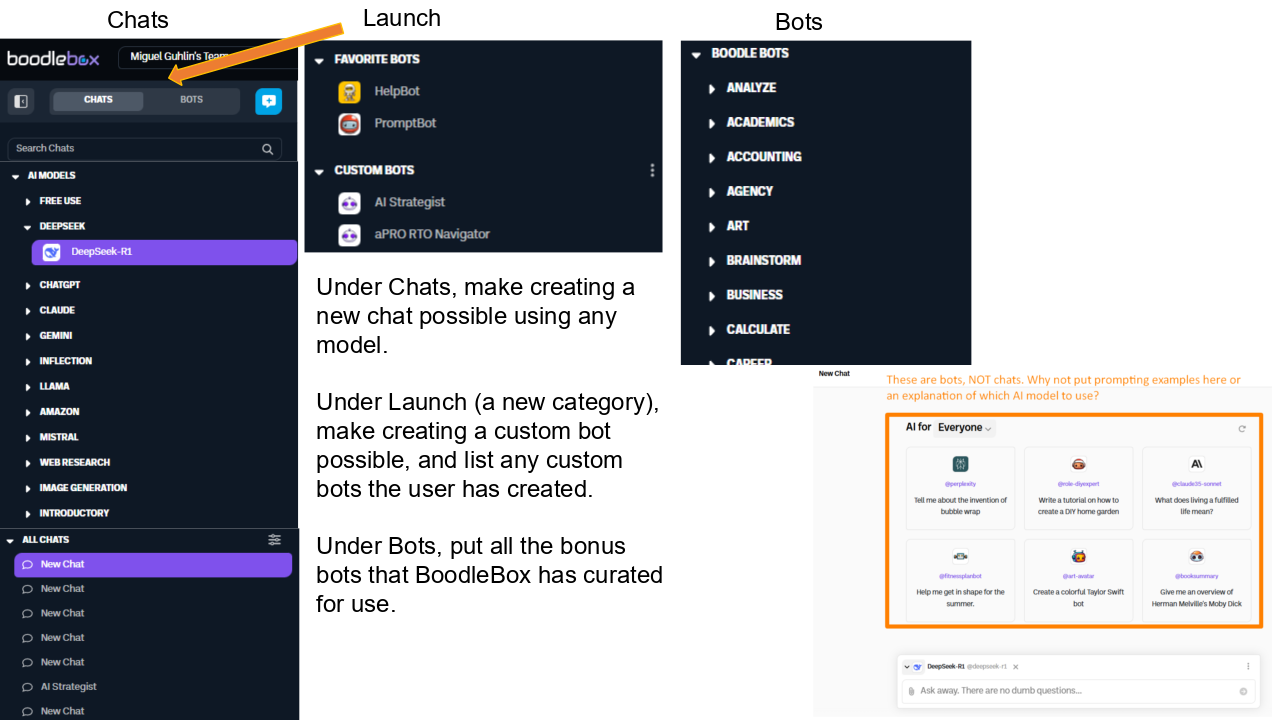
I’m able to access all AI models in the BOTS screen (see above), but NOT in the Chats. The language is a little confusing. Essentially, they appear to be using “bot” to represent CHATS, and Custom Bots to represent BOTS.
I wish there was a different word instead of Chat-oriented “bot.” Is this making sense?
Some layout suggested changes:
Checklist for Boodle Box AI Improvement
You can see a companion blog entry that includes a checklist for improvement here.
Discover more from Another Think Coming
Subscribe to get the latest posts sent to your email.
 Another Think Coming