As I mentioned before, I’m using Msty after trying out several solutions for hosting an AI locally on my computer. Now that I’ve found an AI model that runs fast on my machine (Phi-3-mini-4k-instruct-q4-1739751918121:latest via HuggingFace), I’m ready to start creating Knowledge Stacks in earnest. A little about the model:
The model is intended for broad commercial and research use in English. The model provides uses for general purpose AI systems and applications which require
- memory/compute constrained environments;
- latency bound scenarios;
- strong reasoning (especially math and logic).
Our model is designed to accelerate research on language and multimodal models, for use as a building block for generative AI powered features. (source)
My Quick Takeaway: Even though it runs fast on my machine, it still is less effective at responding to questions than Perplexity, ChatGPT, or Claude. So, in the end, it’s a bust. However, creating knowledge stacks is worth the experience as long as the questions aren’t TOO complex. And, I get better results when I’ve turned off Web Search/Internet access and all responses come from the knowledge stack or general information.
What is a Knowledge Stack?
A knowledge stack for me is a specific collection of documents that you want the AI chatbot to have access to. I see it as a way of plugging in relevant data and information into the AI’s “brain.” In a lot of ways, it reminds me of the “outboard” or second brain analogies people use when talking about their searchable blogs. The knowledge stack augments what the AI already knows. In the case of local AI, it’s important to have a knowledge stack. The reason why I think so (which may be wrong) is that a local AI may have limited access to information because of its training and/or internet access (usually off). The knowledge stack provides much needed information that is may not have in its own general knowledge.
This is known as RAG-Retrieval-Augmented Generation:
- Retrieves relevant information from documents you’ve provided
- Augments the AI’s knowledge with this specific information
- Generates an answer using both its general knowledge and the retrieved facts
Why couldn’t they call it “PEG?” You know, PULL-ENHANCE-GENERATE?
- Pulls info you give it
- Enhances AI’s knowledge with the info
- Generates a response featuring both its own info and pulled data.
Well, whatever you want to call it, PEG or RAG <eyeroll>, the Knowledge Stack is the “pulled” or “retrieved” data.
An AI Definition of a Knowledge Stack
Here’s a Perplexity-derived definition:
A knowledge stack is simply a collection of information that you gather in one place for an AI to use when answering your questions.
Think of it like creating your own custom reference library:
- It’s like a digital backpack where you put all the important documents, websites, videos, and notes you want the AI to know about.
- Example: If you’re researching climate change, your knowledge stack might include scientific papers, news articles, your personal notes, and video transcripts—all in one place.
- How it works: When you ask a question, the AI looks through everything in your stack instead of just giving general information.
- Real-world comparison: Imagine having a personal research assistant who has read exactly the books and articles you’ve selected, and can answer questions based only on those sources.
Knowledge stacks are useful because they help the AI focus on information that matters to you, rather than pulling from everything on the internet. They also let you use private documents the AI wouldn’t normally have access to.
I like the idea of a “digital backpack” that holds relevant documents. I imagine knowledge stacks as backpacks hanging from digital pegs in my garage, ready for use. What Msty makes it easy to do is to add multiple knowledge stacks to a single chat.

Knowledge Stacks (KSs) in Msty
How does Msty handle Knowledge Stacks and connect them to a chat?

As you can see in the website capture, it’s easy to add a variety of formats, importing files OR folders. Here’s what that looks like on my end in two screenshots:
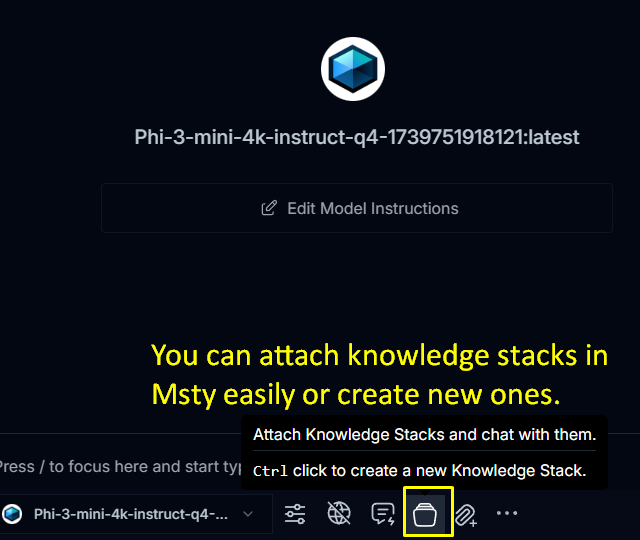
Once you decide to create a Knowledge Stack, you can put them together here:
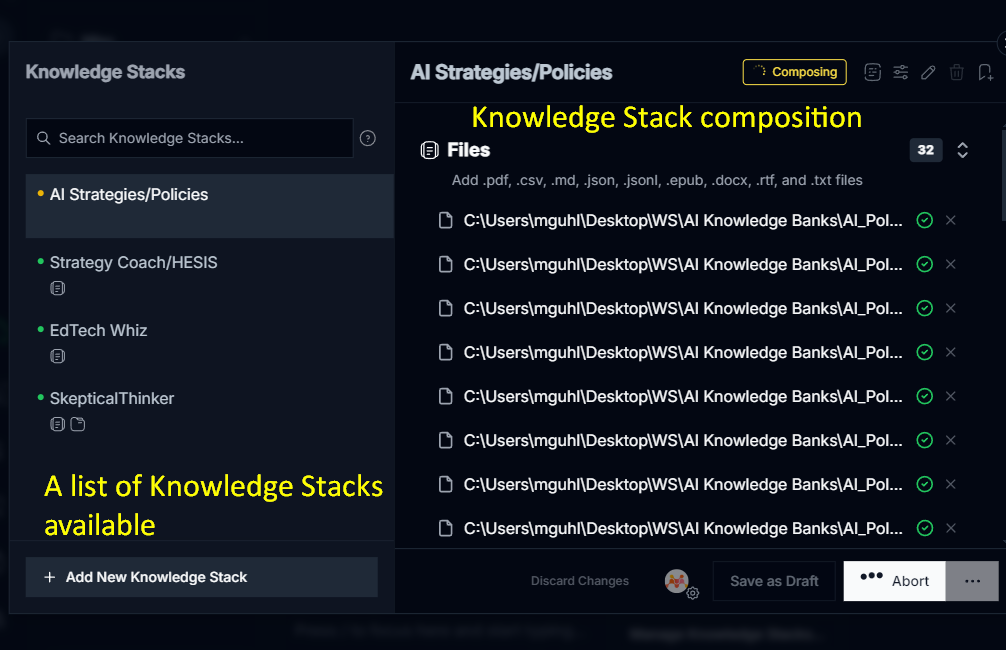
One of the questions going around in my mind is, “How can I better optimize the Knowledge Stack?” Right now, I feel like that teacher learning how to use a learning management system for the first time…you know, when they take all their class documents, convert them to PDF, then drop them in the LMS for students to read. But there has to be a better way.
A Crazy Idea
One idea that popped into my head was to:
- Context file. Create a “background knowledge” or “context” file that provides detailed custom instructions a la megaprompt or long prompt.
- Output file. Create an output file that shows what I want the AI chatbot to create as an end result, providing examples for each type of output desired. If necessary, create specific output files (output1, output2, output3) that showcase for the AI what output could look like for each.
- More info files. This would be all those PDFs, docx, epub, markdown (md), RTF/Txt, CSV files that it would be too much of a pain to separate out.
- Instructions file. A super short custom set of instructions that provides a simple directive and table of contents explaining where to find everything and what to do with it.
I haven’t tried doing this yet. Next project. In the meantime, here is a checklist for optimizing the knowledge stack via Perplexity. It seems pretty straightforward.
In the meantime, I’ve created a folder on my hard drive “AI Knowledge Stacks” and I’m organizing all files and instructions in there. Over time, I will improve the organization but it sure would be nice to have a tool to do that from a file list. Hmm…
Optimizing the Knowledge Stack
| MSTY Knowledge Stack Optimization Checklist | Status |
|---|---|
| Import diverse file formats (PDFs, docs, spreadsheets) | [ ] |
| Add relevant YouTube video transcripts | [ ] |
| Integrate Obsidian/Markdown notes | [ ] |
| Create descriptive stack names | [ ] |
| Organize related materials into folders | [ ] |
| Enable source citations for traceability | [ ] |
| Set up exclusion filters for irrelevant content | [ ] |
| Recompose stack after adding new materials | [ ] |
| Configure local embedding model for privacy | [ ] |
| Attach custom system prompts to guide analysis | [ ] |
| Test stack effectiveness with split-chat comparison | [ ] |
| Create specialized stacks for different use cases | [ ] |
| Set up web integration for real-time data | [ ] |
| Review and prune outdated materials | [ ] |
| Implement branch conversations for complex queries | [ ] |
Discover more from Another Think Coming
Subscribe to get the latest posts sent to your email.
 Another Think Coming