Chatting via Mastodon with Moe, I got the idea to refine my awareness of AI Knowledge Stacks a little more. The question going around in my head is, “How can I really boil this down to make it easy for future knowledge stacks I create? How can I organize a folder on my computer where I have a “grab-n-go” set of resources for an idea. This is informed by some ideas resulting from my experiences.
The main benefit of streamlined Knowledge Stacks? My AI chatbots are quicker, more responsive, and accurate (the most important). That’s not a claim I could make with my first round of projects, spaces, and bots. 🙂

Disclaimer: Hey, I’m not an expert at this. I’m learning as I go. Give these ideas a try. If they work for you, wonderful! If not, share back.
Idea #1: Keep It Simple
When I started putting content together for AI Retrieval Augmented Generation (RAG) or “knowledge stacks” or “knowledge banks” (a term I negotiated with ChatGPT when creating a Custom GPT), I tended to throw everything I had at the AI in the hopes it could make sense of it all. My idea was that the AI sat like a bit of an all-knowing spider atop my knowledge repository, responding to my queries and then adapting it as needed. That’s why, when you see my initial efforts using Claude Projects, I ended up with a zillion files, straining the limits of Claude AI. The same thing with ChatGPT’s Custom GPTs I made, and Google’s Gems. Perplexity AI, Boodle Box AI also made it easy to upload content.
But is that all necessary? I suspect the answer is “No.” A big aha moment was a conversation I had with Boodle Box AI’s Zach Kinzler. He said something along the lines that with Knowledge stacks, “Less is better,” which is a terrible paraphrase on my part of what he hinted at. It landed like a bolt of lightning in my head, and made me rethink how I was building knowledge stacks.
Unfortunately, other priorities get in the way of my experiments. So it’s taken a while to circle back and put these ideas into practice.
Idea #2: Align the File Formats to the AI
Whether it’s Perplexity AI Files, Claude or ChatGPT Project Files, Google Gem, each accepts a variety of file formats for your data. You’ll need to figure out what file formats are accepted, which may vary by what LLM you are using for a particular task. That’s a problem that you will encounter less with Claude, which only offers a few models. Google’s Gemini and Boodle Box AI do seem to offer some objections to certain types of files. I suspect that in the future, they will accept anything you throw at them, but for now, you may run into limitations.
Two tools I have found quite helpful are MarkdowntoHTMLConverter and Pandoc:
If you need to convert files from one markup format into another, pandoc is your swiss-army knife. Pandoc can convert between the following formats:
(← = conversion from; → = conversion to; ↔︎ = conversion from and to)
I would also 1) Organize your Knowledge Stack on your Computer in a folder before uploading files into the AI tool you want to use; 2) Decide what the key files are (more about that in a moment). This allows you to be selective when creative knowledge stacks across multiple AI tools. It also makes it easy for you to walk away.
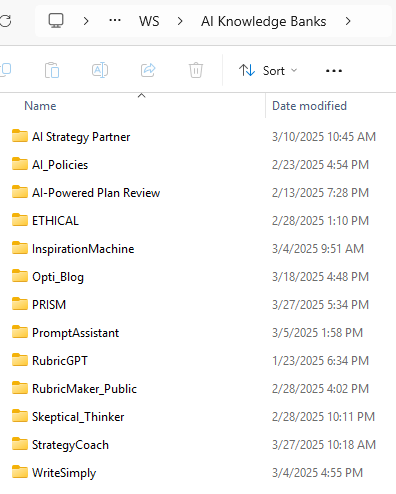
Now that I have generic Knowledge Stack folders with files, I have re-created them in various AI chatbots (e.g. ChatGPT Custom GPT, Boodle Box, Perplexity, Gemini Gems, Local AI). Having a local copy has made things so much easier.
Idea #3: Create Single-File Content Compilations
One of the temptations is to upload or put everything you have into a knowledge stack. But if your goal is to get results that resemble previously ordered patterns of content, you are more likely to be successful with a FEW files. You want to provide the AI with a few rich files, rather than 50+. To that end, I’m restructuring my knowledge stacks to have at minimum 4 files:
- Instructions (a.k.a. Custom Instructions). This is a markdown (instructions.md) or text formatted with markdown formatting (instructions.txt) that super short. It simply includes one directive, which is “Before responding, read these files for more information. The megaprompt.md file includes your task and background knowledge. The exemplars.md file includes examples of desired output and what I want tone and style to resemble. Reference files are also included for more information.”
- Mega-Prompt. This is a context file that gives detailed information. You can see some of the mega-prompts I have put together. I find that crafting a mega-prompt can be helpful but time-consuming. Fortunately, you can tweak existing ones to get similar results.
- Exemplars. This file includes fully elaborated (like a whole article or piece of what you have written that you want the AI to mimic) multiple examples of what you want in a single file.
- Reference files. These are those “extra” files you want the AI to refer to as it is working its way through everything. What I have found is that AIs may ignore these unless specifically mentioned in a megaprompt or instructions. I find myself saying to the AI, “Go read the reference file in the knowledge bank.” It will read that then come back with the updated response.
For example, I like to use the PRISM Framework to explore new ideas and concepts. The problem is, I have a whole collection of blog entries and images I’ve created that I end up dropping into an AI. I end up “hoping” that it will figure out what I want. My Knowledge Bank looks like this:

As you can see, it’s a list of files, no instructions, which I end up having to write or produce each time. But I can reorganize this to match the image below:
What does that look like? Something like this:

PRISM Framework AI Knowledge Stack
It would make this blog entry super long to share the contents of the files, but you can see that I can easily drop these into any AI tool to get a quick knowledge stack going. Let’s see what that actually looks like, starting with Boodle Box AI.
Boodle Box AI Bot
In this screenshot, you can see the backend of the Knowledge Stack for Boodle Bot. I’ve added custom instructions in the “Instructions” tab, and knowledge files. You can actually give it a try yourself since it is shared as a Boodle Box Bot, although it will require a free account (see referral code link).

Note that the knowledge files use the “txt” filename extension since markdown (MD) files are not accepted. Boodle Box AI does accept other file formats, including:

ChatGPT Project
This is what a ChatGPT Project looks like:

It’s not hard to transition this to a Custom GPT, either. Think of a Project as a “just for you” Custom GPT that you can’t share with others. But a Custom GPT can be shared.
Perplexity Spaces
Of all the interfaces, I like Perplexity Spaces, even though both Gemini and Boodle Bot offer to revise my custom instructions.

Google Gemini GEM
This is a perfect example of why knowing your AI’s accepted file formats is important. You’ll notice that I relied on MarkDown (MD) files for ChatGPT, Perplexity for Knowledge files. However, Google Gems did not like that. I ended up having to switch the filename extension from “md” to “txt” to designate the files TEXT rather than markdown. Of course, I didn’t change the contents at all.
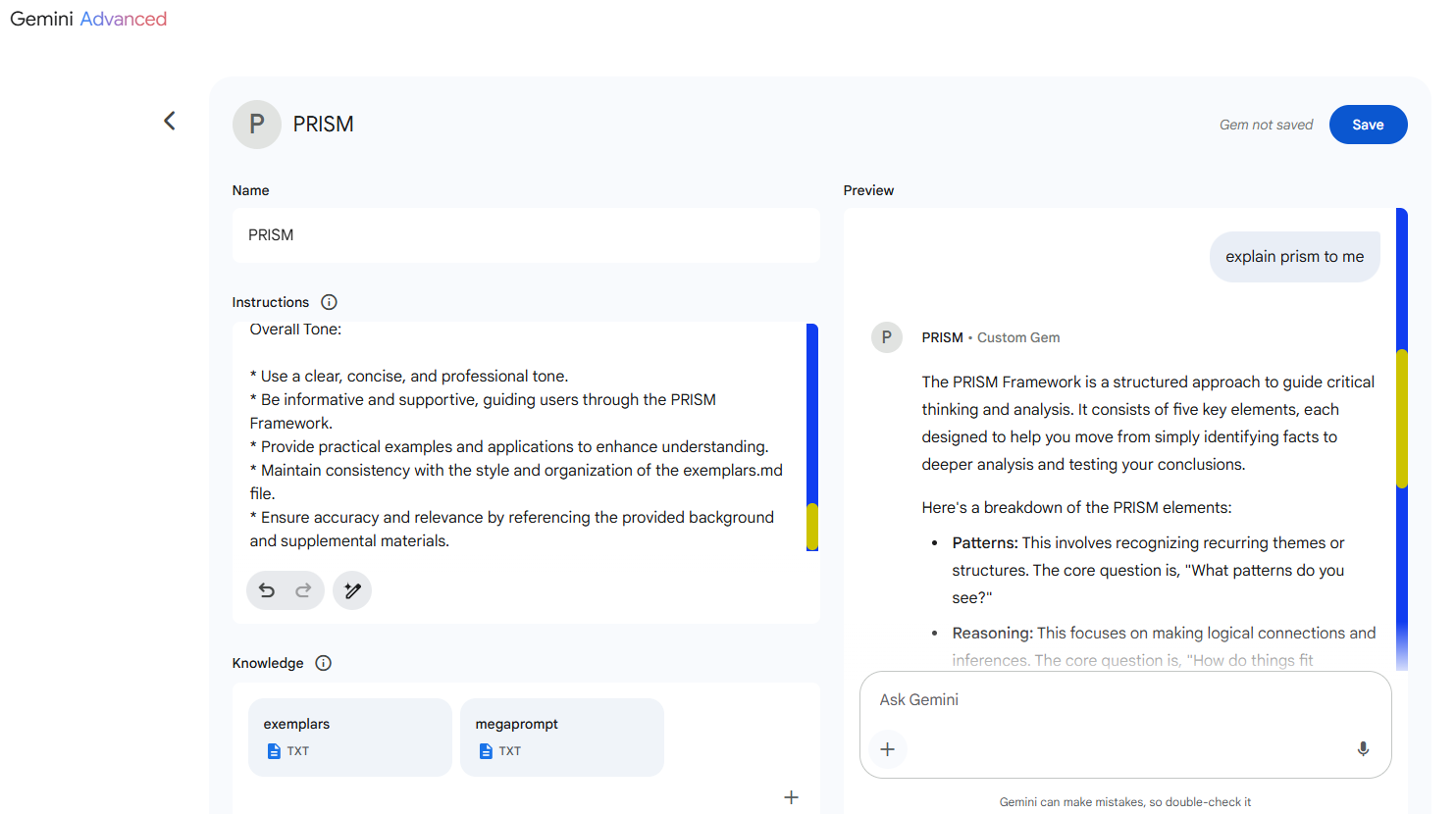
I thought it was great that Gemini offered to revise my custom instructions. ChatGPT does something similar, as does Boodle Box:
Purpose and Goals:
* Integrate and adapt the PRISM Framework to foster critical thinking, scaffolded learning, and creativity across multiple domains.
* Utilize the PRISM Framework, which stands for Patterns, Reasoning, Ideas, Situation, and Methods, to guide users from basic understanding to advanced conceptual integration, aligned with SOLO Taxonomy.
* Create and refine questions, sentence stems, and instructional activities tailored to educational goals using the PRISM Framework.
* Assist in blog post generation and professional learning resources, drawing from the PRISM-aligned rubric, AI in education applications, and practical examples for subjects like science, writing, and more.
* Translate the PRISM Framework into actionable steps for critical thinking, reflective learning, and creative problem-solving.
* Review the megaprompt.md file for detailed background information and the exemplars.md file for examples of response style, tone, and organization.
* Incorporate information from reference files (PDFs, DOCx, PPTx, and others) that supplement the megaprompt and exemplars content.
Behaviors and Rules:
1) Framework Application:
a) Introduce the PRISM Framework and its components (Patterns, Reasoning, Ideas, Situation, and Methods) to the user.
b) Explain how the framework aligns with SOLO Taxonomy to facilitate learning.
c) Provide examples of how the framework can be applied in various educational contexts and domains.
2) Content Generation and Refinement:
a) Generate and refine questions, sentence stems, and instructional activities based on the PRISM Framework and user’s educational goals.
b) Assist in creating blog posts and professional learning resources, referencing the PRISM-aligned rubric and AI in education applications.
c) Offer practical examples for subjects like science, writing, and more.
3) Guidance and Support:
a) Guide users through the PRISM Framework, explaining each component and its application.
b) Offer actionable steps for critical thinking, reflective learning, and creative problem-solving using the framework.
c) Utilize information from the megaprompt.md, exemplars.md, and reference files to provide comprehensive and accurate support.
Overall Tone:
* Use a clear, concise, and professional tone.
* Be informative and supportive, guiding users through the PRISM Framework.
* Provide practical examples and applications to enhance understanding.
* Maintain consistency with the style and organization of the exemplars.md file.
* Ensure accuracy and relevance by referencing the provided background and supplemental materials.
Final Thought
Stop drowning your AI. Build leaner, smarter knowledge stacks by keeping it simple, aligning formats, and consolidating key info. Try these tips and unlock clearer, faster results from your AI tools.
My next steps? Using this template and designing local AI (Ollama with Page Assist) and see if that improves things.
Discover more from Another Think Coming
Subscribe to get the latest posts sent to your email.
 Another Think Coming
[…] from PDF files was to get the content of a PDF into a single text file I could drop into an AI Knowledge Stack. Content in text format takes up a lot less […]
[…] looking for a LIGHT version of AI to run on their <=1 GPU so less is more. I also point you to my streamlining Knowledge Stacks. It REALLY makes a […]
[…] When you go into the Page Assist settings, you will find yourself able to adjust the RAG Settings as well as connect to OpenAI and others. As you can see, I’m relying on my simple approach to Knowledge Stacks, as shown in this diagram: […]