https://go.mgpd.org/banni
Welcome! On this page, you will find resources for the Banni: Gateway to Gen AI for Everyone webinar resources.

Table of Contents
- Presentation Slides
- Referral Codes for Free AI
- Icebreaker Activity Background
- Infographics
- About Miguel Guhlin
Presentation Slides
- Title: Rebooting Teaching and Learning with AI for Everyone
- Description: Wondering about whether AI can be of use to you? This webinar is your survival guide to the world of Artificial Intelligence in higher education. We’ll explore the free (and discuss privacy issues with free AI) as well as paid AI tools that can genuinely boost learning, research, and even administrative tasks for students, faculty, and staff. Discover AI helpers as thought partners. Join us for a practical look at how to make AI work for us. Get ready to upgrade your perspective!
Referral Code Links for Free AI
Use these to get free or discounted access for one of these solutions:
- Boodle Box AI: Use this link or to get TWO months free, use the code “MGFREE123“
- NightCafe Studio
- Perplexity AI
- Google Gemini
Icebreakers
Google Whisk Plushie

- Go to Google Whisk
- Padlet Link: Share Your Plushie and one fun fact about yourself
- Activities for using Google Whisk Plushie
- “Meet the Team” Plushie Parade: Ask participants to upload a photo of themselves to Google Whisk and generate a plushie version. Have each person share their plushie image along with a fun fact about themselves. This activity personalizes introductions and adds a playful element to the session.
- “Classroom Mascot Creation”: Encourage participants to upload images representing their classrooms or teaching styles to create unique stickers or pins using Google Whisk. Participants can then present their creations, explaining the significance behind their chosen images. This fosters sharing of teaching philosophies and classroom cultures.
- “Historical Figure Remix”: Provide participants with images of historical figures relevant to education. Using Google Whisk, have them transform these images into modern avatars or caricatures. Teachers can then discuss how these figures have influenced contemporary education practices.
- “Subject Matter Mashup”: Ask participants to upload images related to their areas of study and use Google Whisk to generate creative interpretations. For example, a science-focused teacher might upload a DNA strand image, resulting in a whimsical plushie. Sharing these creations can lead to discussions on innovative teaching approaches within different disciplines.
AI Tool Picks
General Purpose
- AI Language Learning Models (LLMs), a.k.a. Chatbots
- Use Boodle Box to get access to more than one model at a time. Some of the models you have access to include image generation, as well as the other models like:
- ChatGPT offers Canvas (interactive AI assisted editing), Custom GPTs, and Projects
- Plus ($20) account for individuals, but less data safeguards
- Safeguard data with Teams ($25) or Pro ($200 a month) account
- DeepSeek.ai, a free Chinese reasoning AI that rivals ChatGPT
- Google Gemini offers deep research and AI Studio for Gems, Image Generation, and More
- Mistral.ai Le Chat web-based AI available for free with web search
- Perplexity Pro ($20 per month or buy annual for $204)
- ChatGPT offers Canvas (interactive AI assisted editing), Custom GPTs, and Projects
- Productivity Tools
- Canva AI (Free/Premium tiers)
- Descript (~$12+/month) for video editing
- Gamma App (Varies)
- Napkin AI
- Transcribe Audio using Restream.io or Whisper Desktop
Art and Image Generation
- Lummi.ai
- Leonardo.ai
- OpenArt.ai
- Bing Image Creator
- Foto Art Generator
- NightCafe Studio
- Leap’s Free AI Image Generator
Infographics and Guides
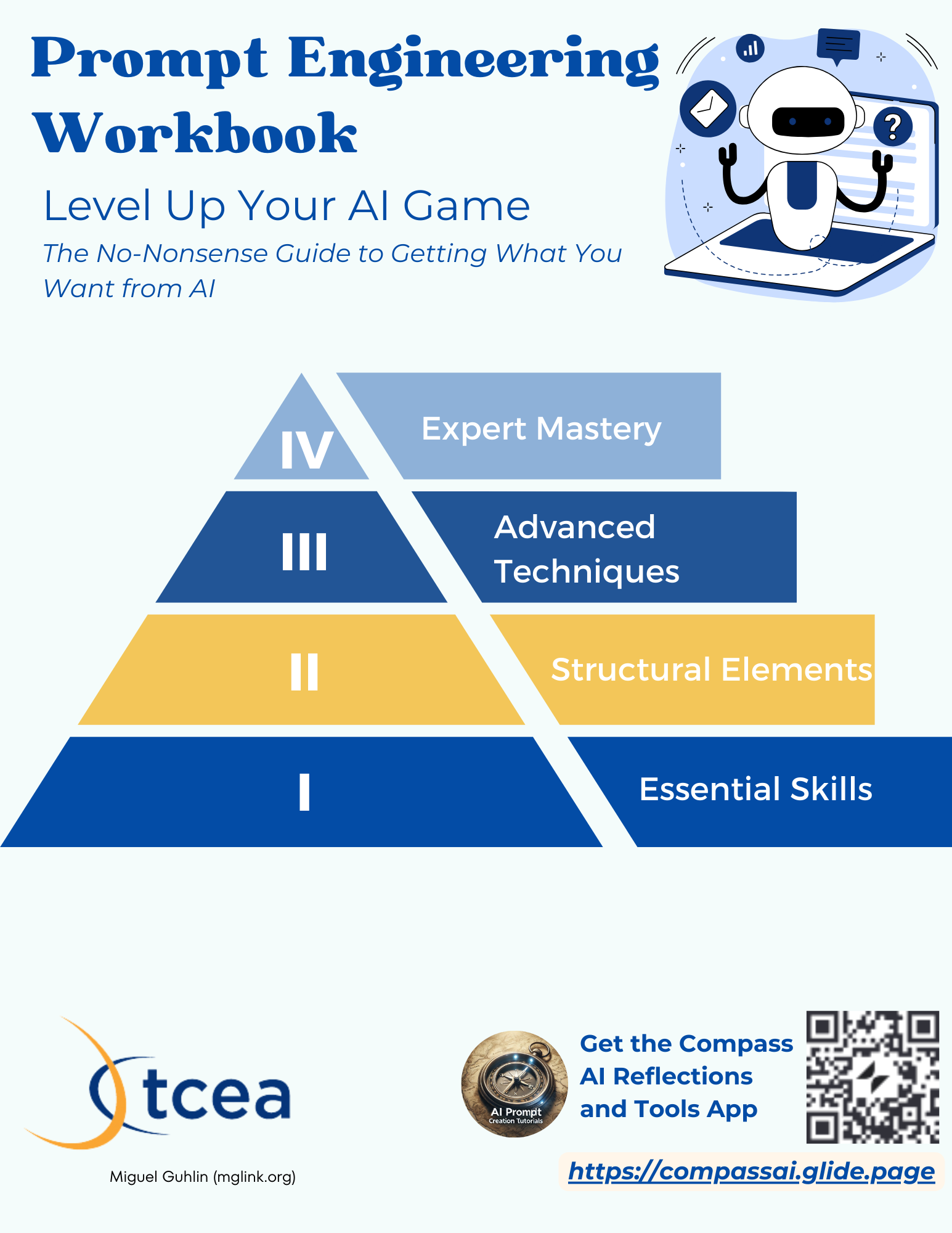
Prompt Engineering Workbook
View the Prompt Engineering Workbook
SHINE: Selecting AI for Use In Your Classroom or Lecture Hall
View this document full-size or get a Canva template copy (CC-BY-SA). Read the blog entry.

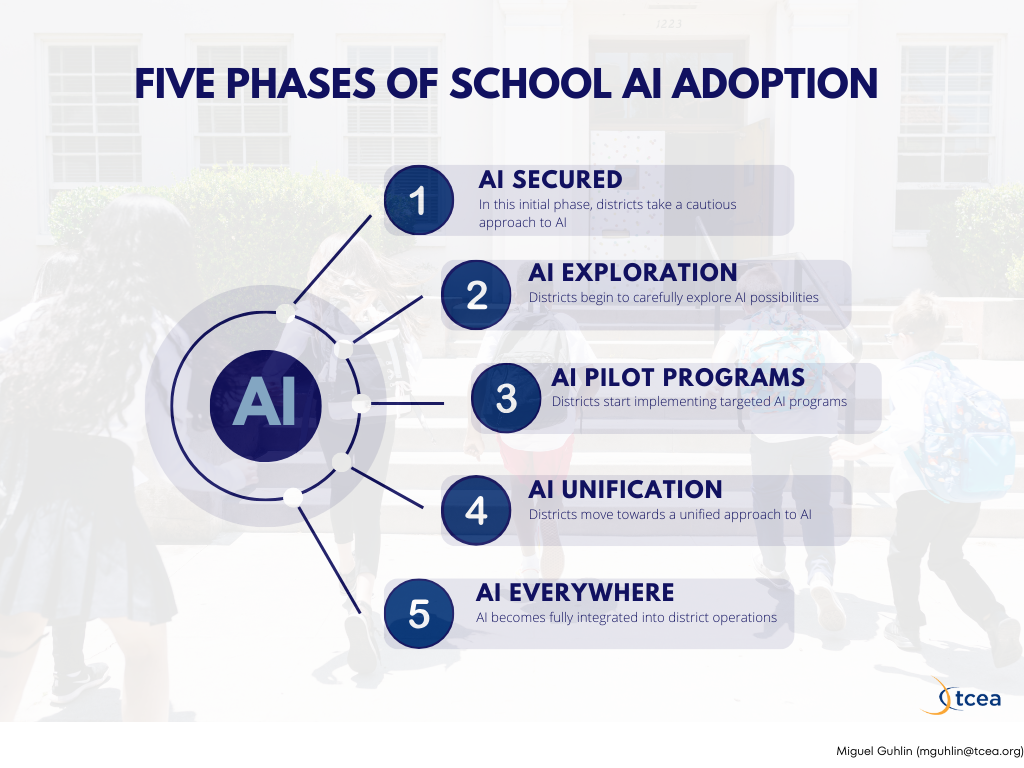
Five Phases of AI Adoption
View document full-size with self-assessment, as well as read the blog entries (part 1 and part 2) explaining it.
Knowledge Stack Creation and Organization
Structure your Claude Project, ChatGPT Project/GPT, Perplexity Space, Google Gem, or Boodle Box AI Knowledge Stack (think of it as a “digital backpack”) to ensure it works the way you want:

Prompt Samples for Learner-Driven Inquiry
These prompts below do the following:
- Ask for step-by-step guidance
- Encourage reflection and application
- Offer examples, analogies, and questions
- Scaffold based on learner’s level
- Provide practice opportunities
Give them a try in your favorite Gen AI chatbot:
🔹 Foundational Understanding
- I’m new to Generative AI. Can you guide me step by step to understand what it is, with Indian examples and analogies I can relate to?
- Break down the difference between traditional AI and GenAI using examples from Indian education, farming, or small business.
- Can you walk me through how a GenAI model works using visuals or simple metaphors? Quiz me at the end to check my understanding.
🔹 GenAI for Educators
- Help me co-create a lesson plan using GenAI for a Grade 8 CBSE science class. Can you walk me through it and ask me questions as we go?
- Show how I can use GenAI to support mixed-ability learners in my classroom. Ask me what subjects or challenges I face first.
- Can you teach me how to use GenAI tools to personalize learning for students? Give examples, ask me what I teach, and adapt from there.
🔹 GenAI for Citizens and Daily Life
- Explain how someone like a farmer, shopkeeper, or anganwadi worker in India can practically use GenAI. Can you suggest small tasks to try?
- How can a homemaker use GenAI to save time or earn income? Can you give some ideas and ask me which tools I want to try first?
- Suggest ways youth in rural India can learn skills using GenAI. Ask me what device or language they use and adjust suggestions accordingly.
🔹 Practical Skill-Building
- Teach me how to write better prompts for GenAI—give examples, ask me to try writing one, then give feedback.
- Show me how to use GenAI for everyday tasks like translation, resume writing, or simple coding. Can you break it down by use case?
- Guide me to build a simple GenAI-powered chatbot or digital assistant for my school or shop. Ask what problem I want to solve first.
🔹 Ethical & Safe Use
- What are the risks of using GenAI in Indian schools? Can you guide me through examples and ask me how I would handle them?
- Teach me about GenAI bias and privacy using Indian case studies. Ask me questions to check if I can spot ethical issues.
- How can I help students use GenAI responsibly? Can you give a few role-play situations and ask how I’d respond?
🔹 Job Readiness and Upskilling
- Walk me through key GenAI tools I should learn for jobs in India. Can you suggest based on my field (e.g., teaching, admin, design)?
- What new GenAI-based jobs are growing in India? Can you help me match one to my current skills and create a learning path?
- Show me how GenAI can help me prepare for a job—from CV writing to interview prep. Let’s do it one step at a time with practice examples.
🔹 Community and Policy Engagement
- How can GenAI help local NGOs or govt programs like Digital India? Ask me what I care about, and show how GenAI could help.
- What policies do Indian educators need to follow when using GenAI in school? Can you explain with scenarios and ask what I would do?
Learn More About AI
Sign up for these fascinating newsletters (via email) about AI innovations. It’s a firehose, so you have been warned.
- Ben’s Bites – A daily AI newsletter providing concise updates on AI developments.
- Critical Inkling – Tom Mullaney’s “AI Resistance” vibe is worth exploring.
- Evolving AI Insights – A newsletter with over 2 million subscribers providing AI insights.
- Futurepedia – A weekly newsletter joining 230,000 professionals learning to leverage AI tools for work.
- Superhuman – Zain K.’s AI-focused newsletter that grew to over 800,000 subscribers.
- The Neuron – An AI-focused daily newsletter with over 500,000 subscribers.
An Alternative Perspective:
“ChatGPT won’t improve your teaching, won’t save you time (anymore than not doing your job would save you time), and doesn’t represent a key skill set that your students must have, lest they be left behind. K-12 educators can and should resist the sales pitch.”
– Dr. Emily M. Bender, November 22, 2024.”About Miguel Guhlin
Transforming work through technology is a principle Miguel Guhlin has long championed. As a seasoned educator, he has demonstrated effective technology integration at classroom, campus, and district levels aligned to recognized industry standards.
A published writer and speaker, Miguel has contributed over one hundred print publications and thousands of online articles in print and digital publications. His work was recognized in EdTech Magazine’s 2017 Must-Read blog awards. His academic credentials include a Master’s and Bachelor’s degree. Read his work online at blog.tcea.org, MGlink.org, and review his portfolio at http://www.MGuhlin.net.
In his tenure as Technology Director, Miguel has applied his experience from multiple school districts—including one with up to fifty-six thousand students—to align technology with educational objectives. He now serves as a Director of Professional Development for TCEA.org, a non-profit education association. In his work for TCEA, he has written over 750 blog entries and authored over 15 online courses, five focused on the use of AI in education.
Discover more from Another Think Coming
Subscribe to get the latest posts sent to your email.
 Another Think Coming