Every Thanksgiving break, I take a stab at backing up one of my external USB hard drives to another. It takes forever since the drives are huge and data is traveling over a USB connection. I’ve tried different solutions.

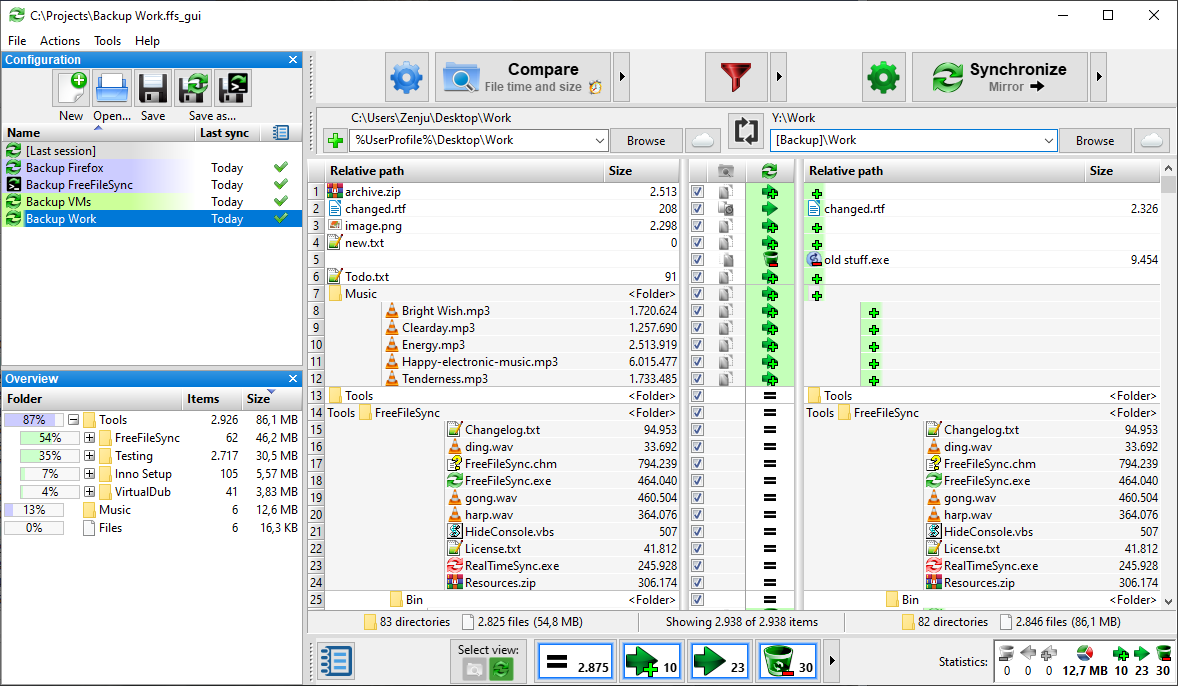
Solution #1: FreeFileSync
This is a solution I have relied on and recommended to others. It works great on both Windows and GNU/Linux.
Solution #2: TeraCopy
Another solution I’ve relied on is TeraCopy. It is easy to use and works well. That said, it’s not my go-to solution every time for USB external drive duplication.

And, finally, I recently found out about rclone. I wanted a command line option on GNU/Linux, hoping that it might get things done faster. I don’t know about faster, but ChatGPT recommended rsync first, then when I pushed it, ChatGPT coughed up rclone.
Solution #3: Rclone
This is the solution that’s working as I type this blog entry. It’s been working for over a day to clone one USB drive to another. ChatGPT points out the following:
| Feature / Factor | rclone | FreeFileSync | TeraCopy |
|---|---|---|---|
| Platform | Windows, Linux, macOS | Windows, Linux, macOS | Windows only |
| GUI or CLI | CLI (scripts/automation), optional browser GUI | Full GUI | GUI |
| Speed: Large Files | Very fast; saturates disk | Very fast | Very fast |
| Speed: Many Small Files | Fastest (parallel transfers) | Fast; faster than TeraCopy | Slowest |
| Directory Scanning Speed | Fast; tunable with --checkers | Fastest (multithreaded) | Slower |
| Incremental Sync | Best (smart sync) | Very good | Basic |
| Two-Way Sync | No (one-way, mirror, copy) | Yes (good for folder mirroring) | No |
| Integrity Checking | Strong (modtime, size, optional checksum) | Good | Minimal |
| Resume Support | Excellent | Good | Very good |
| Deletion Handling | Full sync/mirror options | Yes | Limited |
| Versioning | Yes (if used with backends) | Yes | No |
| Cloud Support | Extensive (70+ providers) | Partial | None |
| Scripting / Automation | Excellent | Weak | Weak |
| Real-time Sync | Via filesystem watchers | Built-in (RealTimeSync) | No |
| Best Use Case | Backups, automation, large datasets, mixed/complex jobs | Interactive folder sync, two-way sync, GUI workflows | Simple one-time file copies on Windows |
| Learning Curve | Medium | Low | Very low |
| Cost | Free | Free | Free |
Speed Test
| Scenario | Winner |
|---|---|
| Large files | Tie (all saturate USB/SSD speed) |
| Many small files | rclone, then FreeFileSync |
| Directory scan | FreeFileSync, then rclone |
| Repeated syncs | rclone |
| Simple drag-and-copy | TeraCopy |
It went on to suggest:
Which tool should YOU use?
- If you want fast, repeatable sync of two USB drives, the best choice is:
rclone (with parallel flags)rclone sync /src/ /dst/ --transfers=16 --checkers=16 --progress - If you want a visual “compare folders” interface and occasional sync:
FreeFileSync - If you want simple, reliable copying on Windows with pause/resume:
TeraCopy
Operating System Compatibility
I spend most of my time on GNU/Linux and Windows 11 these days, and had no idea rclone worked (or existed) on both. The commands are fairly similar:
Linux version
rclone sync /media/mg/USBDriveSource/ /media/mg/USBDriveTarget/ --transfers=16 --checkers=16 --progress
Windows version
rclone sync "SOURCE1" "SOURCE2" --transfers=4 --checkers=4 --progress

rclone copy "SOURCE1" "SOURCE2" --progress --update --transfers=4 --checkers=4
(Replace E: and F: with the actual drive letters.)
I’m looking forward to trying it out on Windows. But for now, the job is still running strong on Zorin Core Linux.
BiSync on Windows
Here is the clean starting-from-scratch bisync command using SOURCE1 and SOURCE2.
Because bisync needs an initial state, the first run must always include –resync.
First-time initialization (required once per pair):
rclone bisync "SOURCE1" "SOURCE2" --resync --progress --transfers=4 --checkers=4
This builds the bisync tracking files and establishes SOURCE1 and SOURCE2 as a synced pair.
All runs after the first initialization
rclone bisync "SOURCE1" "SOURCE2" --progress --transfers=4 --checkers=4
If something breaks and bisync asks to recover
Use –resync again:
rclone bisync "SOURCE1" "SOURCE2" --resync --progress
Reminder
- Bisync is two-way: changes and deletions flow both directions.
- If your intent is one-way without deletions, bisync is the wrong tool—use copy.
Discover more from Another Think Coming
Subscribe to get the latest posts sent to your email.
 Another Think Coming