Reading Bernie Goldbach’s blog entry, Using Copilot on My Mobile Phone, I thought I’d give his three tests a try on ChatGPT 5.2. I didn’t quite do them since I used Project Iceberg PDF for both the “break down” and “creating an audio clip.” Also, I relied on browser-version of ChatGPT.
The tests include:
- We will break down a PDF from PWC.
- And we will see if Copilot can make a pie chart from a screenshot of a survey.
- During a text-to-speech breakout, we will create an audio clip from MIT Project Iceberg
Pie Chart
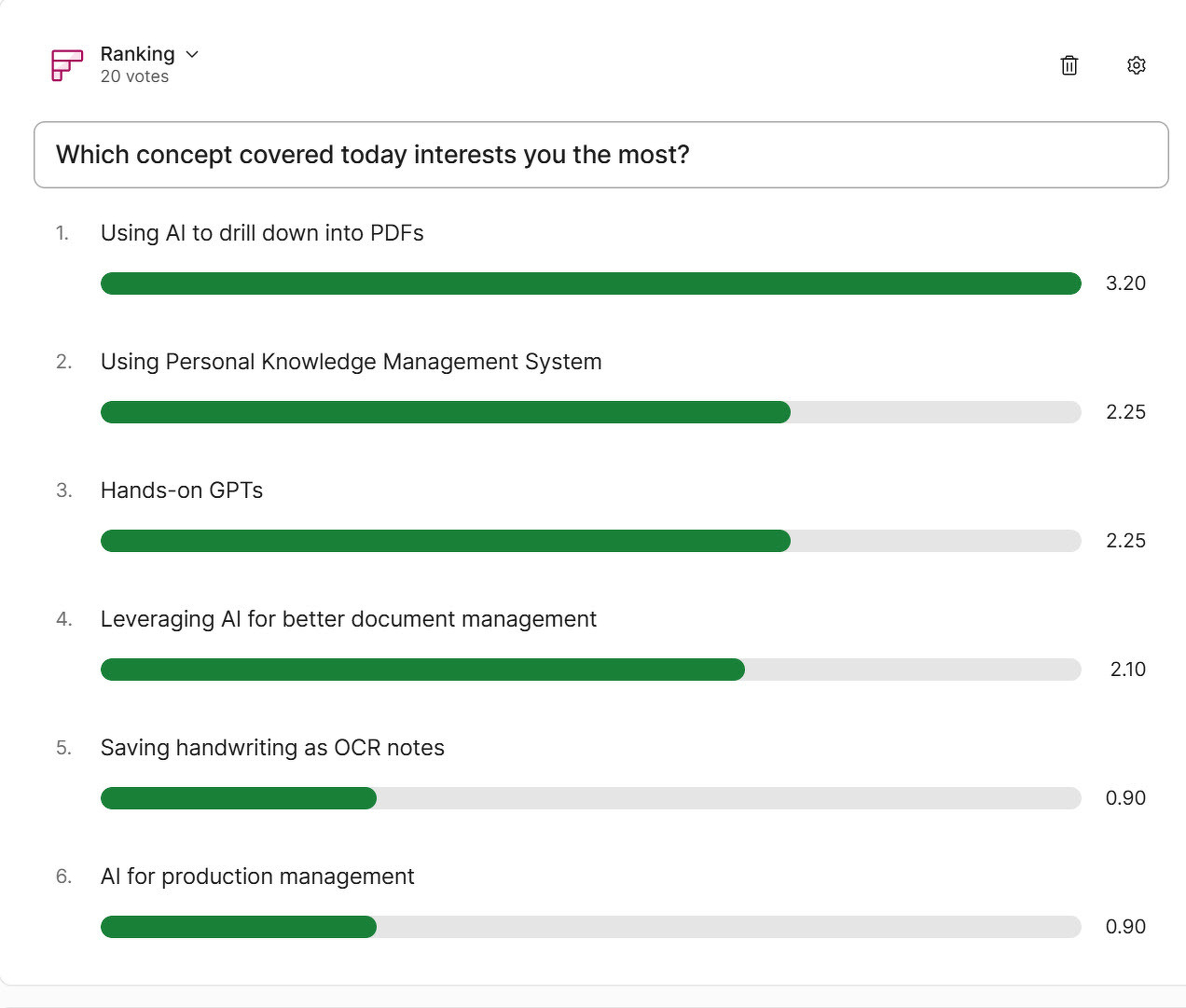
For fun, I started with the pie chart test. I started with this image:

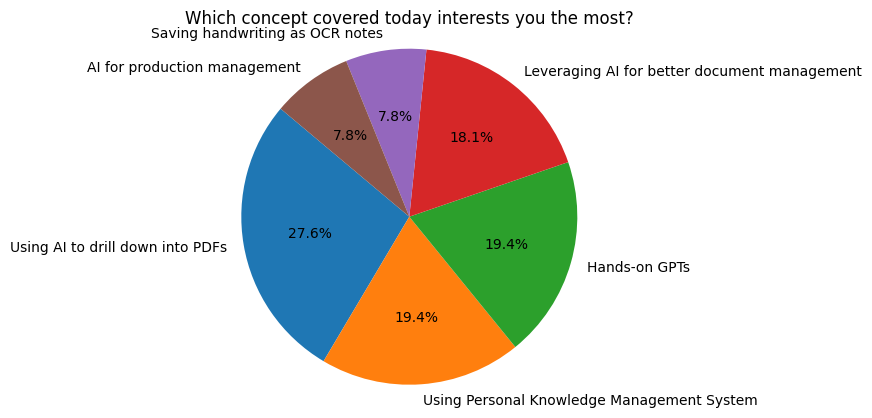
And asked ChatGPT to make a pie chart:
make a pie chart/graph from the attached image
Not a very sophisticated prompt, I know. Here’s the result, nonetheless:
Summarizing a PDF
I asked ChatGPT to give me a prompt for summarizing a PDF, because, why not? This is what it offered:
Task
Analyze the attached PDF and produce a clear, accurate summary for practical use.Instructions
- First, identify the document’s purpose, audience, and main claim (1–2 sentences).
- Provide a concise executive summary (5–7 bullet points) capturing only what the document explicitly states.
- Extract key ideas or findings, organized by section or theme.
- List important data, examples, definitions, or recommendations exactly as presented.
- Flag any unclear, ambiguous, or potentially misleading claims.
- Note what is not included but a reader might reasonably expect.
- End with a short “Use This If…” section explaining when this PDF would be most helpful.
Accuracy Rules
- Do not infer beyond the text.
- Do not invent sources, data, or conclusions.
- If information is missing or unclear, say so explicitly.
Output Format
- Headings and bullet points only
- Plain language
- No filler, no speculation
The result was quite difficult to process, so I asked it to simplify using the VIVA framework for a 15 year old:
VIVA — Explained Simply
Verify — What is the big idea?
- AI is changing many jobs, not just tech jobs.
- We usually notice AI in coding or computers, but most of its impact is hidden.
- The Iceberg Index is a way to measure how much of a job AI could help with.
- Most AI impact is below the surface, like the hidden part of an iceberg.
Illustrate — What does that look like?
- What we see: AI helping programmers write code.
- What we don’t see: AI helping with paperwork, schedules, emails, and reports in offices, hospitals, schools, and factories.
- Example: A nurse uses AI to handle forms, so they can spend more time helping patients.
- Iceberg idea: The small part above water is tech jobs. The big part under water is everyday work.
Validate — How do we know this is real?
- Researchers compared job skills and found their model matches real career changes most of the time.
- They checked where people actually use AI and saw similar patterns.
- The study is careful: it does not say people will lose jobs—only that jobs will change.
Apply — Why should this matter to you?
- Jobs in the future will still need people, but with different skills.
- Learning how to think, organize, explain, and solve problems will matter more.
- Schools and leaders can prepare people before jobs change, instead of reacting too late.
- Understanding AI early helps you be ready, not surprised.
One-sentence takeaway:
AI isn’t just changing tech jobs—it’s quietly changing how almost everyone works, and the Iceberg Index helps us see it coming.
Audio File Generation
ChatGPT actually generated an audio file…so cool.
Discover more from Another Think Coming
Subscribe to get the latest posts sent to your email.
 Another Think Coming