In This Issue:
Stop lecturing at your students and start learning with them. Transitioning to active learning can be daunting, but this issue provides the exact toolkit you need to make it seamless.
Check out these robust, low-cost alternatives to Mentimeter. Repurpose the Google Workspace tools you already own for deep classroom engagement. And, finally, don’t miss this 3-step BoodleBox workflow (prompts included) designed to transform your lecture transcripts into high-impact “Exit Tickets” in seconds. Whether you’re leading a small seminar or a massive lecture hall, these strategies ensure every student has a voice and every “muddy point” is cleared before the bell rings.
📗 Beyond Mentimeter: Top Interactive Polling Tools
🔥 The Big Idea:
Finding a sustainable, low-cost solution for real-time student polling is essential for educators who want to move beyond the limitations of free-tier restrictions. By selecting tools based on class size and integration needs—such as Wooclap for large groups or Vevox for PowerPoint users—instructors can maintain high engagement without breaking the budget.
✅ Putting It into Practice:
- For Large Lectures: Use Wooclap or Slido to handle 50+ participants on a free tier without technical hiccups.
- For Familiar UI: Try AhaSlides if you want the most “Mentimeter-like” experience with more generous slide limits.
- For Quick Brainstorming: Deploy AnswerGarden for instant, no-registration word clouds to gauge initial student thoughts on a topic.
📗 Leveraging Google Workspace for Active Learning
🔥 The Big Idea:
You don’t always need a specialized polling app; the Google Workspace tools your students already use are built for high-level collaboration and retrieval practice. By using Docs, Sheets, and Slides strategically, you can create a “living” classroom environment where students co-create knowledge in real-time without hitting “premium” paywalls.
✅ Putting It into Practice:
- Collaborative Note-Taking: Share a Google Doc with an incomplete outline and have the class “crowdsource” the missing examples and definitions during the lecture.
- The Jigsaw Method: Assign groups to specific slides in a single Google Slides deck to build a comprehensive class study guide in under 30 minutes.
- Real-Time Data: Use Google Sheets for live data entry in science or social science classes to watch trends emerge instantly on a shared chart.
📗 Feedback Loops: Exit Tickets and Self-Assessment
🔥 The Big Idea:
Instructional success is often found in what happens at the end of a lesson; using simple tools for qualitative feedback helps bridge the gap between teaching and understanding. Implementing “Exit Tickets” and self-assessment heat maps allows instructors to pivot their teaching strategy for the next session based on actual student confidence levels.
✅ Putting It into Practice:
- The Muddiest Point: Use Google Forms to ask students what the most confusing part of the lecture was, then address those responses at the start of the next class.
- Stoplight Tracking: Create a “Heat Map” in Google Sheets using conditional formatting where students mark their confidence in learning objectives as Red, Yellow, or Green.
- Qualitative Check-ins: Use Ziplet to gather well-being data and qualitative feedback that goes deeper than a simple multiple-choice poll.
⚠️ Tech Alert: Privacy & “Free” Limits
While many tools offer free tiers, always check your institution’s data privacy agreement before requiring students to create accounts. Additionally, be aware of “participant caps”—nothing kills classroom momentum faster than the 26th student being locked out of a 25-person Poll Everywhere session.
🎧 Must Read / Listen To:
- Podcast: Retrieval Practice | Study Smart — A short, visual guide on how drawing information out of long-term memory strengthens learning pathways.
- Blog: Retrieval Practice Resources — A deep dive into instructional strategies from the TCEA blog.
- Guide: Retrieval Practice Library — Downloadable guides and research summaries to transform your classroom.
🤖 Notable Gen AI Tools:
- Curipod: Generates entire interactive slide decks with polls and drawings based on a single prompt.
- QuestionWell: Exports AI-generated multiple-choice questions directly into Quizizz, Kahoot, or Google Forms.
- BoodleBox: Excellent for taking a transcript of your lecture and instantly generating 5 “Exit Ticket” questions.
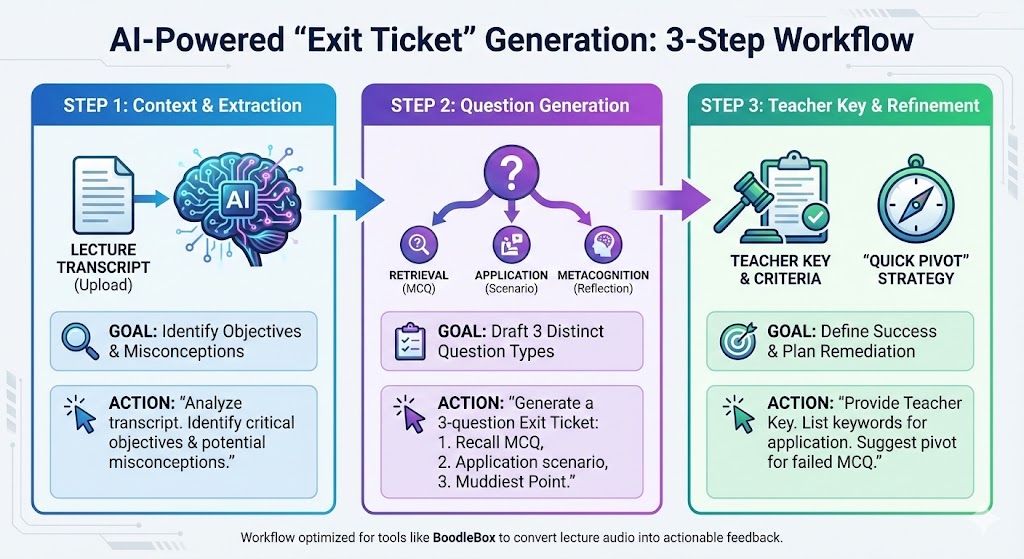
Three Step Prompt Sequence
Generate high-quality “Exit Tickets” from your college lecture transcripts.
Step 1: Context & Objective Extraction
The first step ensures the AI understands exactly what was taught rather than relying on general knowledge. This grounds the output in your specific lecture content.
| Component | Description |
| Goal | Identify the core “Big Ideas” and potential student misconceptions within your specific lecture. |
| Action | Upload your lecture transcript to the BoodleBox chat first. |
| Prompt | “I have attached the transcript from today’s lecture on [Insert Topic]. Analyze this text and identify the three most critical learning objectives I actually covered, along with two potential misconceptions students might walk away with.” |
Step 2: The Exit Ticket Generation
Once the AI has mapped out the content, use this prompt to create a balanced assessment that checks for recall, application, and metacognitive gaps.
| Component | Description |
| Goal | Draft three distinct questions that measure different levels of student understanding. |
| Action | Paste this prompt into the same chat thread immediately after Step 1. |
| Prompt | “Using those learning objectives, generate a 3-question Exit Ticket for a 5-minute window: 1. Retrieval (MCQ): One question testing basic recall of a core term. 2. Application (Short Answer): One scenario-based question requiring the application of a concept. 3. Metacognition (Reflection): One ‘Muddiest Point’ prompt: ‘What is one part of today’s lecture that still feels blurry or confusing to you?'” |
Step 3: Instructor Key & Remediation
The final step provides you with the “grading” criteria and a plan for the next class session based on student performance.
| Component | Description |
| Goal | Establish success criteria and a “Plan B” strategy for the next lesson. |
| Action | Use this final prompt to wrap up the chat and prepare your teaching notes. |
| Prompt | “Provide a brief Teacher Key for these questions. For the application question, list 2-3 keywords/concepts I should look for in a successful response. Also, suggest one ‘Quick Pivot’ strategy I can use at the start of the next class if most students fail the MCQ.” |
Another Think Coming by MGuhlin.org
Discover more from Another Think Coming
Subscribe to get the latest posts sent to your email.
 Another Think Coming