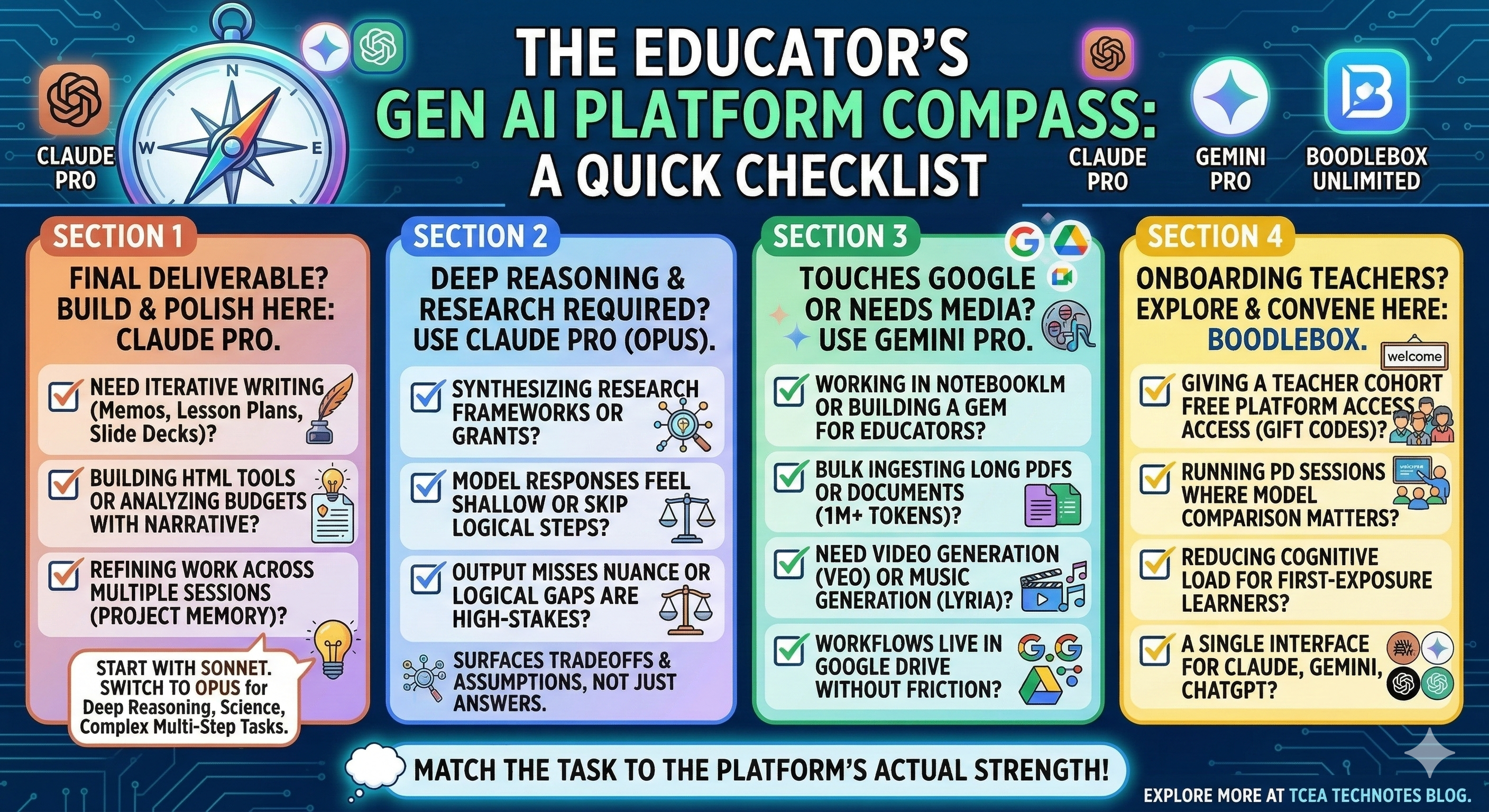
Since I use these three Gen AI tools daily, I keep wondering, “When is the best time to use them?” To try to get at the best answer, I wrote down all the ways I rely on these different chatbots then asked Claude 4.6 Sonnet/Opus, Gemini Pro 3 Fast/Thinking, and BoodleBox to revise the part that described their features. It yielded some insights for me:
- Insight #1: BoodleBox appears to lack a clear awareness of other models latest versions. It only knows what it has access to. That’s not a big criticism, but an observation that suggests that BoodleBox simply doesn’t know that there is a Claude 4.6 (Bbox only shows 4.5 in its line-up), while Gemini is 2.5 Pro, not Gemini 3 Pro available.
- Insight #2: Gemini tore down some of the text that Claude wrote about version 4.6 while suggesting its objectivity.
- Insight #3: Claude 4.6 Sonnet reflected some of the nuances of each, picking up on the changes each Gen AI tool had made, then highlighting which ones might be inaccurate.
No biggies in that list of three. I did find Claude’s note about Gemini and Google Forms worth spending a few more tokens on.
Wait, What?
So, I found this to be really interesting. Claude 4.6 Sonnet picked up on an update for Gemini that allows you to create a Google Form from Drive files. Claude said:
One substantive question worth checking:
The revised version states you can build a Google Form directly from Drive files as a native Gemini feature “as of early 2026.” I’d verify that before publishing. That’s a specific enough claim that it could embarrass you if it’s inaccurate or a BoodleBox-specific feature rather than a native Gemini capability.
Isn’t that cool? I double-checked it with Gemini, and it explained:
Building a Google Form from your existing files is one of the most significant “quality of life” updates for the 2026 Gemini 3 Pro rollout. You no longer have to manually copy-paste questions from a curriculum document or a PDF into a form.
I haven’t tried it yet but it’s on my to-do list.
Note: Everything below was generated by Claude, Gemini, and BoodleBox with fine-tuning by Claude 4.6 at the end at my prompting.
Update: See slide deck based on this blog post content.
A Practical Plan for Managing Your Gen AI Platforms
Sunday evening. Three tabs open. Claude on one, Gemini on another, BoodleBox somewhere in the mix. You have a slide deck to finish, a PD session to prep, and a district cohort waiting on access codes. You reach for the tool you always reach for, finish faster than expected, then wonder if you used the right one.
Sound familiar? Most educators who work across multiple Gen AI platforms don’t have a system. They have habits. Those are different things.
Here’s a platform management plan built around one principle:
Match the task to the platform’s actual strength, not just what’s open in your browser.
Claude Pro: Where You Build the Deliverable
If you’re going to publish it, share it, or hand it to someone else, build it here.
Claude handles long, iterative work better than most platforms. The project memory and extended context window mean you can come back to a document, pick up where you left off, and get consistent results. That matters when you’re refining a strategic memo across multiple sessions or building a custom instruction set from scratch.
I use Claude for anything that requires sustained editing: slide decks with the .pptx skill, single-page HTML tools, budget analysis with narrative attached, Visible Learning resource synthesis. The computer use capability makes file creation reliable in a way other platforms haven’t matched for me.
Sonnet 4.6 or Opus 4.6?
This is worth naming directly, because Claude Pro gives you access to both and the choice actually matters.
Sonnet 4.6 is the default model for Claude Free and Pro users, and for most educator content work, it’s the right call. On GDPval-AA, the benchmark that measures real-world office and knowledge work tasks, Sonnet 4.6 scores 1633 Elo while Opus 4.6 scores 1606.
For blog posts, slide decks, lesson plans, and structured documents, Sonnet 4.6 is faster, costs less against your usage limits, and delivers output that’s genuinely hard to distinguish from Opus on those tasks.
Where Opus 4.6 earns its keep: deep synthesis across research frameworks, grant narrative writing, and complex multi-step agentic work. If you’re not doing those things, Sonnet 4.6 is the smarter default.
| Task | Model |
| Blog posts, slide decks, memos | Sonnet 4.6 |
| Iterative editing across sessions | Sonnet 4.6 |
| Custom instruction design | Sonnet 4.6 |
| Deep research synthesis | Opus 4.6 |
| Complex multi-step reasoning | Opus 4.6 |
| Financial or grant analysis with narrative | Either; start with Sonnet |
Rule: Start with Sonnet 4.6. Switch to Opus 4.6 when you notice any of these:
- Sonnet’s response feels shallow or skips steps in a chain of reasoning
- The task involves synthesizing multiple long documents or research frameworks
- You’re writing something high-stakes where logical gaps could cause real problems, such as a grant narrative, a board presentation, or a policy summary
- The output keeps missing nuance you’ve already explained, and re-prompting isn’t fixing it
- You need the model to surface tradeoffs and assumptions, not just produce an answer
If none of those apply, stay with Sonnet.
Gemini Pro: When It Touches Google or Needs Media
Gemini’s practical advantage is its native Google ecosystem integration and a one-million-token context window that makes bulk document ingestion fast. If you’re working in NotebookLM, building a Gem to share with educators, or experimenting with video or music generation, Gemini is the right tool.
Gemini 3 Pro now includes a Deep Research mode that autonomously browses, synthesizes, and cites sources. For an instructional coach who needs a literature review on high-effect size strategies for ESL learners, that’s a meaningful capability. It also includes a Thinking mode toggle that pauses before responding on complex reasoning tasks.
There’s no Claude equivalent for Veo video generation or Lyria music generation. And if a workflow lives in Google Drive, Gemini connects to it without friction.
| Task | Why Gemini |
| NotebookLM source synthesis | Native integration, citation-grounded |
| Deep Research and literature reviews | Autonomous browsing with verified citations |
| Long PDF or document ingestion | One-million-token context window |
| Google Drive-connected workflows | Native, no extra steps |
| Video generation (Veo) | No Claude equivalent |
| Music generation (Lyria) | No Claude equivalent |
| Gem sharing with educators | Google ecosystem distribution |
Rule: If it touches Google or requires media you can’t make elsewhere, use Gemini.
BoodleBox Unlimited: A Multi-Model Hub with an Educator Access Advantage
BoodleBox is more than a starter platform. It’s a multi-model environment that gives you access to Gemini Pro, Claude 4.5, multiple ChatGPT versions, image generation, and more under one roof, without managing separate subscriptions or accounts.
That said, its unique value for educators isn’t just the model breadth. It’s the gift code model. Districts and educator cohorts can get two to six months of full platform access at zero cost to participants. For someone trying to get teachers into Gen AI without IT procurement battles or budget conversations, that’s significant.
The platform also has structural features that go beyond basic access. Bot Stacking lets you prompt Claude 4.5 to write a lesson plan, then tag Gemini Pro in the same thread to analyze a PDF rubric against that plan. The bots share context. Shared Folders let teachers create spaces where students submit their AI chats, shifting the focus from policing final outputs to assessing prompt engineering and critical thinking. GroupChats allow multiple colleagues and multiple bots in the same planning session.
The all-in-one interface also reduces cognitive load for first-exposure learners. They come in through one door, explore multiple models in one place, and build confidence before committing to individual subscriptions.
| Task | Why BoodleBox |
| Educator cohort access | Gift codes eliminate cost barriers for districts |
| First-exposure Gen AI learning | One interface, multiple models, less overwhelming |
| Model comparison for PD sessions | Gemini Pro, Claude 4.5, ChatGPT all in one place |
| Collaborative planning | GroupChats with colleagues and bots together |
| Student AI transparency | Shared Folders for submitted AI chats |
| Image generation demos | Available within the same platform |
Rule: BoodleBox is your educator access vehicle and a capable multi-model workspace. It’s not a compromise platform. It’s a different kind of convenience.
The Decision Shortcut
When you’re not sure which tab to open:
- Is this a final deliverable you’re building and publishing? Use Claude Pro (Sonnet 4.6 by default)
- Does it require deep reasoning, research synthesis, or complex multi-step work? Use Claude Pro with Opus 4.6
- Does it touch Google, require media, or live in NotebookLM? Use Gemini Pro
- Are you giving a teacher or cohort free platform access, or running a PD session where model comparison matters? Use BoodleBox
One Gap Worth Naming
Claude Pro has no educator cohort distribution mechanism. No gift codes, no bulk access model for districts. BoodleBox fills that role structurally right now. If Anthropic ever builds something comparable, the platform map shifts. Until then, this division of labor holds.
Which platform do you default to out of habit? Drop a note in the comments.
Explore more on Gen AI tools for educators at the TCEA TechNotes blog.
Discover more from Another Think Coming
Subscribe to get the latest posts sent to your email.
 Another Think Coming