Update to: DIY #AI: Running Powerful Models Locally to Save Money and Protect Privacy. This is an AI-powered update to my original post. Do you agree with the recommendations?
A lot has changed since my July 2025 TCEA AI for Educators Conference session on running local AI. The models are better, the hardware options are clearer, and the case for running AI locally has only gotten stronger. Here’s what’s new and what I’d recommend now.
What’s Changed Since July 2025
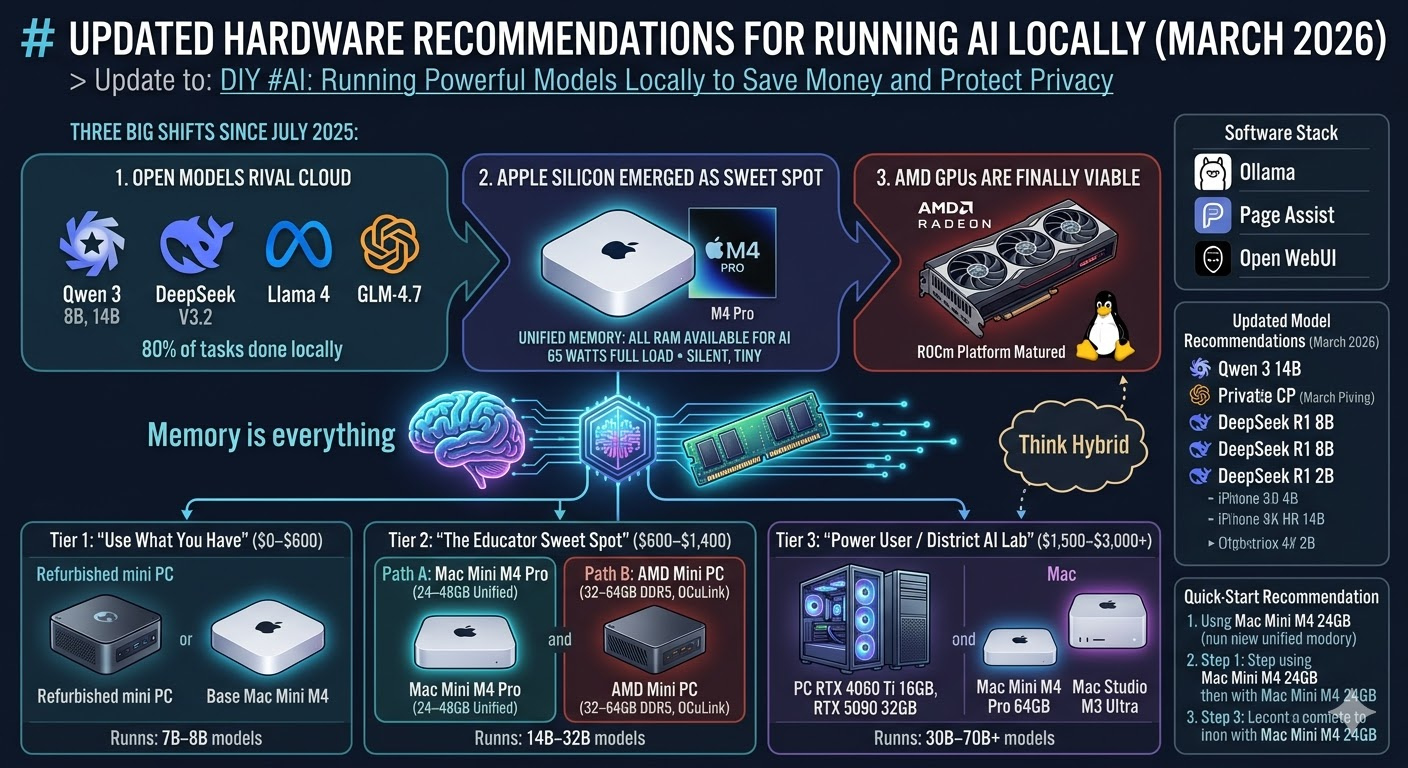
Three big shifts:
- Open models now rival cloud services. Qwen 3 (8B and 14B), DeepSeek V3.2, Llama 4, and GLM-4.7 have pushed local model quality to the point where, for most educator tasks — lesson planning, summarization, writing feedback, document drafting — you won’t miss ChatGPT or Claude for 80% of your daily work.
- Apple Silicon emerged as the local AI sweet spot. The Mac Mini M4 and M4 Pro, with unified memory architecture, turned out to be one of the best options for running local models. All your RAM is available for model loading (unlike PCs where you’re limited by separate GPU memory), the machines are silent, tiny, and sip power — about 65 watts under full AI load for the entire system.
- AMD GPUs are finally viable. If you’re on a PC, you’re no longer locked into NVIDIA. AMD’s ROCm platform has matured enough that running LLMs on modern AMD cards is completely viable, especially on Linux.
The bottom line: local AI is no longer a compromise. For many workflows, it’s the better default since it is private, fast, offline-ready, and fully under your control.
The One Rule That Matters
Memory is everything. The bottleneck for running AI locally is almost always memory (VRAM on a GPU, or unified memory on a Mac), not processor speed. When you’re shopping for hardware, prioritize memory over CPU speed every time.
A quick trick: Q4_K_M quantization reduces model size by nearly 50% with less than a 1% drop in perceived quality. This is how you squeeze big models onto affordable hardware. Ollama handles this automatically.
Hardware Tiers for Educators
Tier 1: “Use What You Have” ($0–$600)
Start here. If you have a gaming PC or Apple Silicon Mac from the past 2–3 years, you very likely already have a local AI capable machine sitting in front of you.
Minimum specs to get started:
- 16GB RAM (32GB strongly recommended)
- Any modern CPU (Intel 10th gen+, AMD Ryzen 3000+, or Apple M1+)
- SSD with at least 20GB free space (models are big files)
Budget option: A refurbished mini PC (Beelink, Lenovo ThinkCentre Tiny) with 16–32GB RAM runs 7B–8B models on CPU alone at 6–9 tokens per second. That’s slow by enthusiast standards, but perfectly functional for single-user chat, summarization, and light tasks.
Best budget buy: The base Mac Mini M4 (16GB) at $599 handles 7B–8B quantized models well, typically 28–35 tokens per second with Ollama. Silent. Tiny. Done.
What you can run at this tier:
The models and what they are good for:
- Qwen 3 8B – General purpose — rivals much larger models in reasoning
- Llama 4 8B – General purpose, strong multilingual
- DeepSeek R1 – 8B (distilled) Math, logic, reasoning tasks
- Gemma 3 – 1B Ultra-lightweight, fast on minimal hardware
Tier 2: “The Educator Sweet Spot” ($600–$1,400)
This is where most educators should aim. Two strong paths:
Path A — Mac Mini M4 Pro (24–48GB unified memory)
The standout option for 2026. A Mac Mini M4 Pro with 48 or 64GB of unified memory can run 30B-class models at 12–18 tokens per second — that’s real-time chat speed. Even the 24GB version handles 7B–14B models comfortably. The unified memory means every gigabyte of RAM is available for AI, unlike a PC where system RAM and GPU memory are separate pools.
The power efficiency is remarkable. A Mac Mini peaks at about 65 watts under heavy AI inference. Five Mac Minis running at full tilt draw roughly 200 watts combined — less than a single high-end desktop GPU under gaming load. At roughly $15 a year in electricity, you can run models around the clock.
Path B — AMD Mini PC with 32–64GB DDR5
Options like the Minisforum UM890 Pro or GEEKOM A9 Max with 32–64GB DDR5 RAM run Llama 3 8B at roughly 20–25 tokens per second using the integrated GPU. Cheaper than the Mac route if you already have a monitor, keyboard, and mouse. Runs Linux beautifully. Look for an OCuLink port — it opens a future upgrade path to an external GPU without buying an entirely new machine.
What you can run at this tier:
| Model | Size | What It’s Good For | Memory Needed |
|---|---|---|---|
| Qwen 3 14B | 14B | Near GPT-4 quality for most tasks | 16GB+ |
| DeepSeek R1 14B | 14B | Strong reasoning and analysis | 16GB+ |
| Qwen 2.5 Coder 32B | 32B | Coding assistance (fits in 24GB with Q4) | 24GB+ |
| Llama 4 Scout | 17B active | Multimodal (text + images) | 24GB+ |
Tier 3: “Power User / District AI Lab” ($1,500–$3,000+)
For running 30B–70B models at usable speed, serving a small team, or building a district-level AI resource:
PC build path:
- GPU: RTX 4060 Ti 16GB VRAM (do NOT buy the 8GB version — it fills up immediately), or step up to RTX 4090 (24GB) or RTX 5090 (32GB)
- CPU: AMD Ryzen 5 or better
- RAM: 64GB system RAM
- Storage: 2TB NVMe SSD
The RTX 5090 (32GB GDDR7) is the new high-end option at roughly $2,000 for the GPU alone, but it can run models up to 405B parameters with quantization.
To try any of these with Ollama:
ollama run qwen3:8b ollama run deepseek-r1:8b ollama run llama4:8b ollama run qwen2.5-coder:7b
Mac path:
- Mac Mini M4 Pro with 64GB unified memory (~$1,999)
- Mac Studio M3 Ultra with 96GB unified memory (~$3,999) — can hold multiple models (reasoning, embedding, coding) in memory simultaneously
Software Stack (Unchanged but Worth Repeating)
The software side remains simple:
- Ollama — One-command model management. Pull and run models with
ollama run qwen3:8b. - Page Assist — Browser extension that gives you a ChatGPT-style interface for your local models.
- Open WebUI — Full-featured web interface with RAG (upload documents and chat with them), multi-model support, and user management for shared setups.
For a walkthrough of setting up Ollama and Page Assist, see my earlier post: Creating an AI Bot Using Ollama and PageAssist.
Updated Model Recommendations (March 2026)
The open model landscape has shifted dramatically. Here are the standouts:
| Model | Parameters | Best For | Min. Memory | Notes |
|---|---|---|---|---|
| Qwen 3 8B | 8B | General purpose | 8–12GB | Punches far above its weight; rivals the original Llama 3 70B in reasoning |
| Qwen 3 14B | 14B | Quality-critical tasks | 16GB | Near GPT-4 quality for 90% of tasks |
| DeepSeek R1 8B | 8B | Math, logic, reasoning | 8–12GB | Uses chain-of-thought to solve problems that previously required 30B+ models |
| Llama 4 8B | 8B | General purpose | 8–12GB | Meta’s latest, strong multilingual support |
| Qwen 2.5 Coder 7B | 7B | Code generation | 8–12GB | Gold standard for local coding assistance |
| Gemma 3 1B | 1B | Ultra-fast, minimal hardware | 4–6GB | Runs on almost anything |
To try any of these with Ollama:
ollama run qwen3:8bollama run deepseek-r1:8bollama run llama4:8bollama run qwen2.5-coder:7b
Think Hybrid
Local AI won’t entirely replace cloud services like ChatGPT, Claude, or Gemini for the heaviest reasoning tasks. Think of it this way: your local setup handles 80% of your daily work with total privacy, no API logs, no surprise bills, and it works without internet. For heavy lifting — long research synthesis, complex multi-step reasoning, image generation — you use the cloud.
The smartest setup is both.
Update via Doug Holton
Some info from Doug worth exploring:
For the 128gb level, check out Strix Halo devices (AMD Ryzen AI Max+ 395), although the prices just shot up ($2k-$2500) strixhalo.wiki
Above that are Nvidia GB10 and Mac Studio M5 (>$4000)
Quick-Start Recommendation
If you’re an educator who wants to get started today with the least friction:
- Buy a Mac Mini M4 with 24GB ($799 configured through Apple.com) or use your existing machine
- Install Ollama — one download, one install, done
- Run your first model:
ollama run qwen3:8b - Install Page Assist in Chrome/Firefox for a friendly chat interface
- Try it for a week — lesson planning, email drafting, summarizing articles, generating quiz questions
You’ll know within a few days whether local AI fits your workflow. And everything you type stays on your machine.
This post updates my July 2025 TCEA AI for Educators Conference presentation, DIY #AI: Running Powerful Models Locally to Save Money and Protect Privacy. The original session covered installing Ollama, Page Assist, and selecting models based on hardware constraints. The hardware and model recommendations above reflect the state of local AI as of March 2026.
Related Posts:
- Creating an AI Bot Using Ollama and PageAssist
- DIY #AI: Running Powerful Models Locally to Save Money and Protect Privacy
Discover more from Another Think Coming
Subscribe to get the latest posts sent to your email.
 Another Think Coming
[…] Another suggested ‘apps’ is AI which allows you to connect to an AI if you have a key. I do not pay for any AI so do not have a key. By chance I installed Ollama yesterday, a local AI, I am not sure what I am doing just following Miguel Guhlin’s notes. […]