Update: The Project migration from one Claude account to a new one went well and everything is working fine on the new account. I share this because my previous post is so complaining, it makes it sound terrible. That’s not to say the criticisms about 2FA/MFA in lieu of email verification are invalid, and all that other stuff, but I regret sounding so grumpy. Of course, it took about an hour to move everything. I better stop or I’ll work myself up again. It’s just the simple question of, “What’s the exit policy for clients?” Claude and many others don’t have one. That’s something to grow on, especially for enterprise clients.
Ugh, what a pain. Why doesn’t Claude have an account migration tool? I ended up having to migrate projects, including custom instructions and support files, from one account (based on email login) to a new one (based on SSO with Google). The reason for the move? Nothing special, only that I got tired of trying to login securely to Claude via an email link. Why don’t they have two factor authentication? I keep track of my codes using Ente Auth, and it would have been so easy to add Claude via QR code to generate codes.
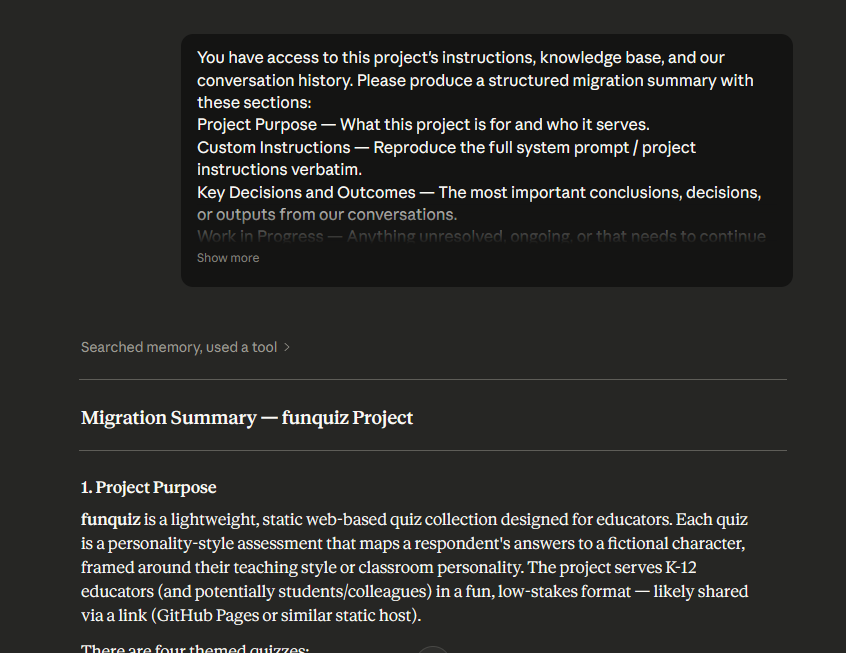
This is the prompt I used, along with copying my custom instructions and any files I didn’t already have backed up:
You have access to this project’s instructions, knowledge base, and our conversation history. Please produce a structured migration summary with these sections:
Project Purpose — What this project is for and who it serves.
Custom Instructions — Reproduce the full system prompt / project instructions verbatim.
Key Decisions and Outcomes — The most important conclusions, decisions, or outputs from our conversations.
Work in Progress — Anything unresolved, ongoing, or that needs to continue in the new account.
Knowledge Base Contents — List every uploaded file or document by name and describe what each contributes.
Recurring Context — Preferences, constraints, terminology, or patterns I use consistently in this project.
Recommended Starting Prompt — Write a single prompt I can paste into the new project’s first conversation to restore useful context immediately.Be thorough. Do not summarize when full detail matters. Flag anything you cannot recall or access.
This resulted in a summary file I was able to quickly add as a text file to a Claude Project. Here’s a brief screenshot so you can see what happens….
Discover more from Another Think Coming
Subscribe to get the latest posts sent to your email.
 Another Think Coming
How do you then add it to a new project on your new Claude account?
Sorry, just saw this. You simply drop the summary the initial prompt gives you into the Files section of the Claude Project. Then, copy-n-paste the instructions from the old Project to the New Project Instructions area. On your first chat, Claude will read everything and be ready to go!