As I build out more digital resources, my GitHub has gotten cluttered with “single-purpose” repositories. This is due to ignorance and a desire to align how GitHub works to websites of yesteryear. As a result, I created a lot of repositories I didn’t need. This necessitated I recently consolidating several smaller projects into a single, organized repository using a subfolder structure (e.g., creations/cudl/).
Here are some key takeaways from the process:
1. Branches vs. Folders: Knowing the Difference
A point of confusion for me was whether I needed a new repository for every folder. The answer is no.
- Folders are for organization, acting like drawers in a filing cabinet. They define your URL structure (e.g.,
yoursite.com/folder/page). - Branches are for versioning, acting like parallel universes. Use branches to experiment with new code or content (like a
claude-experimentbranch) before merging those changes into your “live”mainsite.
With that in mind, I ended up moving content from repositories into folders in one repository. I also had branches of content that I didn’t really need. But since I had put content in a branch, I had to move it.
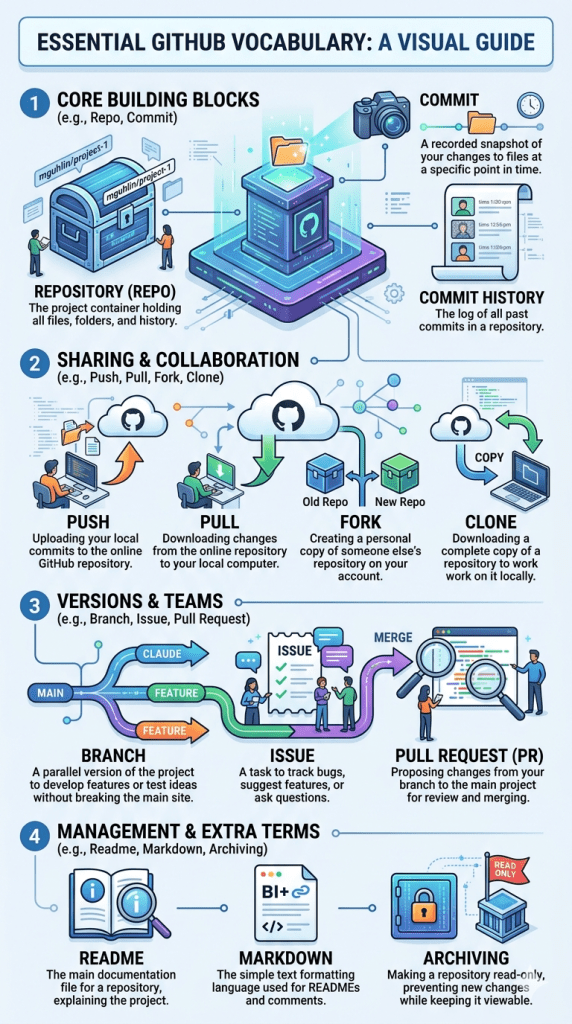
2. The “Moving Day” Strategy
To move files between branches in the browser, the most reliable method is a Pull Request. Set your destination branch as the “base” and your source as the “compare.” Once merged, you can safely delete the originals from the source branch; Git maintains the history independently.
This involved a step or two that I only executed once. But after I made new folders in a single repository, I still had lots of links pointing to old repositories. I didn’t want to have to update all of those links scattered and published in different places.
3. Don’t Break Your Links (The Redirect)
When you move a project to a new repository, don’t just delete the old one. Instead, create an index.html file in the old repository with a Meta Refresh tag to automatically “point” visitors to the new subfolder location:
“`html
<!DOCTYPE html>
<html>
<head>
<meta http-equiv=”refresh” content=”0; url=[https://mguhlin.github.io/creations/cudl/](https://mguhlin.github.io/creations/cudl/)”>
</head>
<body>
<p>This page has moved. <a href=”[https://mguhlin.github.io/creations/cudl/](https://mguhlin.github.io/creations/cudl/)”>Click here</a> if you are not redirected.</p>
</body>
</html>
That’s something I haven’t done since I managed 13 Moodle instances back in the day. That bit of code ensures anyone with my old link still finds my resources.
4. Archive, Don’t Delete
Once my redirects for each old repository werelive, I Archived the old repositorys in the “Danger Zone” of the repository’s settings. This makes the individual repository read-only, preventing accidental edits while keeping my redirect active and my content visible for future reference. What a time-saver!
I had started the process on Windows (a machine propped up on boxes so I can stand at my desk) but switched to a Linux machine since I wanted to sit down.
5. Local Management on Linux (Pop!_OS)
For those using Pop!_OS, or GNU/Linux , managing these changes might be significantly faster using GitHub Desktop. I did not find it such since I kept running into uncommitted changes on the web stopping those from my desktop, but over time I can see the possibilities.
While not officially released by GitHub for Linux, there is a Flatpak version available in the Pop!_Shop works well.
It allows you to manage commits and sync files as easily as moving documents on your local hard drive. I still made a backup of all the “code” since it represents hours of effort. Good thing, too, since I made a mistake with a single file and had to dig out a copy. Whew!
The Resulting Benefit
The main benefit is I now have an easier to backup, manage, organize set of content in GitHub. And, down from 15+ repositories to one. With a greater , albeit burgeoning, understanding, I can start making more code available…like vibe-coded games I spent a lot of time on last year. I can also create a menu of sorts for all content in my single repository, which will come in handy.
What’s more, I learned how to do this with Gen Ai assistance in a two hour project before bedtime. What frustrating fun!
Discover more from Another Think Coming
Subscribe to get the latest posts sent to your email.
 Another Think Coming