
I have over 3000 HTML files to modify to correct an old web URL (address). I want to to set it up so that I can easily replace ALL the incorrect URLs without having to open the files one at a time.
Yesterday, I shared that MakeUseOf.com had pointed to Notepad++. Unfortunately, Notepad++ only works on files that are already open. I left a comment on the MakeUseOf.com blog post asking for help:
Howdy! NotePad++ looks like a great editor, but you didn’t point out HOW to open all files found in the search. I’m trying your step by step to no avail…this is where more how to is needed:
>Once I click on all the instances I want to change, it will open those files. I can then do my >“replace on all open files”.
If you have 7000+ files, you have click on everything? I tried that and no luck.
Thanks in advance
Unfortunately, Notepad ++ wasn’t the right tool. Instead, the bloggers at MakeUseOf.com suggested another title, BK ReplaceEm, sharing that it was an awesome tool. So, I downloaded it.
Here’s a description of BK ReplaceEm
BK ReplaceEm is a powerful application meant to be a string-replacing tool for Windows.At its core, ReplaceEm is essentially a text search-and-replace program. However, unlike the search-replace functionality of a standard text editor, ReplaceEm is designed to operate on multiple files at once.
A quick overview in screenshots:
You essentially add a folder and an action to take…note that on the bottom, you can type in your original text and the replacement text. This is great because you don’t have to go one change at a time, the program makes the changes all at once!
When you set up a new file/folder, you have to define the properties. If you define a folder, you can have it set to search files in subdirectories as well. What a time-saver!

To kick it off, press Control-R and you’ll be prompted…

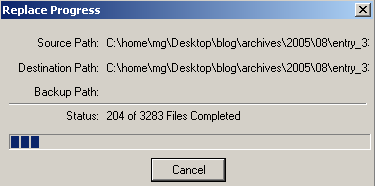
Here’s what the operation looks like in progress:
Success is reflected in a log file letting you know how many changes were made in what files, as shown below:

Nice utility to keep handy for fast, parallel file search and replace!
 Subscribe to Around the Corner-MGuhlin.net
Discover more from Another Think Coming
Subscribe to get the latest posts sent to your email.
 Another Think Coming
Hi Miguel, Great tool .. it is one of a few free tools. Have used it for 5 years now, great for those who handcode html pages and need to update across the site. Not sure how the prominent html editors are now but at that point dreamweaver html generated terrible code.
Hi Miguel, Great tool .. it is one of a few free tools. Have used it for 5 years now, great for those who handcode html pages and need to update across the site. Not sure how the prominent html editors are now but at that point dreamweaver html generated terrible code.
I am glad you liked my articles! If you ever want to guest post over @ AskTheAdmin.com let me know 🙂
I am glad you liked my articles! If you ever want to guest post over @ AskTheAdmin.com let me know 🙂