 |
| Source: http://www.todossantos-baja.com/todos-santos/eagles/Hotel-California-1950.jpg |
Some time ago, Allanah K and I were bemoaning what a pain it was to backup blogger blog posts (actually, it was all Allanah…I knew what I was getting into when I switched to Blogger from Thingamablog, eschewing the security of the MySQL WordPress database for the security of publishing everywhere).

Today, that changed…
The import/export feature opens up a whole new range of portability for your blogs, as well as allows for a few new options in the blog creation process. To get you started, we’ve rounded up a handful of ideas that can be done with importing and exporting:
- Merge two or more blogs into one. Have a few scattered blogs and want to get a fresh start? Now you can combine comments and posts from multiple blogs into a brand new blog.
- Move individual posts from blog to blog. Cross-publish your posts on multiple blogs, or transfer large batches of posts from one blog to another with a single click.
- Back up your blog to your own storage. It’s never a bad idea to create backup copies of your own content, and now you can easily export an archival copy of your blog to your hard drive with a simple tool.
- Move your blog somewhere else. Our standard Atom XML export format will open up new blogging channels between providers, and let you take your content with you should you decide to move somewhere else. And of course, if you decide to come back to Blogger, importing your export file will get you back up and running in seconds.
You can access Import and Export from the Blog Tools section on the Settings | Basic tab
For fun, I did the export and then imported it into somewhere else.
WORDPRESS
I setup WordPress (latest version) on my computer at home (XAMPP on Linux) and noticed that it already has a Blogger importer into WordPress!!! Sheesh, why hadn’t I seen that before?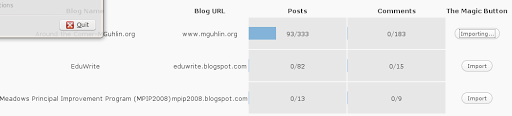
So, that was too easy. It not only listed my completed entries, but also, my draft entries in progress!
So, that pretty much took care of the problem of running my blog entries “locally” on a computer. This feature in WordPress is also available at Edublogs.org, so…you can easily “backup” and transport your blog entries anywhere! What’s more, you can use Edublogs.org to make incremental backups of your Blogger blog. Isn’t that amazing? I will always know that I can easily backup my blog, essentially having it posted in two places on the Web, in case of an outage.
If you started out with Blogger, you’re not “stuck” there and, if you want to stay, you can always leave!
It’s no longer a “Hotel California” kinda place! (you know…you can checkout but you can never leave).
Here’s what my mguhlin.Edublogs.org site looks like…
b2Evolution
Of course, once your posts are in WordPress format, you can easily import them into b2Evolution using a built-in tool: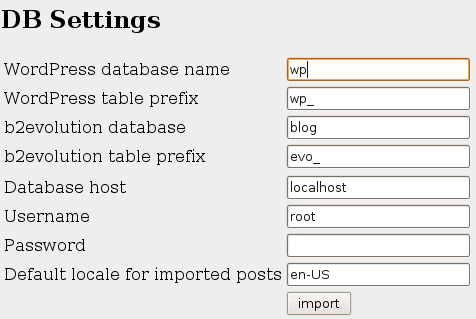
and easy is exactly what it turned out to be:
But what about that Atom.xml file from Blogger export? Well, I figured that one place I could use it was if I ever wanted to import my files into my old blogging software, Thingamablog. Unfortunately, it didn’t work. Sigh.
2 out of 3 isn’t bad, though!
;->
 Subscribe to Around the Corner-MGuhlin.net
Be sure to visit the ShareMore! Wiki.
Discover more from Another Think Coming
Subscribe to get the latest posts sent to your email.
 Another Think Coming
Great stuff. I think I will need to have a go with a small blog that I can play with to see how it works. Thanks again for sharing.
Great stuff. I think I will need to have a go with a small blog that I can play with to see how it works. Thanks again for sharing.