Ever consider using Moodle, rather than WordPress or Ning or a wiki, to organize your “virtual conference presence?” If yes, what does that look like? What SHOULD it look like? What are the key elements?
Yesterday, I had the opportunity to chat with conference organizers for a local event. They were expecting quite a few participants, had over 100 sessions, and were wondering how to organize the event. I was immediately tempted to suggest they use Moodle as one way to organize the conference but wasn’t sure if they’d go for it. . .let’s say I didn’t want to step on toes in my consultation role. Fortunately, they did ask for some suggestions, and I was prepared to share an idea that Moodle could be used to create the virtual conference environment.
While that idea is still being considered by those conference organizers, I am intrigued by the concept of using Moodle–as opposed to WordPress blog installation or a wiki, as these two conferences are–to facilitate the conference. While the temptation is to run to a Ning–another possibility–a local housed Moodle gives us control over LDAP authentication for participants, allows conversations to be secluded and, that feared word for some Web 2.0 advocates, controlled. On the back end, it does require some work, however.
Two conferences that I’ve seen are using Moodle as a way to organize content. They include the Education Service Center, Region 11’s approach to their Virtual Technology Conference. I really like the way this was organized and would love to hear from participants about their insights.
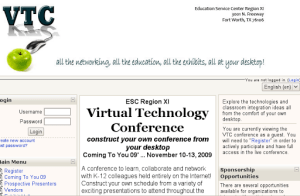

One of the concerns expressed was, how would we show the presenters how to upload their presentations? While a face to face class was suggested, I’d like to encourage presenters to just learn how to upload their stuff. The ESC11 VTC Organizers offered this suggestion:
Create a VTC account NOW to Be a Presenter! We want you to share experiences, successes, and challenges with your colleagues. Please consider being a presenter for the conference. It should prove to be a unique and rewarding experience.
The conference fee will be reimbursed for all accepted conference presenters.
- All live presentations will be 45 minutes
- A Web Conferencing (Elluminate Live!) room will be provided.
- Training will be provided on using the Elluminate Live! room.
- An optional asynchronous discussion forum will be provided upon request.
- On-Demand presentation sessions share presentation documents as a asynchronous poster session.
- On-Demand presentations will include a discussion forum for asynchronous participation.
- It will be the presenters responsibility to facilitate that discussion forum.
To propose a presentation:
- Create an account,
- Login,
- Enter the “enrolment key” vtc09
- Click on the Program link, and then,
- Enter the required proposed presentation information
- Presentation training provided according to schedule (no registration required)
- Presentation “Best Practices” resources
- Presenter Practice Room open 24/7
A message will be sent to you shortly after submission informing you of the status of your proposed presentation.
Compare the VTC’s approach to organization with MoodleMoot Oklahoma (June 10, 2009). It’s easy to see that in VTC, the focus was more on the content of the conference rather than on “moodle.” In fact, that word doesn’t even appear but ONCE on the front page! Clearly an approach to make Moodle transparent to the purpose of the conference.

MoodleMoot is obviously different (as seen above), focused more on Moodle itself. What I like about the MoodleMoot2009 organization is their instructions regarding the conference tracks (which I’d call “strands” in our local conference, but no surprise there):
The curriculum track will focus on using Moodle for curriculum development and delivery and cool & unique ways to use Moodle in the classroom. If you are using Moodle in some exciting ways, we’d love to have you present.
The hands-on track will focus on teaching others how to set up courses and use various components of Moodle. Computer labs will be provided and limited to 10-15 users each, with help (hopefully) to keep everyone on track with what you’re doing. This track was the most popular last year and we could use all the help you can give us.
The technical track will focus on technical and administrative aspects of Moodle. How are you securing Moodle? What have you done with Moodle code that lets you do just what your organization needs? We’ll have our fair share of geeks and moodle administrators that will be on the edge of their seats listening to what you have to say.
The business track will focus on using Moodle for corporate training needs. Academia isn’t the only place for Moodle. We think this would be a wonderful opportunity to share how Moodle is being used in other environments from small business to large organizations or government. Come teach us some of what you know.
The Moodle 2.0 track will focus on showcasing the features and capabilities introduced in Moodle 2.0. If you have inside information about the improvements in Moodle 2.0 we’d love to have you come tell us about them.
Source: http://moodle.metrotech.org/
Lots of other folks are using Moodle to organize their conference. This blog post hasn’t gotten me any closer to relevant elements of using a Moodle to organize a conference…but here’s some quick ideas:
- Set up a course to handle presentation submissions
- Create a metacourse to allow for “repository” of presentations. That is, presentations put into this metacourse enable other courses to have access to the content (have to test this)
- Divide the conference courses into categories (in Moodle) that allow for organization of the content
- Create a front page that has 4 columns, including presentation title, presenter name, link to download presentation content, and a link to a Simple Discussion forum to enhance participation.
That’s all I have right now. Suggestions?

 Subscribe to Around the Corner-MGuhlin.org
Be sure to visit the ShareMore! Wiki.
Everything posted on Miguel Guhlin’s blogs/wikis are his personal opinion and do not necessarily represent the views of his employer(s) or its clients. Read Full Disclosure
Discover more from Another Think Coming
Subscribe to get the latest posts sent to your email.
 Another Think Coming
The Moodle Choice Activity works well for presentation sign-ups. You can limit the number of attendees and the Choice wording can transmit critical info that may have been overlooked in other summaries. Consider an extra choice for standbys or to guage demand for added sessions.Adapted this successfully after overhearing a teacher at NECC2008 last year mention using it for parents to schedule their conference periods.
The Moodle Choice Activity works well for presentation sign-ups. You can limit the number of attendees and the Choice wording can transmit critical info that may have been overlooked in other summaries. Consider an extra choice for standbys or to guage demand for added sessions.Adapted this successfully after overhearing a teacher at NECC2008 last year mention using it for parents to schedule their conference periods.