 |
| http://www.phpmyadmin.net/home_page/index.php |
One of my favorite tools to play around with when working with MySQL databases is PHPMyAdmin. This web-based tool allows you to do quite a bit, including importing Excel files into your web-based MySQL database. This is a life-saver! I wasn’t always a fan…the one feature I wished for, PHPMyAdmin didn’t seem to be able to do for me. Of course, I was still learning how to use a complex tool…now, it’s something I teach my team responsible for maintaining Moodle backups, etc.
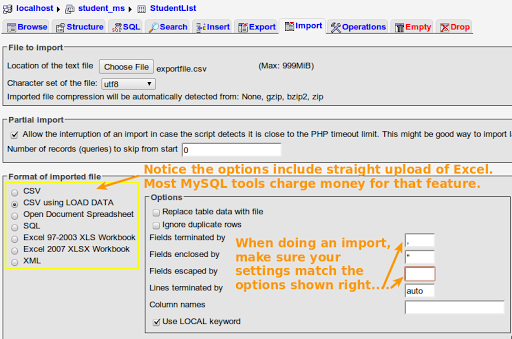
Since I was running off a XAMPP (local installation), I found that the pre-installed version of PHPMyAdmin wasn’t working easily with the import of a CSV file. I’d previously learned about the right import settings, shown below (click to enlarge):

Get Blog Updates via Email!
Enter your email address:
Delivered by FeedBurner

 pingthis();
  Bookmark this on Delicious
 Subscribe to Around the Corner-MGuhlin.org
Everything posted on Miguel Guhlin’s blogs/wikis are his personal opinion and do not necessarily represent the views of his employer(s) or its clients. Read Full Disclosure
Discover more from Another Think Coming
Subscribe to get the latest posts sent to your email.
 Another Think Coming
What's the benefit of uploading users via phpmyadmin and the moodle interface? What format does the file have to be in? As far as columns..
What's the benefit of uploading users via phpmyadmin and the moodle interface? What format does the file have to be in? As far as columns..
Melissa, I wanted to create an external database that Moodle could authenticate to, rather than importing users directly into Moodle.So, to accomplish that, I had to import users into a MySQL database (e.g. students) so that I could point Moodle to that as an external database.The format of the file is comma-delimited, also known as CSV. If you go to SAVE AS or EXPORT in MS Excel, you'll see it as one of the options.Miguel
Melissa, I wanted to create an external database that Moodle could authenticate to, rather than importing users directly into Moodle.So, to accomplish that, I had to import users into a MySQL database (e.g. students) so that I could point Moodle to that as an external database.The format of the file is comma-delimited, also known as CSV. If you go to SAVE AS or EXPORT in MS Excel, you'll see it as one of the options.Miguel