 |
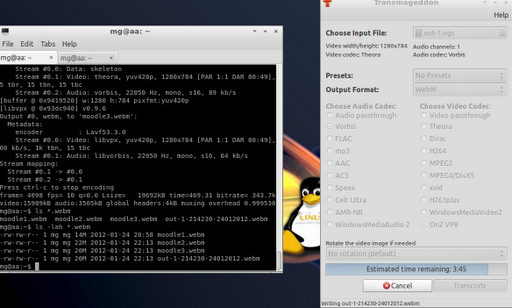
| Converting via command line on left side, using Transmaggedon on the right. |
Earlier tonight I made some recordings (of Moodle 2.2 setup) using the gtkDesktopRecorder, which works great. However, since I’d be sharing these videos with a colleague, I needed to convert them to WebM format on my LubuntuLinux (very lazy, don’t want to reboot to Windows to use FormatFactory).
My first video, I converted using Transmaggedon, which works quite well, but…took forever (25 minutes for a 50 meg video) and I could only convert one at a time. So I started looking for a different approach and found this one by Paul Rouget.
Using the Terminal, I was able to type in the following command on multiple tabs and get simultaneous conversions going…the video input/output files are in bold:
Try #1 – Failed!
ffmpeg -i out-1.ogv moodle2.webm
The command line was a lot faster, unfortunately the quality stunk! So, then I tried the following (from Paul’s site):
Try #2 – Failed!
ffmpeg -i out-1.ogv -acodec libvorbis -ac 2 -ab 96k -ar 44100 -b 345k -s 640×360 moodle2.webm
But the quality stunk on that one, too. Sigh.
Try #3 – Failed!
ffmpeg -i out.ogv -f webm -sameq out.webm
Not knowing what the right settings are for ffmpeg, I’ll have to keep using Transmaggedon (sudo apt-get install transmaggedon), which has been working great on the conversions to WebM (albeit one at a time and slow).
For fun, here’s the original OGV file (99.4 megs) and the converted WebM file (21.8 megs). You have to like the smaller size! And, no, I didn’t script this at all. It’s a rough-n-ready video for a colleague.

Get Blog Updates via Email!
Enter your email address:
Delivered by FeedBurner


Everything posted on Miguel Guhlin’s blogs/wikis are his personal opinion and do not necessarily represent the views of his employer(s) or its clients. Read Full Disclosure
Discover more from Another Think Coming
Subscribe to get the latest posts sent to your email.
 Another Think Coming
Thank you for the tips!I use http://www.screencast-o-matic.com/ to record and share my Moodle videos. It lets you edit and uploads them, automatically, to YouTube too.
Thank you for the tips!I use http://www.screencast-o-matic.com/ to record and share my Moodle videos. It lets you edit and uploads them, automatically, to YouTube too.