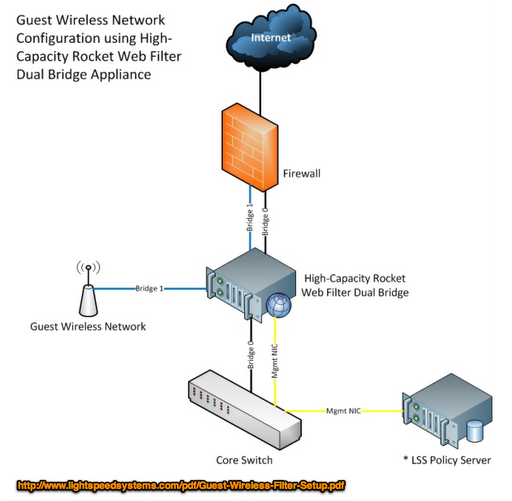
 |
| Source: Lightspeed, http://goo.gl/scosS (no endorsement/preference implied) |
What kind of solutions does your school or organization use for BYOD Filtering? I’d love to hear from vendors with products and what their features are for this new area in K-12!
Although this blog entry focuses on filtering, it does encourage technology directors to crowd-source resources for BYOD filtering, as well as share what devices they’re jumping into, such as Android or iPad or something else.
We are going to a BYOD model next school year. We will be giving the “have-nots” a laptop (maybe Linux or Windows). In order to stay CIPA compliant I need to provide filtering for these laptops when not on campus. I may also have a need for filtering IOS and Android. I am looking for a cloud based filtering service for these devices. I have looked at Barracuda (but it does not work with Linux, based on what I read), I have also looked at Lightspeed. (but I noticed a lot of you abandoning it on this list)
- It had to be capable of managing the SSL connections for Google Apps to work
- No client side software
- A remote filter for devices that are off the network (just in case we need to go that route)
- BYOT support to ensure an easy way to create a way for users to agree to the District’s Responsible Use Policy and also authenticate to the network if they have district credentials.
- A less expensive recurring cost
- 24×7 support is very important
- Override functionality is also an important feature
- Do you have a wireless infrastructure that will support a device for each student?
- Do you have a wireless infrastructure that will support (2.4/5 GHZ b/g/n)?
- What do you plan to do if your wireless infrastructure will not support the wireless radio in a personal device?
- How are do you plan to handle connectivity issues with the personal devices?
- Do you have a way to handle mobile device management?
- Do you plan to deploy Virtual Applications or Desktops to end user devices?
- Filtering features
- BYOD Questions
- Districts deploying Android vs iPad
 |
| Source: Apple Insider, http://goo.gl/DTvAO |
Some suggestions for filtering from Texas Tech directors include the following:
- Barracuda Web Filter
- Bloxx
- CIPAFilter
- Cisco Ironport – Per one source, “Ironport doesn’t like anything from Apple and mobile devices. And those two pieces are fairly importan…It has problems authenticating both and requires a lot of management to get them to even see SSL sites.”
- Fortinet – http://www.fortinet.com/
- Lightspeed – This product didn’t seem too popular among tech directors in Texas who reported on its use, mentioning they had just switched to other products.
- Impero Classroom Management
- Microsoft ForeFront Threat Management Gateway
- M86 – http://www.m86security.com/
- Sophos Web Protection Suite
- WebSense
- How will it handle GoogleApps https:// ?
- How do you handle filtering for devices that are district-owned and go into students’ backpacks? Do you have them “phoning home” where “home” is the district or filter tool? Here’s how someone put it: “That being said there is generally an assumption (at least in our community) that a district device is automatically filtered at all times. So if you are sending a device home I suggest you make sure you discuss exactly how that device may or may not be filtered when it is not on your network. That way everyone is on the same page with what to expect (whether you filter or not).”
We are working on this very issue, and we have found it is almost impossible to send home the device filtered with iPad2’s deployed to 735 middle school students. We are using JAMF Casper to deply apps and were hoping it could allow us to turn off Safari and only use a safer browser called K9 to provide filtered Internet access. However, Apple only alllows Casper to force 500 devices to check in at a time. Also, all a student has to do is turn off his wireless access on the iPad, and his device will not update to remove Safari. It’s really been an uphill battle with the iPad. Our netbook projects at the elementary level do have filtered Internet at home.
Here’s the big question: if parents provide Internet access for their family, who are we to monitor what happens at home? The kids are on the Internet all the time on their phones. It’s not filtered. I think trying to decide what a family does with Internet access is one step too far. We provide the device at home. It should be up to the parent how it’s used and how they monitor it.
Enter your email address:
Delivered by FeedBurner


Discover more from Another Think Coming
Subscribe to get the latest posts sent to your email.
 Another Think Coming
Hi Miguel. I'm taking you up on your invitation to vendors to post!We don't have anywhere near the marketing budget of the filtering companies you listed, so I won't be surprised that you haven't heard of us, but I believe we have the best solution on the market for filtering district-owned iPads when they leave the network – BASCOM Anywhere Filter. I won't go into the whole Sales spiel here, but if you're interested, I'd love to talk to you and have you test out our solution.Start at AnywhereFilter.com, then fill out the Demo form and I'll get back to you asap. Or contact me directly at afoxen@bascom.com.Best regards,Tony FoxenDirector of Business DevelopmentBASCOM
Hi Miguel. I'm taking you up on your invitation to vendors to post!We don't have anywhere near the marketing budget of the filtering companies you listed, so I won't be surprised that you haven't heard of us, but I believe we have the best solution on the market for filtering district-owned iPads when they leave the network – BASCOM Anywhere Filter. I won't go into the whole Sales spiel here, but if you're interested, I'd love to talk to you and have you test out our solution.Start at AnywhereFilter.com, then fill out the Demo form and I'll get back to you asap. Or contact me directly at afoxen@bascom.com.Best regards,Tony FoxenDirector of Business DevelopmentBASCOM