Problem: We are deploying iPads in carts at the high school. Students will only have access to them once per day but we want them to work on projects. How can we make it so that students can log in at the start of the period, then out at the end of the period? We are trying to avoid paying for a solution like eBackpack.
 |
| A free (and no-cost) open source solution |
Are you involved in an iPad deployment with students/staff? Then one of the fun challenges you’ll encounter is how to handle documents on the iPads. While GoogleDocs would be a perfect solution, unfortunately, GoogleDocs and iPad’s browser just don’t quite like each other. This dissonance between the iPad and the Cloud pushes you in some inevitable directions, probably by design (since it makes Apple $$$). Those directions include the following:
- Use cloud-based storage (e.g. Dropbox, Box.net) to store files via WebDav created with iWorks apps like Pages and Keynote.
- Come up with your own WebDav solution on a server and save files that way (not hard).
- Pay for an Otixo (or similar) service to enable WebDav to GoogleDocs
- Use eBackpack
The question occurred to me, how hard would it be to connect the iPad via WebDav to a district server-hosted OwnCloud.org installation?

- To get this going on UbuntuLinux, I typed in the following commands:
sudo apt-get install owncloud - Then added webdav support with this command (admittedly, I may have loaded the kitchen sink with this one):
sudo apt-get install webdav* - I copied the owncloud folder from /usr/share/owncloud to the /var/www folder with this command:
sudo mv /usr/share/owncloud /var/www/
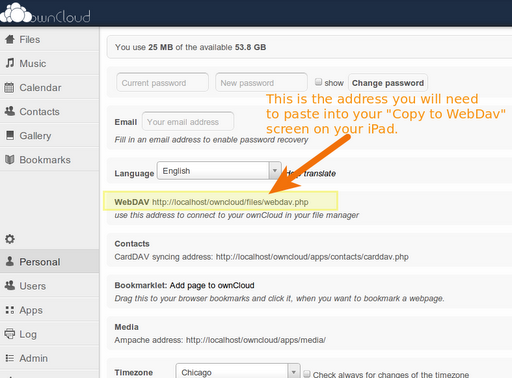
- In Keynote or Pages, I tapped on the button “Copy to WebDav”
- I entered the URL provided in the screen below, which is common to all users, but each users employs their own credentials (username/password) to login to OwnCloud via WebDav:

- Once you have typed in your webdav address/URL, username/password, you will see a screen that looks like this…the copy from your iPad to OwnCloud has begun:

This allows you to determine the format (since I’m in Keynote, these are the choices) 
Copy is in progress…. - Here’s what you’ll see next:

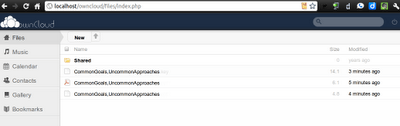
- And, here’s what it looks like on the OwnCloud web site running on your computer (which could be a full-blown server or a laptop running in a classroom, right?):


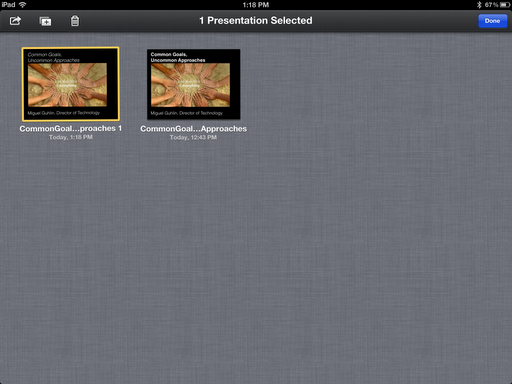
One of the neat things about WebDav access is that you can open files saved in OwnCloud using your iWorks app. Here’s what that looks like:


What Happens at the end of the period when the student needs to turn in the iPad?

Enter your email address:
Delivered by FeedBurner


Discover more from Another Think Coming
Subscribe to get the latest posts sent to your email.
 Another Think Coming
I'd like to hear how this works out for you. I'm wondering though if it can be tied to our LDAP (Active Directory)
I'd like to hear how this works out for you. I'm wondering though if it can be tied to our LDAP (Active Directory)
Nathaniel, yes, it can be. That is how it's being done in a district I work with. And, even though I mention it above, you can find more info about it below: http://owncloud.orgFrom the feature page, you can see:"Now ownCloud enables admins to manage users and groups from their LDAP or AD instance."With appreciation,Miguel Guhlin
Nathaniel, yes, it can be. That is how it's being done in a district I work with. And, even though I mention it above, you can find more info about it below: http://owncloud.orgFrom the feature page, you can see:”Now ownCloud enables admins to manage users and groups from their LDAP or AD instance.”With appreciation,Miguel Guhlin
Now that Google has introducedGoogle Drive it works extraordinarily well on an iPad browser. Accessing it just from a browser e.g. Safari gives better functionality than using official Drive app from itunes. I recommend Google Drive as it's available and works across all platforms rather than being locked into iPad/apple locked down environments! for Nathaniel via Google Apps for Education or Business you can link it to LDAP too!
Now that Google has introducedGoogle Drive it works extraordinarily well on an iPad browser. Accessing it just from a browser e.g. Safari gives better functionality than using official Drive app from itunes. I recommend Google Drive as it's available and works across all platforms rather than being locked into iPad/apple locked down environments! for Nathaniel via Google Apps for Education or Business you can link it to LDAP too!
@Mary-Louise, howdy! I tried Google Drive, opened a word processing document in Safari and promptly received this message:"The browser you're using may not support all features of the desktop version of Google Docs."That said, it would be neat if GoogleDrive enabled documents to be opened in Google Chrome since that would make it possible to edit. I have tried Google Chrome and it works surprisingly well with GoogleDocs.Still, for a school deployment, I'm sticking with WebDav and Office2 HD with Keynote as the solution to use…until things get better.Miguel
@Mary-Louise, howdy! I tried Google Drive, opened a word processing document in Safari and promptly received this message:”The browser you're using may not support all features of the desktop version of Google Docs.”That said, it would be neat if GoogleDrive enabled documents to be opened in Google Chrome since that would make it possible to edit. I have tried Google Chrome and it works surprisingly well with GoogleDocs.Still, for a school deployment, I'm sticking with WebDav and Office2 HD with Keynote as the solution to use…until things get better.Miguel
I'm a year late to the conversation, but I recently had the exact same questions as to how to save/receive documents on the iPad. It's the one missing piece to make it a fully functional learning device, for we have to interact with artifacts.We are exploring enabling WebDAV on our student shares for this very purpose.
I'm a year late to the conversation, but I recently had the exact same questions as to how to save/receive documents on the iPad. It's the one missing piece to make it a fully functional learning device, for we have to interact with artifacts.We are exploring enabling WebDAV on our student shares for this very purpose.