 |
| Image Source: http://bit.ly/120oAlt |
Unbelievable news–Netflix finally works on Linux! I’d whined about this several times, but now, Netflix works on Linux!
This stupendous video walks you through the commands on various 32-bit Linux distros:
Here are the commands for those of you using an ubuntu-based Linux distro. I use LubuntuLinux so here’s what the steps look like based on the video and my install on LubuntuLinux:
1. Add repository:
sudo apt-add-repository ppa:ehoover/compholio
2. Update list of apps available:
sudo apt-get update
3. Install Netflix:
sudo apt-get install netflix-desktop
(this step will run for about 3-5 minutes depending on your Internet connection and computer speed)
4. Go to Sound & Video (on LubuntuLinux) and choose Netflix-Desktop. You’ll be prompted to install additional software for WINE–Mono and Gecko–but those are easy:
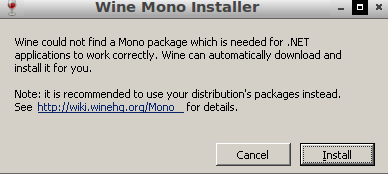

Sure enough, it works great! With Netflix AND Steam on Linux, lots of opportunities for distraction!
Some tips for Steam on Linux (I’m running on LubuntuLinux):
- If you don’t have a beta account, Steam won’t come up for you after login. So, go to command line at type steam steam://store and you’ll be in!
- Find a list of Linux games on Steam online


var _gaq = _gaq || []; _gaq.push([‘_setAccount’, ‘UA-3445626-5’]); _gaq.push([‘_setDomainName’, ‘mguhlin.org’]); _gaq.push([‘_trackPageview’]); (function() { var ga = document.createElement(‘script’); ga.type = ‘text/javascript’; ga.async = true; ga.src = (‘https:’ == document.location.protocol ? ‘https://ssl’ : ‘http://www’) + ‘.google-analytics.com/ga.js’; var s = document.getElementsByTagName(‘script’)[0]; s.parentNode.insertBefore(ga, s); })();
Discover more from Another Think Coming
Subscribe to get the latest posts sent to your email.
 Another Think Coming