This past weekend, I spent half a day sharing a variety of content and ideas with English teachers, as well as encouraging them to create. Here are fun photo tools you can use to enhance teaching and learning:

1) 30 Hands Learning (free): This free app has worked phenomenally in the past by allowing you to sequence images from your Camera Roll, add audio to each as independent slides, then publish the narrated photos/images back to your Camera Roll as a video. Although they’ve been experiencing some technical difficulties (e.g. audio sync hasn’t been perfect), the CEO, Eric Braun writes (via email on 11/10/2013;2:04pm) the following:
Good news! Apple just approved our latest version of 30hands Mobile, which I believe will resolve your synchronization issues and speed up publishing. Included is a new color palette, too, with skin tones and the ability to select from a full color palette.
We would love to hear about your publishing results.
Keep in mind, you do not need to recreate any presentations, only republish with the updated version. After the update, check on the settings tab to see that you are using version 1.3.40.
Thanks again for your feedback and support!Eric30Hands Learning

Note: For the above 3 apps, it’s fun to create a video of images+audio, then drop it into another app like iMovie or Pinnacle Studio for further edits, additions, combining with other content.
3) Everlapse (free): A new app that Jeanne Reed (@jeannereed1) introduced me to earlier today. It just lets you create and publish a web-based slideshow/flipbook sans audio. Playing around with it, I made the following creation:
A few other comic book makers, including newcomer BitStrips (which once was a web site but is now an iPad app!):
- Strip Designer ($2.99)
- StoryMe (Free)
- BitStrips.com (Free, requires Facebook access)
- Comic Maker HD (Free)
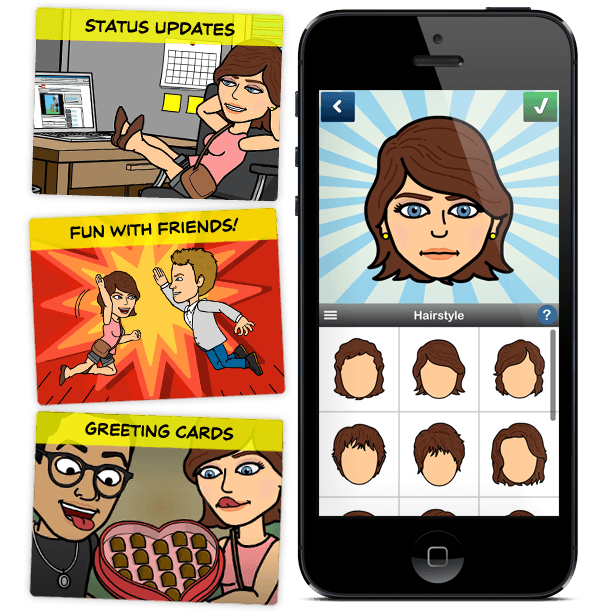 |
| BitStrips is now an iPad app, not a web site! |
- Observe: Making Your Own Comics (10 mins) | Optional: View Other Resources
- Read:
Check out Miguel’s Workshop Materials online at http://mglearns.wikispaces.com

var _gaq = _gaq || []; _gaq.push([‘_setAccount’, ‘UA-3445626-5’]); _gaq.push([‘_setDomainName’, ‘mguhlin.org’]); _gaq.push([‘_trackPageview’]); (function() { var ga = document.createElement(‘script’); ga.type = ‘text/javascript’; ga.async = true; ga.src = (‘https:’ == document.location.protocol ? ‘https://ssl’ : ‘http://www’) + ‘.google-analytics.com/ga.js’; var s = document.getElementsByTagName(‘script’)[0]; s.parentNode.insertBefore(ga, s); })();
Discover more from Another Think Coming
Subscribe to get the latest posts sent to your email.
 Another Think Coming
Cool tool – the shadow puppet. I've heard about it but didn't try it out just yet. Recently I've created an app of my own, but I hear you have to get a copyright or something.. Too bad I used this song for it – it turns out you can't do that. So if you ever want to create a tool of your own, keep that in mind 😉
Cool tool – the shadow puppet. I've heard about it but didn't try it out just yet. Recently I've created an app of my own, but I hear you have to get a copyright or something.. Too bad I used this song for it – it turns out you can't do that. So if you ever want to create a tool of your own, keep that in mind 😉
Excellent tools.Thanks for sharing with us. And thanks Bob for your valuable suggestion.
Excellent tools.Thanks for sharing with us. And thanks Bob for your valuable suggestion.
Nice and helpful post, I appreciate it really. Thanks for this. I have got my new I pad recently, Oh I will try this now 🙂
Nice and helpful post, I appreciate it really. Thanks for this. I have got my new I pad recently, Oh I will try this now 🙂