Note: Read Other Blog Entries in this series:
BoodleBox Bots | Local AI | ChatGPT GPTs | Google Gems
Creating some of my favorite task-helpers via Custom GPTs in OpenAI’s ChatGPT has been a lot of fun. I love tweaking custom instructions, updating files in the Knowledge Bank to get the result I want. But Perplexity Pro Spaces has lured me back.
Did You Know?
Sign up for TCEA’s AI Amplified Educator Accelerator, a totally online learning opportunity for K-16 educators. You get six months of access via BoodleBox Unlimited to learn the skills you need to build bots (a.k.a. similar to Perplexity Spaces, OpenAI Custom GPTs, Google Gems, etc.). It’s only $149 and you get 22 hours of CPE credit, digital badge and certificate. Learn more about all of TCEA’s Gen AI professional learning offerings.
That is to say, I enjoy creating Perplexity Pro Spaces because my experience in Boodle Box gave me a deeper appreciation for custom instructions. ChatGPT has also made it a breeze to get key information (e.g. custom instructions) from its Custom GPTs into other systems.

Steps To Create a Custom GPT
My steps at this point are pretty relaxed, compared to some of the complex guides I’ve seen floating around.
- Design custom instructions
- Gather the minimum number of files with relevant content to place in Knowledge Bank
- Define the personality and tone of the GPT
- Test it, then make adjustments to the custom instructions
- Optional: Add a profile pic
- Share the “Anyone with a the link can view,” if a public GPT
ChatGPT makes Custom GPT so easy with each of these points, updating the custom instructions as I go. At the end, I can copy-n-paste those for another GPT or, if on the same account, duplicate the GPT.
Desired Feature: Quick backup of custom GPT via zipped file for download, including custom instructions, profile picture, and knowledge bank.
Getting a Comprehensive Markdown Document with Key Knowledge Bank Info
Here’s a prompt I use:
Based on all the information you have access to in the Knowledge Bank, come up with a comprehensive document in markdown format (including tables) that captures it in one document
Hey, it’s not my best prompt, but it works. It can take a few minutes to generate. Here’s the comprehensive document generated with that prompt for my Write Simply GPT.

I add this document to the Files section of Perplexity Spaces. My hope is that I won’t have to upload a whole bunch of files. Instead, I have a concise document. Time will tell whether this approach works well or not.
Back to Spaces
As much as I like ChatGPT’s Custom GPT experience (and it is slick), I keep coming back to Perplexity Pro’s Spaces. I like the bare bones feel (most of the time), and now that I have a better handle on custom instructions (my goodness, Perplexity, INCREASE the characters allowed in your custom instructions box…although I guess I could just add a one liner that says, “Read this file” which would hold a megaprompt…I’ll have to try that), I prefer it.
My ChatGPT Custom GPTs on my personal account:
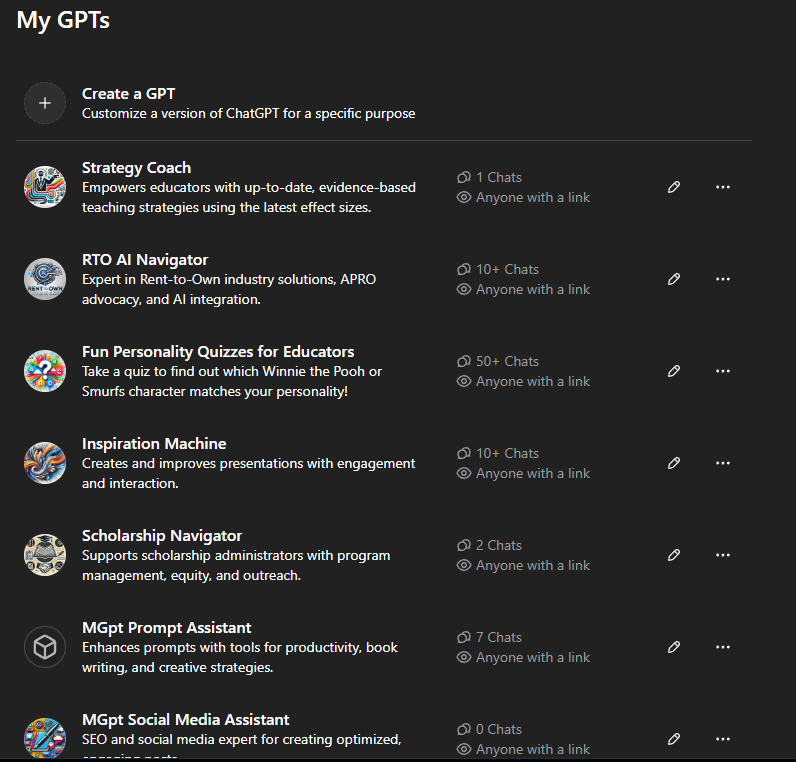

After giving it some thought, I’m moving some into my work account or into Perplexity Spaces:
| ChatGPT Plus for Work | Perplexity Pro Spaces (Personal) |
| Fun Personality Quizzes for Educators Prompt Assistant RTO AI Navigator* Scholarship Navigator* Social Media Assistant Strategy Coach | AI Strategist Blog Optimizer ETHICAL Analysis GPT Inspiration Machine PRISM: See Thinking in a New Light Skeptical Thinker Write Simply |
*Asterisked items were created for presentations to organizations.
Perplexity Excels Over ChatGPT
As nice as OpenAI’s ChatGPT is, Perplexity’s Spaces offers a few features ChatGPT lacks:
- Ability to use a variety of AI models
- Somehow, the citation of sources is cleaner and better than ChatGPT. Technically, they may be the same.
- The interface is simpler for Files, and you can upload more than 20 files that ChatGPT allows. Perplexity allows 50 files, 25 mbs each. If you convert those into markdown files first (PPTx, Docx, etc.) using PanDoc (free), wow, that’s a lot of content.
- You can add LINKS to online documents. Wow, what a game-changer.
I know some say Perplexity isn’t going to last. But it keeps getting better.
A Suggestion
Perplexity might improve its Spaces with this suggestion. Right now, it only offers a “Private” or “Public” option that shows the Files in its knowledge stack. But I can see how some might want to restrict access to that list of files.
For example, I created a Rubric Maker (a mirror of one I’d made on a ChatGPT account for work). However, ChatGPT doesn’t make it obvious to show the files in the Knowledge Bank. But Perplexity does:
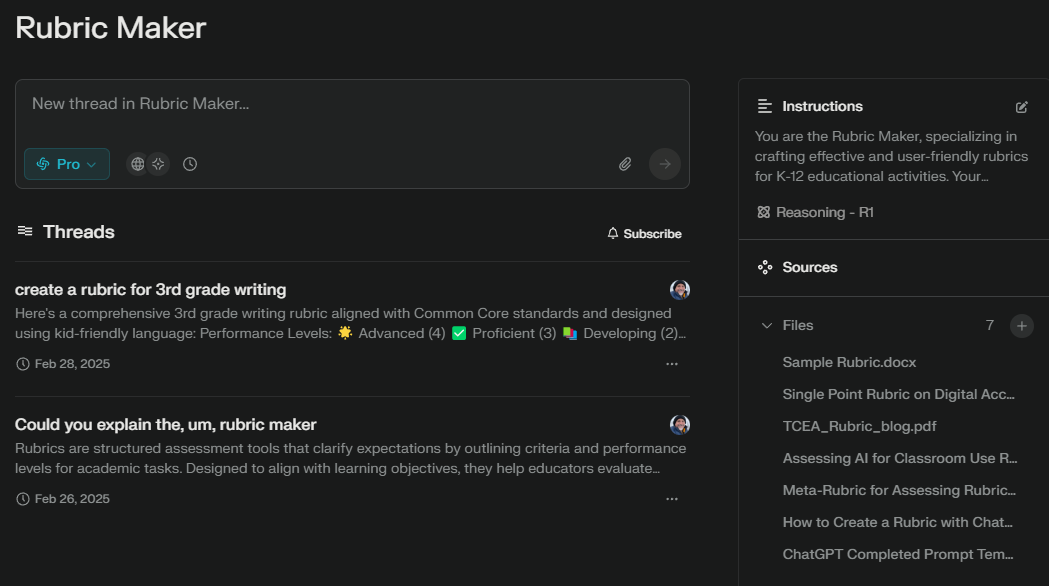
Not only can users SEE the files, they can download them and create their own Space, absent the instructions. Here are the current options:
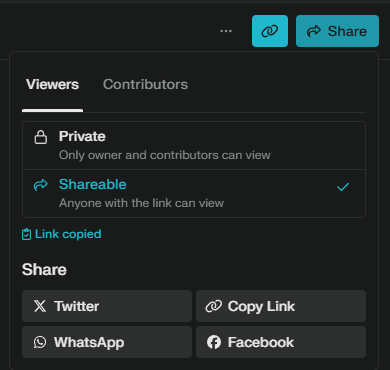
I’d like to see Perplexity give these options when sharing:
- TIER 3 Privacy – Private: Only owner and contributors (added via email) can view
- Tier 2 Privacy – Public with Hidden Sources: This is a new option with the sources unavailable for viewing by anyone with the link. Instructions would also be hidden.
- Tier 1 Privacy – Public with Viewable Sources: This is their current “Shareable” anyone with the link can view option. I would allow the Instructions to be viewable, as well.
Wondering what Perplexity thinks about it? Well, I don’t know about the developers, but Perplexity AI says:
Your proposed sharing options for Perplexity Spaces present an interesting tiered approach to privacy and visibility. Here’s a critique of each tier:
Tier 3 Privacy – Private
This option provides the highest level of privacy, which is essential for sensitive or confidential work. It’s a standard feature in many collaborative platforms and is crucial for users who need to keep their work completely private.
Strengths:
- Ensures complete control over who can access the content
- Ideal for personal projects or sensitive business information
Potential Improvement:
- Consider adding an option to invite specific individuals by email, enhancing collaboration while maintaining privacy
Tier 2 Privacy – Public with Hidden Sources
This new option introduces an interesting middle ground between private and fully public spaces.
Strengths:
- Allows for public sharing while protecting proprietary sources or methodologies
- Useful for showcasing results without revealing the underlying process
Concerns:
- Hiding sources may reduce transparency and credibility of the information presented
- Users might find it frustrating if they want to verify or explore the sources
Suggestion:
- Consider adding an option for the owner to selectively reveal sources, balancing transparency with privacy
Tier 1 Privacy – Public with Viewable Sources
This option, being the current “Shareable” setting, offers the most transparency.
Strengths:
- Promotes open knowledge sharing and collaboration
- Allows viewers to verify information and conduct further research
- Including viewable instructions enhances reproducibility and learning
Potential Improvement:
- Implement a feature to allow owners to choose which specific sources or instructions are visible, providing more granular control
Overall Assessment
The proposed tiered system offers a good range of privacy options, catering to different user needs. However, consider the following suggestions:
- Implement more granular controls within each tier for finer adjustments to visibility
- Add a feature for temporary or time-limited access to broaden sharing possibilities
- Consider integrating version history or change logs, especially for collaborative work in Tier 3
- Explore the possibility of allowing users to set different privacy levels for different sections within a single Space
By refining these options, Perplexity Spaces could offer a more flexible and user-friendly sharing experience, balancing privacy concerns with the benefits of open collaboration and knowledge sharing.
Answer from Perplexity: pplx.ai/share
Discover more from Another Think Coming
Subscribe to get the latest posts sent to your email.
 Another Think Coming
[…] A fast journey showing how I create Perplexity Spaces. […]