The work of creating a Gen AI tool that does what you ask it to reliably can be easy. But, also, time-consuming.
It feels like making your way in a dark room, stubbing your toe, checking to see if what you’ve made really works. You do your best to remember the dozen variations of a path to success, only to realize most don’t get you where they need to. Instead, you discard the ones that don’t and figure out which is the one that did.
The problem is, all get confused in the mix of solutions tried. You end up testing and re-testing them until you definitively confirm the one worth sharing with others. Which learning paths do you keep, or discard, when all seem critical to learning?
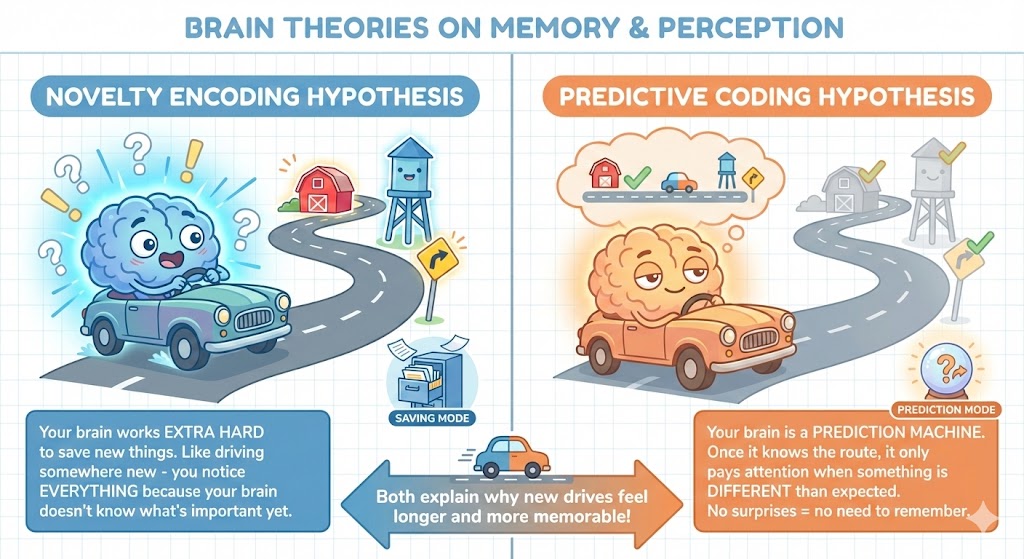
It reminds me of driving some place you’ve never been before. Your brain is hyper-alert, aware of everything on the way there. But after you’ve figured it out, you forget most of the details, keeping only what you need to get there again.
Novelty Encoding Hypothesis
Turns out, my vague recollection of that idea has some merit:
…the novelty encoding hypothesis holds that when incoming
information is novel, it undergoes furthcr encoding processing and ends up
successfully stored. When it is totally familiar – for instance, one and the
same picture presented for the umpteenth time in a long series – it is
“screened out”, and its umpteenth presentation to the rememberer would not change what was already in the store before the umpteenth time.The two extremes, one of the highly novel and the other of the boringly familiar, are separated by a continuum of novelty detection and subsequent encoding, and a corresponding continuum of subsequent memory. (source)
[Miguel’s note: By the way, there is another hypothesis…The scientific consensus is leaning towards the Novelty Encoding Hypothesis, but there may be a better one known as “predictive coding framework.“]
That’s a little of what it feels like to explain to someone how to make a custom GPT that works. You might know the way, but you don’t really KNOW it until you can throw out the extraneous details and explain it in a way that makes sense to someone else.
Reflections on TSAE Event
Yesterday, I had the opportunity to present on AI Prompting Made Simple for organization professionals who are new. Looking into most of their eyes, I got the sense that they “knew” what they needed to do when it came to prompting, but lacked the experience. That is, the nitty-gritty, get your hands down in the muck of getting a Gen AI take your questions and files, then predict in ways that aligned to what you want to see.
That’s the hard part, the fun part, the part that requires the patience. As we move into agentic AI solutions, it’s easy to forget those folks who haven’t put in the time yet to learn AI prompting. While the Gen AI tools are getting better (Claude 4.6, Gemini 3.1), that workflow of identifying what you want to see, then plotting a path forward in collaboration with Gen AI is hard to grasp.
Mapping the Process
To map my own process, I made a quick sketch in my handy notepad I carry for that purpose…you can see I drew this image while listening to a keynote speaker share important Gen AI vocabulary terms with the audience. Of course, I was only half-listening as I tried to identify my own workflow for inclusion in my presentation. This is what I came up with:
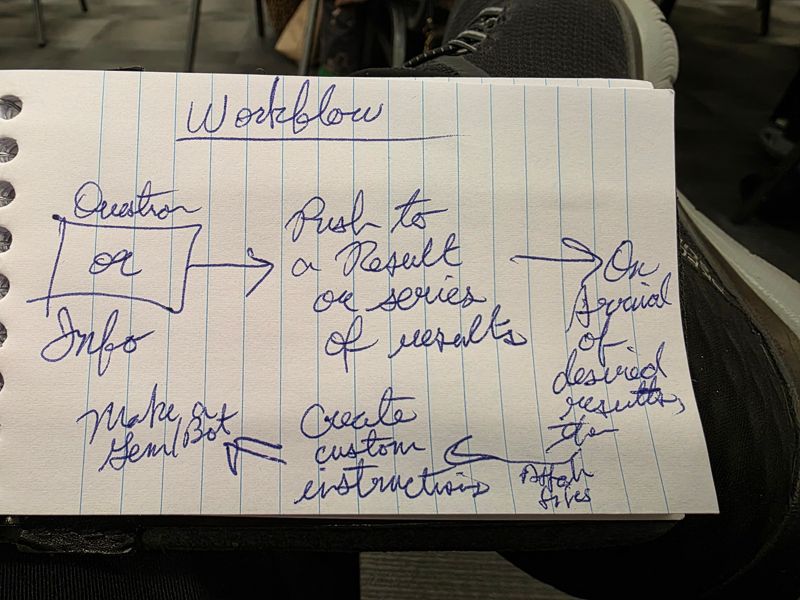
As I looked at this workflow, I made the jump to BoodleBox, and asked Claude 4.5 Opus to refine it:
This is Miguel ‘s workflow when creating content. Flesh it out with knowledge stacks, NotebookLM, connected to Custom GPT, Gems, or BoodleBox Bots
It came up with a lot of text (see end of this blog entry for it), which I used to build a more complex diagram.
Make an infographic+landscape orientation that captures this workflow
The result was sorta right, but not quite.
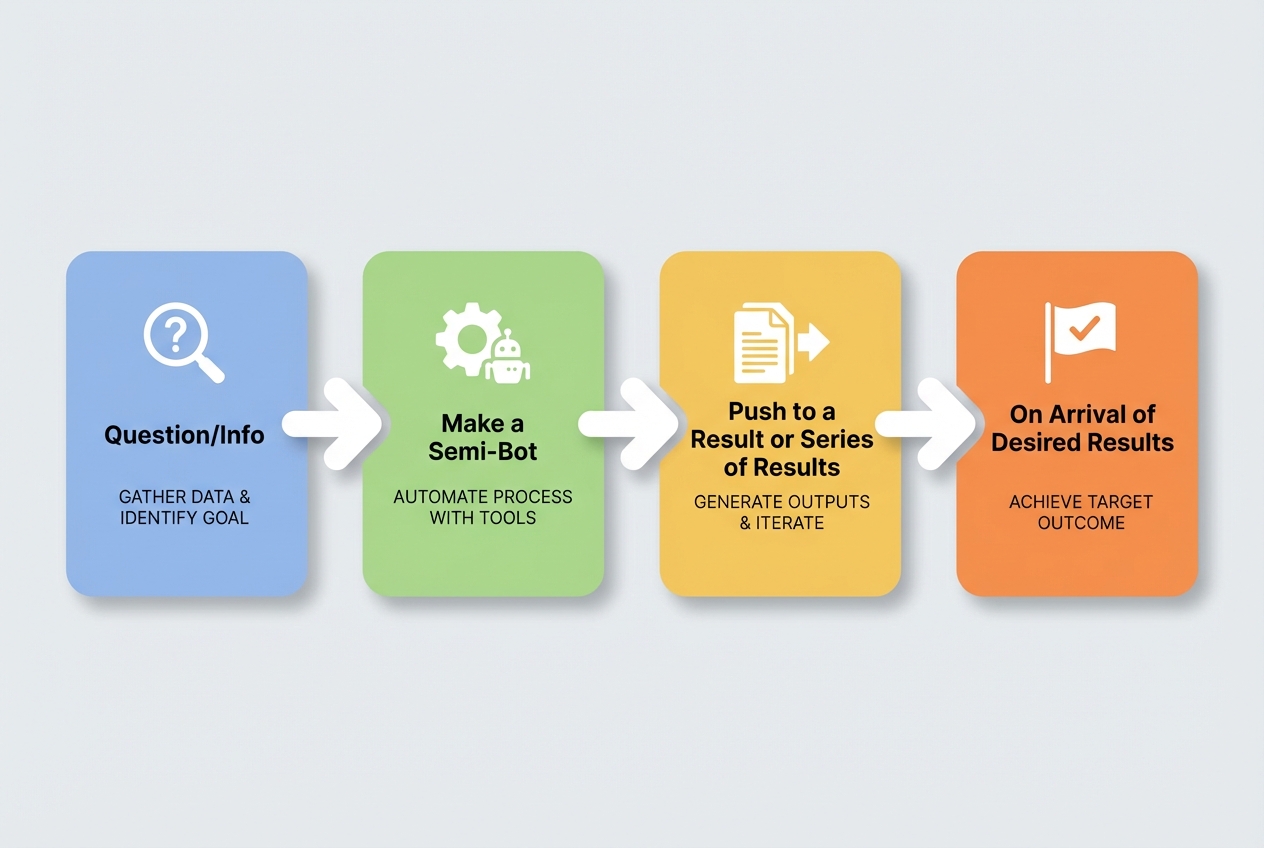
As nice as this was, more accurate to my handwritten note, I wanted something else. So, I enabled the Memory option on BoodleBox, then offered this prompt:
Analyze how I have created bots in the past then update the image prompt for this infographic to reflect more detail about process
The result:
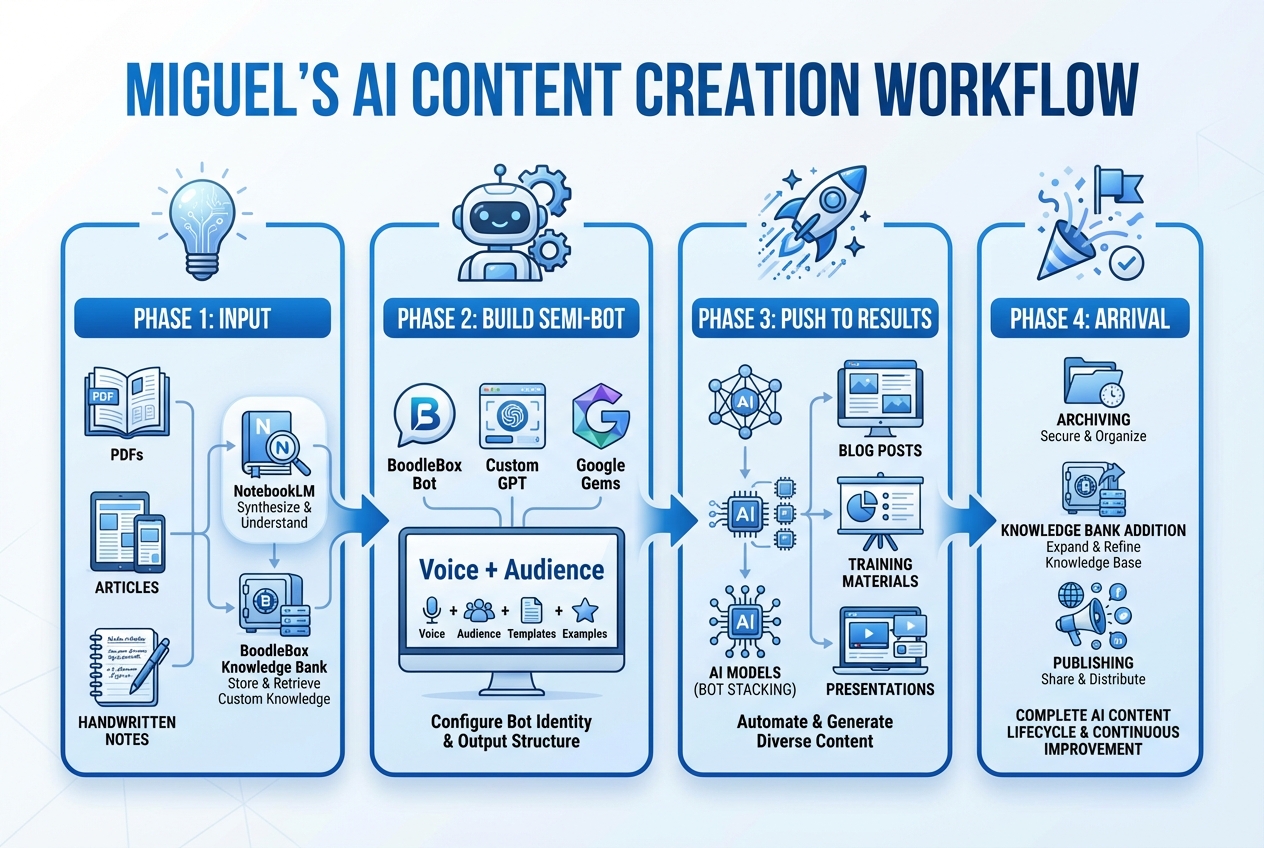
Now this image really DOES capture everything I do, but I found it to be too complicated to share with an audience of folks who needed a simple process. So, I went back to Boodlebox with this prompt:
Simplify this to a 3 step process with bullet points descriptions
- A Question or Information Problem
- Have an interative conversation to get the desired result(s)
- Ask the chatbot to generate custom instructions and identify key documents needed to ensure future success as a custom GPT, Gem, or Bot
Claude 4.5 Opus in BoodleBox gave me a response, again, text-based that I asked Nano Banana Pro to turn into an image:
Miguel’s 3-Step AI Content Workflow
Step 1: Start with a Spark
- Identify a question you need answered OR an information problem to solve
- Gather initial source materials (articles, PDFs, notes)
- Frame the challenge clearly before engaging AI
Step 2: Iterate to Results
- Have a back-and-forth conversation with your AI of choice
- Refine outputs through feedback and follow-up prompts
- Push until you arrive at your desired result(s)
Step 3: Capture for Future Use
- Ask the chatbot to generate custom instructions based on your successful conversation
- Identify key documents needed to replicate success
- Build a reusable Custom GPT, Google Gem, or BoodleBox Bot
The Final Result
With that in mind, I asked Nano Banana Pro in BoodleBox to give me an image. The final result is this image below, which captures the simple three-step process:
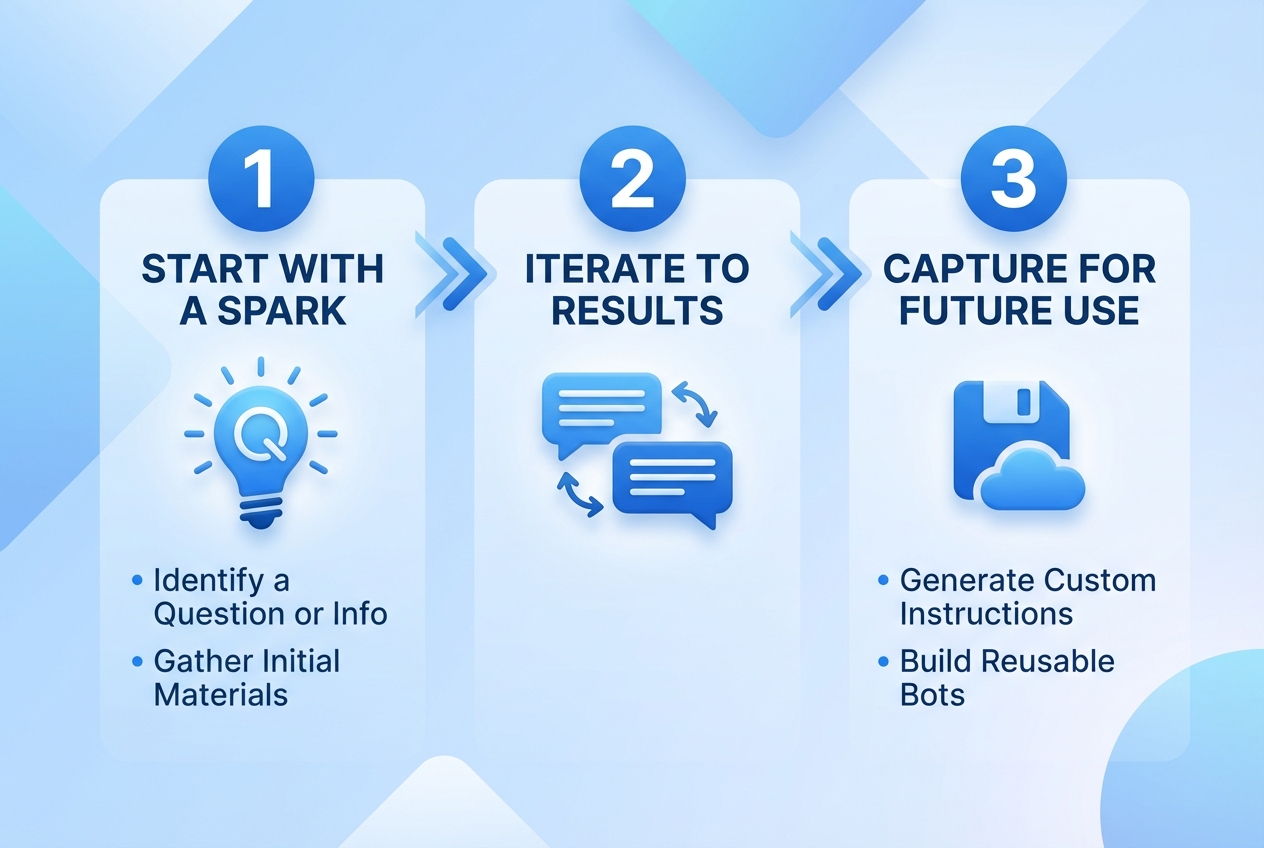
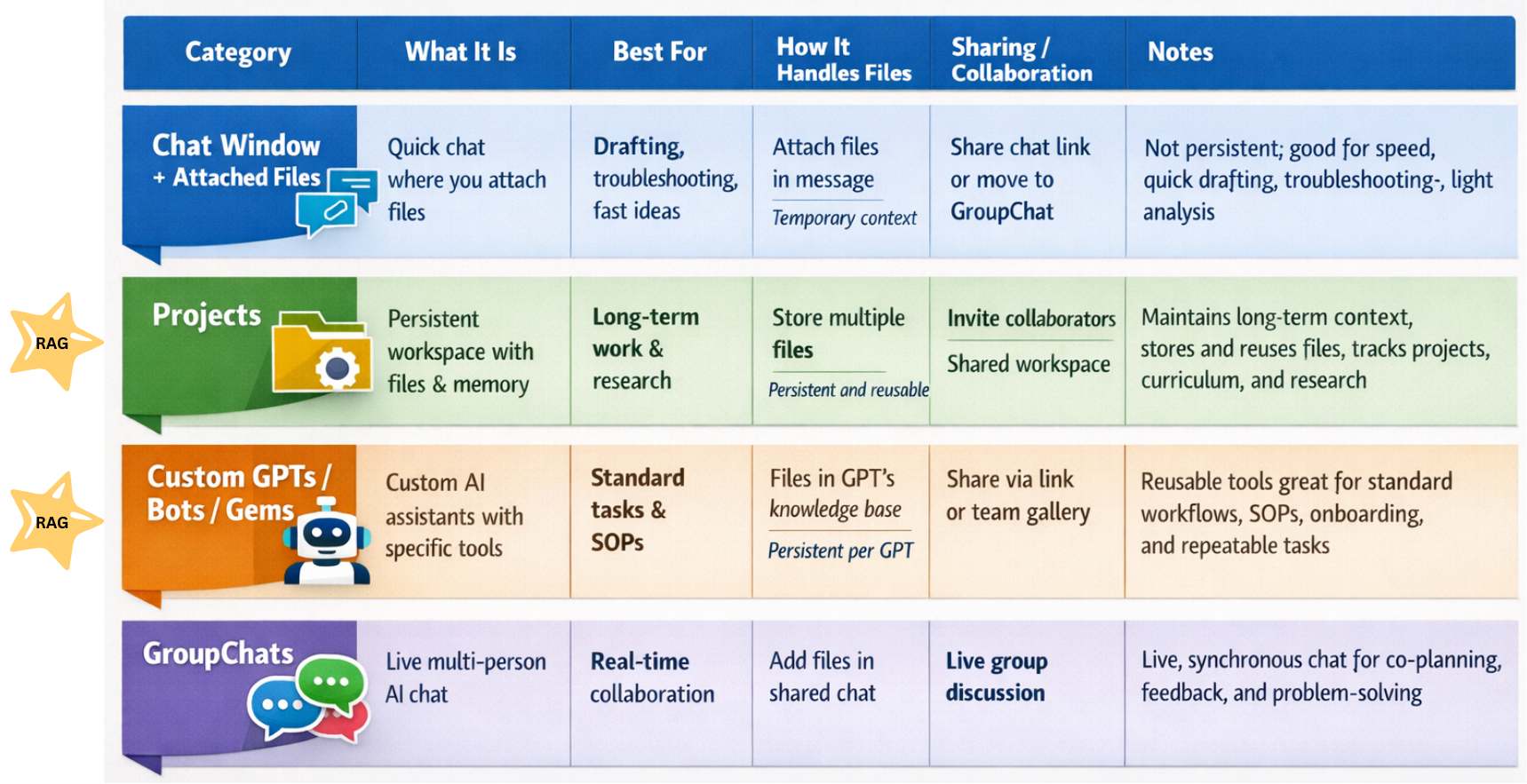
This is what I finally shared with the audience. It is easy to explain, too. What I like about it is that it makes the shift from prompting a chatbot+attached files to Retrieval-Augmented Generation (RAG) a straightforward one (for an explanation, see image below).
Where the Magic Happens
That’s because RAG, whether for Projects/NotebookLM or GPTs/Gems/Bots is where the real magic of none to few hallucinations happen. The faster we can get folks to that, the quicker they will see success.
Claude’s Interpretation and Refinement
Based on your handwritten notes, here’s a fleshed-out version of your workflow integrating knowledge stacks and various AI tools:
Phase 1: Input (Question or Info)
Knowledge Stack Setup:
- BoodleBox Knowledge Bank — Upload source documents (PDFs, articles, research papers, your own notes)
- NotebookLM — Create a notebook with your source materials for deep synthesis and audio overview generation
- Star key documents in BoodleBox so they auto-attach to every new chat
Trigger: A question you want to explore OR information/content you need to transform
Phase 2: Make a Semi-Bot → Create Custom Instructions
Build specialized bots for your recurring content needs:
| Platform | How to Implement |
|---|---|
| BoodleBox Bot | Create a custom bot with your writing style guide, audience profile, and content templates baked into the system prompt |
| Custom GPT | Build a GPT with your knowledge files + instructions for your specific content type (blog posts, newsletters, training materials) |
| Google Gems | Configure a Gem with persona instructions tailored to your voice and output format |
Pro tip: Your “semi-bot” should include:
- Your tone/voice guidelines
- Target audience description
- Preferred output structure
- Examples of your past work
Phase 3: Push to a Result (or Series of Results)
Use bot stacking in BoodleBox:
@notebooklm-style-summary→ Generate initial synthesis@your-custom-bot→ Transform into your content format@claude45-sonnet→ Polish and refine
Phase 4: On Arrival of Desired Results → High Fives 🙌
- Export final content
- Archive the chat to a folder for future reference
- Add successful outputs back to your Knowledge Bank as examples
Discover more from Another Think Coming
Subscribe to get the latest posts sent to your email.
 Another Think Coming