Yesterday, I had the opportunity to present to a group of folks. Like many of the folks I present to, there’s an expectation that you can protect data privacy with free Gen AI tools. I may have been a little heavy-handed in getting the point across that such is NOT the case.
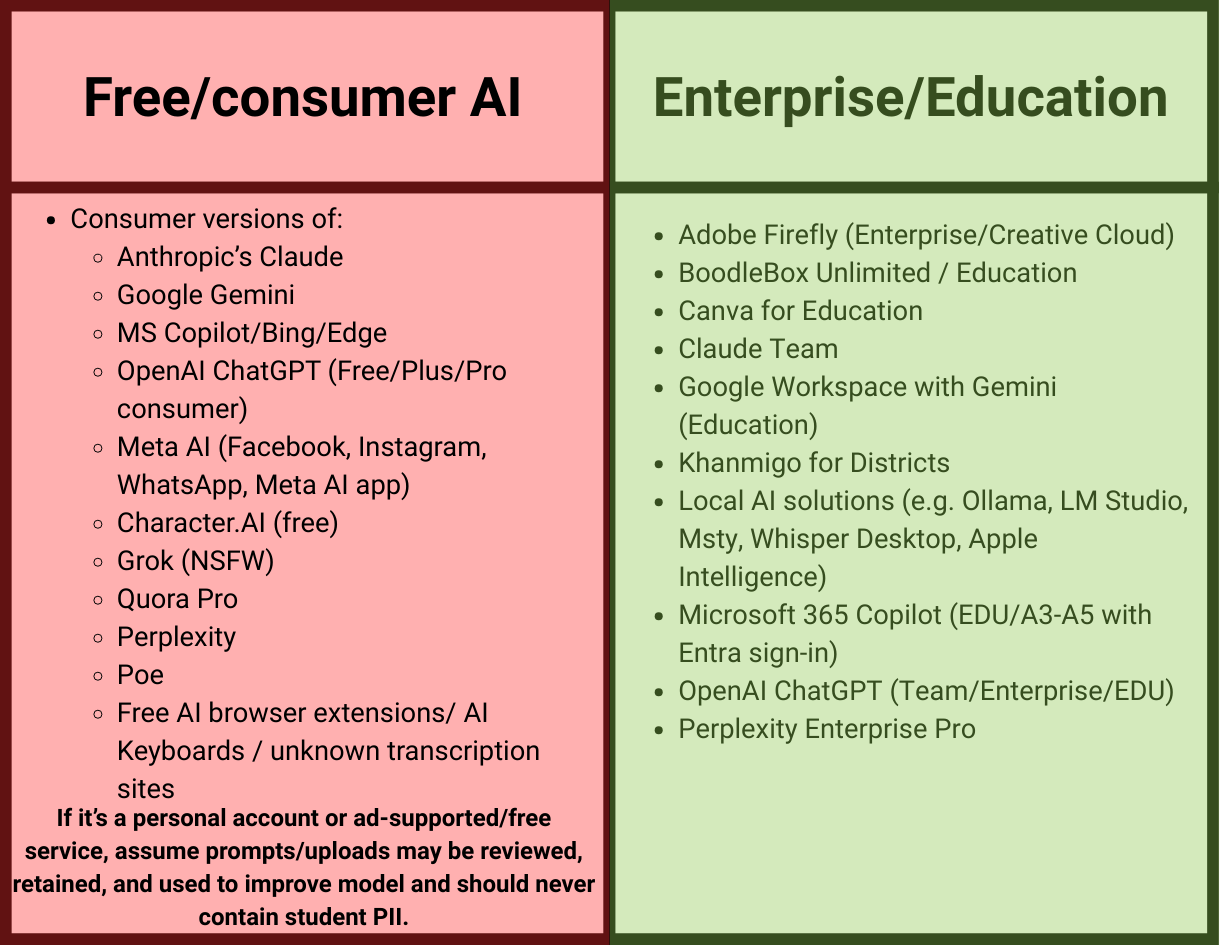
Some inquired about using Microsoft Copilot, but again, the consumer version. Here’s a clarification from Microsoft Copilot about the Pro version:
Copilot Pro is a consumer version, designed for individuals rather than organizations. It gives you access to advanced AI features like GPT-4, priority access during peak times, and enhanced capabilities across Microsoft apps.
As for data usage and training, Microsoft has recently announced that consumer interactions—including those in Copilot, Bing, and Microsoft Start—may be used to train AI models to improve performance and personalization. However, they’re doing this with a strong emphasis on transparency and control:
- 🛑 You’ll be notified before any data is used for training
- ✅ You’ll have the option to opt out via clear controls in the product
- 🔐 Data won’t be used until at least 15 days after opt-out controls are made available
- 👤 These changes apply only to signed-in consumer users, not enterprise accounts
You can read more about Microsoft’s approach to consumer data use in this official blog post.
If you’re working with sensitive or proprietary data, you might want to consider Microsoft 365 Copilot, which is built for enterprise use and does not use your data for training
This chart may be helpful and clarify MS Copilot licensing options:
Microsoft Copilot Licensing Options – Data Privacy Focus
| License Type | Can Use Copilot? | Your Data Privacy – What Actually Happens | Key Features in Plain English | Who Should Use This | What You DON’T Get |
|---|---|---|---|---|---|
| Microsoft 365 E3 | ✅ Yes (must buy Copilot separately) | YOUR DATA IS PROTECTED: • Microsoft CANNOT see your data • Your data NEVER trains their AI • Your data stays in YOUR organization only • Everything stays private to your organization • Meets standard business privacy laws • You can add SharePoint Advanced Management (a tool that gives you more control over your documents and who sees them) | • Basic security tools • Standard email and document protection • Can track who accesses files • Can set basic rules about data sharing • Good enough for most organizations | Organizations that handle normal business data and want solid protection without breaking the budget | • Advanced threat detection • Sophisticated data leak prevention • Advanced legal discovery tools • Premium security analytics |
| Microsoft 365 E5 | ✅ Yes (must buy Copilot separately) | YOUR DATA IS PROTECTED (PLUS MORE): • Everything from E3 PLUS • Advanced monitoring of data access • Can detect unusual employee behavior • Better protection against hackers • More detailed audit trails • Still NEVER used to train AI | • Everything from E3 PLUS • Automatic detection of risky behavior • Advanced protection against data leaks • Better tools for legal compliance • Can automatically classify and protect sensitive documents • Phone system included | Organizations handling very sensitive data (SSNs, financial records, health info) or under strict regulations | • More expensive • Has many features smaller organizations won’t use • Requires more IT expertise to manage |
| Microsoft 365 A3 (Education) | ✅ Yes for teachers/ staff only (must buy Copilot separately) | YOUR DATA IS PROTECTED: • Same privacy as E3 • Complies with education privacy laws (FERPA) • Student data is protected • Microsoft CANNOT use your data • Data NEVER trains their AI | • Same as E3 but cheaper for schools • Designed for education privacy laws • Basic security and compliance • Good document and email protection | Schools and education-focused scholarship organizations with standard needs | • Students can’t use Copilot • No advanced threat protection • Basic data protection only |
| Microsoft 365 A5 (Education) | ✅ Yes for teachers/staff only (must buy Copilot separately) | YOUR DATA IS PROTECTED (MAXIMUM): • Same as E5 privacy levels • Meets strictest education regulations • Advanced monitoring and protection • Complete audit trails • Still NEVER used to train AI | • Same as E5 but cheaper for schools • Maximum security for education • Advanced analytics about data use • Automatic threat detection • Phone system included | Schools handling very sensitive data or large scholarship organizations in education sector | • Students can’t use Copilot • Still expensive even with education discount • Complex to set up and manage |
Simple Recommendations for Scholarship Providers
| Your Situation | Best Choice | Why This Makes Sense |
|---|---|---|
| Small scholarship foundation (under 50 people) | E3 | Protects your data completely, costs less, has everything you need |
| Large scholarship organization (50+ people) | E5 | Better monitoring tools, helps prove compliance, worth the extra cost for peace of mind |
| School-based scholarship program | A3 | Education discount, meets school privacy laws, saves money |
| Scholarship program handling very sensitive financial data | E5 or A5 | Maximum protection, best audit trails, helps you sleep at night |
THE BOTTOM LINE ON DATA PRIVACY:
- ALL these licenses protect your privacy completely
- Microsoft NEVER uses your organization’s data to train Copilot or any AI
- Your scholarship data, applicant information, and internal documents stay 100% private
- The main difference is HOW MUCH monitoring and control you get, not whether your data is private
Important: Copilot itself costs extra (about $30 per person per month) on top of any of these licenses.
And, of course, you can see something similar with other frontier models….
Claude
Here’s the email everyone with a Claude account has gotten:
We’re writing to inform you about important updates to our Consumer Terms and Privacy Policy. These changes will take effect on September 28, 2025, or you can choose to accept the updated terms before this date when you log in to Claude.ai.
These changes only affect Consumer accounts (Claude Free, Pro, and Max plans). If you use Claude for Work, via the API, or other services under our Commercial Terms or other Agreements, then these changes don’t apply to you.
Of course, if you use BoodleBox Unlimited for $20 a month, you are using all the models via API, and your data is safe. Why is this so hard to understand? You’d think everyone would want to sign up for BoodleBox simply to safeguard their data.
Checklist
A quick checklist to keep in mind:
- Hard rule: No PII in consumer/free AI.
- Standardize on an approved assistant (Copilot EDU or Gemini EDU) and publish the allowlist/blocklist.
- Use local tools for recordings/IEP notes/transcripts when possible.
- Train staff: “Would you email it unencrypted? If not, don’t paste it into free AI.”
How are you handling this in your organization?
Discover more from Another Think Coming
Subscribe to get the latest posts sent to your email.
 Another Think Coming
[…] easy to customize it, too. BoodleBox AI is an education-friendly, data privacy safe option to consumer Gen AI tools that costs $16 a month for educators or $20 for anyone else. Too much awesomeness? Let’s take […]